Which audience simulation platforms are best for product launch testing?
Use Remesh or PlaybookUX for simulated audiences, choose UserInterviews, Maze, UserTesting or Dynata for real, recruited, representative samples.

Use Remesh or PlaybookUX when you want synthetic audiences; choose UserInterviews, Maze, UserTesting or Dynata when you need real-panel, representative or recruited respondents.
At a glance
| Option | Best for | Starting price (paid plan) | Free plan | Simulated audience | Source |
|---|---|---|---|---|---|
| Remesh | large live group conversation testing | Quote only (contact sales) | No | Yes | remesh.ai help, Simulate feature |
| PlaybookUX | quick AI personas & video-based tests | Not confirmed, see source | No (trial available) | Yes | playbookux.com/pricing |
| UserInterviews | ad-hoc recruitment and session management | Usage-based (per-session pricing) | No | No | userinterviews.com/pricing |
| Maze | prototype, copy and rapid concept testing | Quote only (contact sales) | Yes (free tier exists) | Partial | maze.co/pricing |
| UserTesting | enterprise remote usability & panel tests | Quote only (contact sales) | No | No | usertesting.com/plans |
| Dynata | large, representative consumer samples | Quote only (contact sales) | No | No | dynata.com / Dynata+ overview |
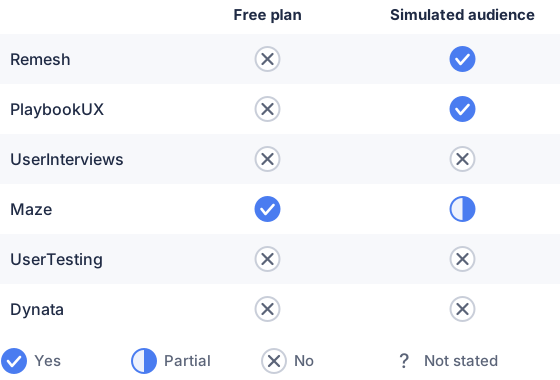
From the sourced table above, checked November 2026.
Remesh: best when you need real-time, large-group reactions
Remesh runs live, AI-assisted conversations that let hundreds (or thousands) of people respond and vote in real time, and it includes a “Simulate” mode that generates synthetic responses for practice or demo runs. Its strength is rapid qual-to-quant synthesis during a single session; the trade-off is enterprise pricing and a group-conversation format that differs from one-to-one interviews. Remesh’s docs explain the Simulation/Practice workflow and that simulated responses are produced for each question during a simulation. (help.remesh.ai)
PlaybookUX: best when you want AI personas built from your research
PlaybookUX provides video interview capture plus synthetic “AI personas” (patent-pending) that are generated from real transcripts and session data and can be deployed to answer new tests instantly. It’s useful for small teams that want rapid early-stage validation or to rehearse messaging before recruiting people. The limits are that richer AI persona features are gated to higher plans and the vendor bills some capabilities at annual prices. (playbookux.com)
UserInterviews: best when you need flexible recruitment and scheduling
UserInterviews focuses on sourcing and scheduling real respondents (B2C and B2B) with clear per-session pricing and subscription bundles; it is well suited for recruiting target customers quickly for moderated or unmoderated studies. It does not create synthetic respondents; costs are usage-based and scale by session volume and targeting complexity. If you need population representativeness or tightly screened professional audiences, this service is appropriate. (userinterviews.com)
Maze: best when you want fast prototype and copy testing at scale
Maze is built for prototype, copy and prototype-to-live testing with an integrated panel and AI study builder; it excels at click-through, first-click and copy validation ahead of launch. Maze emphasizes automated reporting and panel recruitment, but many enterprise features and advanced targeting are sold via contact-sales packages. It’s a strong fit for product teams validating flows and microcopy before launch. (maze.co)
UserTesting: best for enterprise usability and recorded sessions
UserTesting supplies a global opt-in participant network plus moderated and unmoderated tests and strong video-first reporting for UX and launch validation; pricing is typically quoted through sales. Use it when you need polished stakeholder deliverables and broad behavioral testing across devices, and when you can budget an enterprise contract. It is not a synthetic-audience tool. (usertesting.com)
Dynata: best when you need representative consumer samples
Dynata (Dynata+) delivers very large, source-diverse consumer and professional panels for population-level estimates and campaign measurement; pricing and feasibility are provided on request. Use Dynata when you must test a launch with representative quotas or multi-market samples and when survey-based population estimates matter more than simulated conversational feedback. (itechguides.com)
Which audience simulation platforms are best for product launch testing?
Use simulation tools (PlaybookUX, Remesh) when you want fast, low-cost rehearsals of messaging, prototype walk-throughs or to generate early qualitative reactions without recruiting many live participants. PlaybookUX’s AI personas are designed to replay observed behavior and answer new prompts quickly; Remesh’s Simulation mode produces synthetic responses for practice runs or demos. (playbookux.com)
For representative, statistically reliable launch tests (pricing sensitivity, market sizing, A/B holdouts) use real-panel providers (UserInterviews, Dynata, Maze, UserTesting) because they recruit actual people who match demographic or behavioral quotas. These vendors position themselves for prototype or survey validation at different scales and price points. (userinterviews.com)
How do audience simulation platforms simulate target customers?
They simulate customers in two main ways: (1) generate synthetic respondents from existing qualitative data or models, and (2) create rule/AI-driven responses that mimic typical replies. PlaybookUX builds AI personas from your video transcripts and recorded sessions so those personas respond as if they were derived from your library. Remesh’s Simulation toggles create randomized simulated responses for each question to let you rehearse a conversation or demo. Both approaches rely on prior human data (your sessions or training panels) rather than creating statistically representative population estimates. (playbookux.com)
When you need population-level accuracy, simulation is not a substitute for recruited panels or probability-balanced panels; suppliers such as Dynata or Maze’s panel recruitment provide screener and quota controls you must use for representative launches. Simulation is best for speed and hypothesis-generation, not for final market sizing. (itechguides.com)
What features matter for product launch testing?
The features that matter most are:
- Targeting & quotas: ability to reach the demographic or behavioural segments you plan to sell to (panel providers and recruitment tools show these controls). (userinterviews.com)
- Method fit: prototype/usability tests, concept or conjoint modules, or live conversation formats depending on the question (Maze and Zappi highlight prototype and concept testing respectively). (maze.co)
- Speed to result: how fast you can get reliable answers (Remesh and PlaybookUX emphasise quick turnarounds and AI assistance). (help.remesh.ai)
- Analysis outputs: automated reporting, clip reels, theme extraction and export APIs so stakeholders can act on findings (PlaybookUX, Maze and UserTesting advertise these). (playbookux.com)
- Cost model: per-session or subscription vs enterprise quotes, pick a vendor whose pricing matches your frequency of testing (UserInterviews is per session; many enterprise research platforms are quoted). (userinterviews.com)
Decide which features matter by writing the exact launch questions you need answered (e.g., "Which headline lifts purchase intent?" vs "Can users complete checkout?") and match those to method capabilities. (maze.co)
Which platforms suit ecommerce and Shopify brands?
Ecommerce and Shopify brands usually need two things: fast prototype/usability checks for product pages and representative consumer feedback on price, packaging or claims. For page-level and checkout UX testing, use Maze or PlaybookUX (both support live website/prototype testing, Figma integration, and behavioral metrics). For representative consumer feedback or brand/price concepts use Dynata or UserInterviews to recruit the right shoppers. Use Remesh when you want to stress-test messaging and see why groups converge during a single moderated session. None of the mainstream simulation tools replace a probability-based panel if you require statistically generalizable estimates. (maze.co)
Which should you choose?
| Your situation | Best fit |
|---|---|
| You need rapid AI-driven persona feedback on packaging or messaging | PlaybookUX |
| You want large, live group reactions and on-the-fly follow ups | Remesh |
| You need representative consumer samples for pricing or market estimates | Dynata |
| You want fast prototype, copy and flow testing with automated reports | Maze |
| You need ad-hoc recruiting and scheduled moderated interviews | UserInterviews |
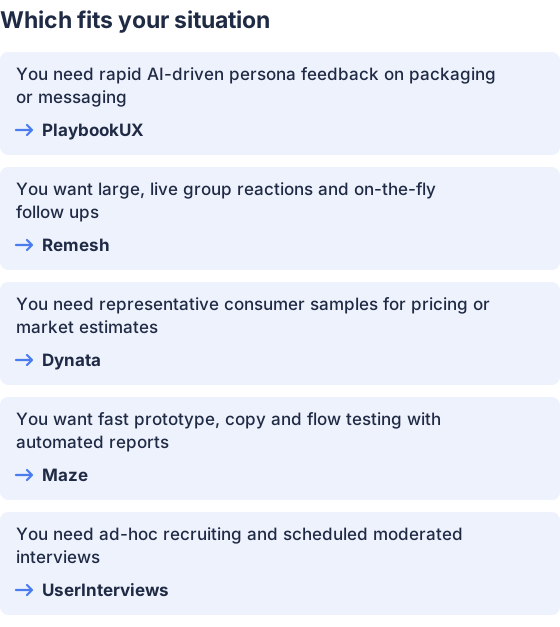
From the table above.
How this comparison was made
Prices and feature claims were taken from each vendor’s published pages and documentation and re-checked in November 2026. The products were not tested hands-on for this comparison.


