What is the best customer escalation management software?
Compare Zendesk, Freshdesk, Jira, PagerDuty and Salesforce to pick the right escalation tool by team size, incident type and budget.

Zendesk, Freshdesk, Jira Service Management, PagerDuty and Salesforce each lead in different escalation scenarios, pick by team size, incident type, integrations, and budget.
Zendesk and Freshdesk fit general support teams; Jira and PagerDuty suit incident/on-call escalation; Salesforce fits enterprise contact-centre workflows.
At a glance
| Option | Best for | Starting price (paid plan) | Free plan | Escalation automation | Source |
|---|---|---|---|---|---|
| Zendesk (Support Team) | General ticketing + AI | Not confirmed, see source | No | Yes | zendesk.com |
| Freshdesk (Growth) | Low-cost helpdesk with AI | $23/mo | No | Yes | freshworks.com |
| Jira Service Management (Standard) | Teams using Jira/ITSM | $21.50/mo | Yes (3 agents) | Yes | atlassian.com |
| PagerDuty (Professional) | On-call incident escalation | $25/user/mo | Yes | Yes | pagerduty.com |
| Salesforce Service Cloud (Starter Suite) | Enterprise contact-centre workflows | $25/user/mo | No | Yes | salesforce.com |
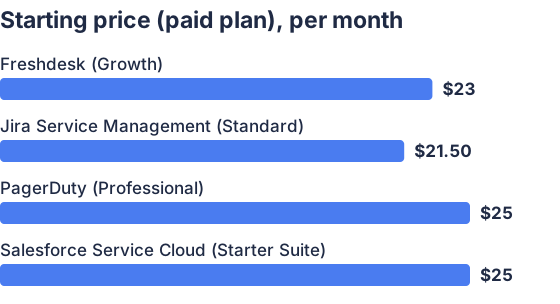
From the sourced table above, checked November 2026. Not charted, no single published figure: Zendesk (Support Team).
(Starting prices are the vendor-displayed monthly-billed plan prices checked on vendor pages in November 2026.) (zendesk.com)
Zendesk: best when you want a familiar, channel-rich support suite
Zendesk centralizes email, chat, messaging and voice and ships with automations, triggers and workflow builders that support escalation rules and manager escalations. Zendesk’s plans include ticket routing, automations and AI agents. Zendesk scales well but add-ons (voice, per-resolution AI) and agent-seat licensing can raise total cost for growing teams. (zendesk.com)
Freshdesk: best when you want low initial cost with AI routing
Freshdesk’s Growth plan is the lowest paid tier with built-in ticketing, a customer portal and AI features; the monthly variant of Growth appears on pricing toggles (Growth ≈ $23/agent/mo billed monthly). Freshdesk advertises intelligent routing, SLA policies and external collaborators so escalations can be automated and tracked; it tends to be cheaper per agent than some alternatives but some advanced AI add-ons are metered. (freshworks.com)
Jira Service Management: best when you already use Atlassian tools and need ITSM
Atlassian’s Service Collection (Jira Service Management) offers a free tier for 3 agents and a published Standard plan at $21.50/agent/mo (monthly), with on-call schedules, escalation policies and incident templates built in. It is strong where escalation must tie to engineering workflows, assets and runbooks; non-technical support teams may find the UI and licensing model more complex. (atlassian.com)
PagerDuty: best for fast incident/on-call escalation and reliability
PagerDuty is designed for incident orchestration, on-call scheduling and escalation policies; its Professional plan is a paid step above a functional Free tier and lists $25/user/mo for monthly billing. PagerDuty’s core strengths are timed escalations, multi-channel alerts and post-incident review tooling, making it the usual pick for operations, SRE and security teams rather than general customer-service ticketing. (pagerduty.com)
Salesforce Service Cloud: best for enterprise contact-centre workflows and CRM tightness
Salesforce Service Cloud’s Starter Suite is listed at $25/user/mo and includes case auto-assignment, queues and “case escalation rules and queues.” It is strongest where escalation must be embedded into a broader CRM, sales and enterprise data model; expect higher total cost and sales-led contracts for larger deployments. (salesforce.com)
What is the best customer escalation management software?
There is no single best product; the best choice depends on your need: Zendesk or Freshdesk for general support escalations, PagerDuty for incident/on-call escalation, Jira Service Management when escalation must link to engineering tickets, and Salesforce when escalation must live inside CRM workflows. Each product optimizes for a different workflow and buyer: ease and omnichannel support, low-cost AI routing, incident reliability, developer integration, or enterprise CRM alignment. (zendesk.com)
Which vendors are top for escalation management?
Top vendors are Zendesk, Freshdesk (Freshworks), Jira Service Management (Atlassian), PagerDuty and Salesforce Service Cloud; they appear on vendor pricing and product pages and in independent help-desk/incident comparisons. Zendesk and Freshdesk lead for day-to-day ticket escalations; PagerDuty is a market standard for on-call and timed escalation; Jira Service Management is top where ITSM and asset context matter; Salesforce leads for CRM-centric contact centres. Independent reviews and market lists show similar leader sets. (zendesk.com)
What features matter in escalation software?
The essential features are:
- Escalation rules and timed policies (automatic reassign, notify manager). These are core to incident handling and are listed as built-in on PagerDuty and Atlassian pages. (pagerduty.com)
- On-call scheduling and rotation for responders; key for 24/7 coverage and shown on incident platforms. (pagerduty.com)
- SLA and priority enforcement to move high-priority tickets up the chain; seen on Freshdesk and Zendesk feature lists. (freshworks.com)
- Multi-channel intake and a single ticket view so escalations aren’t lost across email/chat/voice. Zendesk and Salesforce emphasise omnichannel routing. (zendesk.com)
- Automation and workflow builders (triggers, action builders) to reduce manual escalation steps; Zendesk and Jira advertise workflow builders. (zendesk.com)
- Integrations and APIs so escalation state syncs with monitoring, CRM, or order systems; PagerDuty and Jira highlight many integrations. (pagerduty.com)
Those features cover the mechanics of escalation; also consider reporting, post-incident review and alert throttling to avoid escalation noise. (pagerduty.com)
How do I choose the right escalation tool for my team?
Pick by role, volume, and integration needs: if you need classic customer-service ticket escalation across channels choose Zendesk or Freshdesk; if your problem space is incidents and on-call responders choose PagerDuty; if you need ticket-to-engineer workflows and asset context choose Jira Service Management; if escalation must be embedded in enterprise CRM and contact-centre routing choose Salesforce. Also evaluate monthly cost per agent/user, the availability of a free tier or trial, and whether required escalation features are included or add-ons (check AI resolution meters and voice add-ons). Test with a pilot using your actual escalation scenarios and volume to validate latency, noise and reporting. (zendesk.com)
Which should you choose?
| Your situation | Best fit |
|---|---|
| You need simple, omnichannel customer ticket escalation | Zendesk |
| You want lowest per-agent entry with AI routing | Freshdesk |
| Escalations must feed engineering/IT workflows | Jira Service Management |
| You run 24/7 ops, incidents, or security on-call rotations | PagerDuty |
| Escalation must be part of CRM/contact-centre workflows | Salesforce |
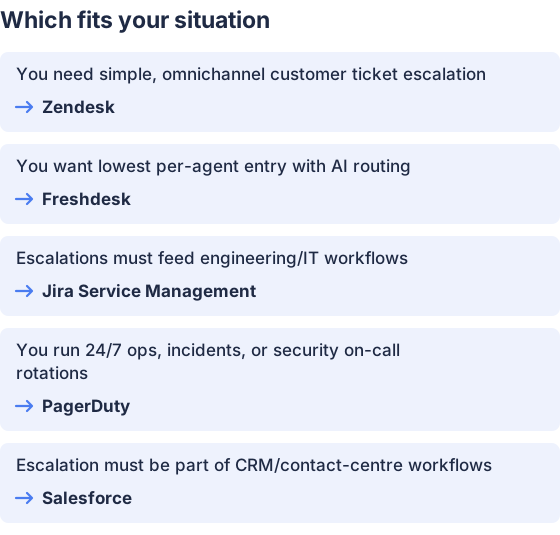
From the table above.
How this comparison was made
Prices and feature claims were taken from each vendor’s published pricing and product pages, checked in November 2026. The products were not tested hands-on; statements reflect vendor-published feature lists and pricing displays. (zendesk.com)


