What are the best tools for managing multilingual email templates?
Compare Klaviyo, Customer.io, HubSpot, and Mailchimp for multilingual email features, translation workflows, pricing, and Shopify integration.

The best tools depend on your workflow: Klaviyo suits ecommerce teams, Customer.io suits product-led messaging, HubSpot suits CRM-centered teams, and Mailchimp suits simpler campaigns. For built-in translation management, compare Klaviyo and Customer.io first; HubSpot offers translated email variations on higher plans, while Mailchimp relies more on manual conditional content.
At a glance
| Option | Best for | Starting price (paid plan) | Free plan | Built-in language variants | Shopify integration | Source |
|---|---|---|---|---|---|---|
| Klaviyo | Shopify ecommerce marketing | $20/mo | Yes | Yes | Yes | klaviyo.com |
| Customer.io | Product and lifecycle messaging | $100/mo | No | Yes | Partial | customer.io |
| HubSpot | CRM-connected marketing teams | Not confirmed, see source | Yes | Yes | Yes | hubspot.com |
| Mailchimp | Simple, low-cost campaigns | $13/mo | Yes | Partial | Yes | mailchimp.com |
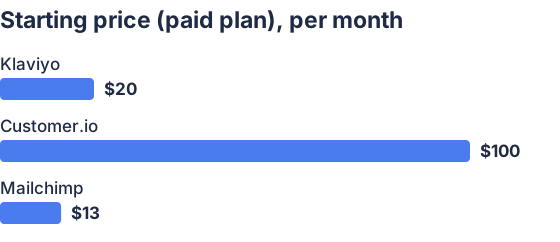
From the sourced table above, checked November 2026. Not charted, no single published figure: HubSpot.
Klaviyo: best for ecommerce teams
Klaviyo is a strong fit when marketing emails need to use purchase, browsing, and catalog data, especially for Shopify stores. Its Smart Translations feature covers emails in campaigns and flows, saved templates, and reusable content blocks; it also supports translated product content when catalog localization is configured. Translation is generated with AI, so reviewers should check the result and confirm template tags, product details, and images display correctly. (help.klaviyo.com)
Customer.io: best for product and lifecycle messaging
Customer.io suits teams that trigger messages from product activity or customer events and need the same message workflow across email and other channels. Its editors let teams add language variants to a message and send each person the version matching a language attribute, without building a separate automation branch for every language. The exact language-code match matters: if a profile’s locale doesn’t match a variant, the recipient gets the default message. (docs.customer.io)
HubSpot: best for CRM-centered teams
HubSpot is useful when email templates, contact records, and marketing automation should live alongside the CRM. It supports translated email variations, but generating them with its AI translation feature requires Marketing Hub Professional or Enterprise; lower tiers can still set an email’s language and create content manually. That makes HubSpot a better fit when CRM connections matter as much as translation workflow, rather than when a low-cost plan must include automated translation. (knowledge.hubspot.com)
Mailchimp: best for straightforward campaigns
Mailchimp can work for teams that send conventional campaigns and are comfortable managing translations with audience fields and conditional content. Its help documentation describes manually translated text displayed according to a contact’s language, as well as Google Translate links; it also notes that the conditional-content method cannot translate the subject line. This approach can suit a small set of language variants, but it is less centralized than a workflow built around translation tabs or message variants. (mailchimp.com)
What are the best tools for managing multilingual email templates?
For ready-made translation workflows, start with Klaviyo or Customer.io; choose HubSpot if its CRM is central to your marketing, and Mailchimp if your needs are simpler. Klaviyo includes AI translation and review steps in campaigns and flows, while Customer.io organizes translations as language variants matched to a recipient’s stored preference. HubSpot’s translated email variation feature requires a higher-tier plan, and Mailchimp’s documented method relies on conditional merge tags or translation links rather than a dedicated variant workflow. (help.klaviyo.com)
How do these tools handle translations and localization workflows?
Klaviyo and Customer.io both connect a recipient’s saved language preference to the version of a message they receive, but they differ in how teams create translations. Klaviyo can generate translations with AI, then lets editors review and update changed content; its documentation also describes glossary and do-not-translate settings. Customer.io lets teams create message variants and map them to a profile language attribute, with an important caveat: unmatched locale values receive the default message rather than an automatic base-language fallback. (help.klaviyo.com)
HubSpot can generate a translated variation of an email, but the automatic translation option is limited to Professional and Enterprise. Mailchimp supports manually written language-specific content selected with contact-language data, and its translate merge tag offers Google Translate links instead; its documentation says that method does not translate subject lines. For any tool, check whether translation changes are flagged when the source template changes, how reviewers edit or approve versions, and what language is used when a contact has no matching locale. (knowledge.hubspot.com)
Which tools integrate with Shopify and ecommerce platforms?
Klaviyo, HubSpot, and Mailchimp publish Shopify integrations; Customer.io can use Shopify webhooks or a data-warehouse connection to bring store events into messaging workflows. Klaviyo is oriented toward ecommerce marketing, while Mailchimp also documents connections for platforms such as WooCommerce, BigCommerce, and PrestaShop. HubSpot’s Shopify integration syncs store data into the CRM for marketing and follow-up; Customer.io’s documented webhook approach can be flexible, but may require more setup than installing a dedicated store app. (help.shopify.com)
For Shopify specifically, compare which customer, order, product, and behavioral events sync, whether the integration supports multiple stores, and whether localized catalog data carries through into email blocks. Klaviyo documents localized product details when Shopify Markets or a locale-aware catalog is configured. Mailchimp documents syncing customer and order data, while HubSpot’s app description highlights using Shopify store data to personalize campaigns. (help.klaviyo.com)
What pricing and team features should I compare?
Compare the monthly price at your actual contact count and expected send volume, not just the advertised entry point. As checked in November 2026, Customer.io Essentials starts at $100 per month; Klaviyo’s lowest paid tier starts at $20 per month after its free allowance; Mailchimp Essentials starts at $13 per month for up to 500 contacts. These prices can change with audience size, usage, promotions, or selected plan, so confirm the checkout total before choosing. (customer.io)
Check what each plan includes for seats, roles, approvals, and template permissions. Customer.io lists unlimited user seats, standard role-based permissions, and saved templates with version control; Mailchimp’s paid plans include role-based access, with seat counts and roles varying by tier. Also check profile or contact limits, email-send allowances, overage charges, and whether access to translation features requires a higher plan. (customer.io)
Which should you choose?
| Your situation | Best fit |
|---|---|
| Shopify store with product-based campaigns | Klaviyo |
| Product events trigger lifecycle messages | Customer.io |
| Marketing depends on CRM records and activity | HubSpot |
| Basic language variants and lower entry cost | Mailchimp |
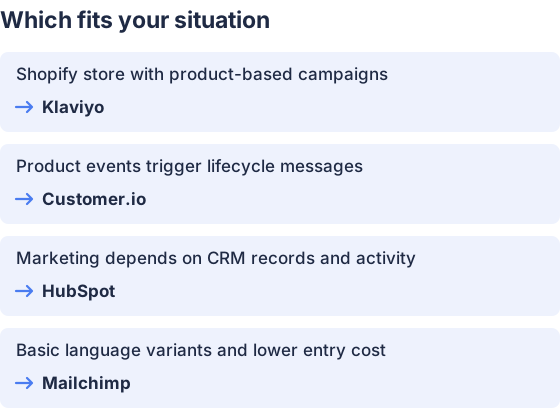
From the table above.
How this comparison was made
Prices and features come from each vendor’s published pages, checked in November 2026. The products were not tested hands-on.


