What Are the Best Unbounce Alternatives for Marketing Reports?
Explore Unbounce alternatives for marketing reports, including custom dashboards, agency tools, data connectors, and CRM-linked analytics.

The best Unbounce alternatives for marketing reports depend on whether you need cross-channel dashboards, automated agency reports, or CRM-linked reporting. Data Studio suits custom dashboards, Swydo and AgencyAnalytics suit agency reporting, Supermetrics moves data into report tools, and HubSpot connects reporting to its CRM. Unbounce’s own reporting centers on landing-page views, visitors, conversions, and conversion rates, so these options are aimed at broader marketing reporting. (documentation.unbounce.com)
At a glance
| Option | Best for | Starting price (paid plan) | Free plan | Cross-channel reports | Landing-page builder | Source |
|---|---|---|---|---|---|---|
| Data Studio | Custom dashboards | $9/mo | Yes | Yes | No | cloud.google.com |
| Swydo | Agency client reporting | $69/mo | No | Yes | No | swydo.com |
| AgencyAnalytics | Branded client reports | $25/mo | No | Yes | No | agencyanalytics.com |
| Supermetrics | Marketing data feeds | $59/mo | No | Yes | No | supermetrics.com |
| HubSpot | CRM-linked reporting | $20/mo | Yes | Yes | Yes | hubspot.com |
| Databox | Team KPI dashboards | $499/mo | No | Yes | No | databox.com |
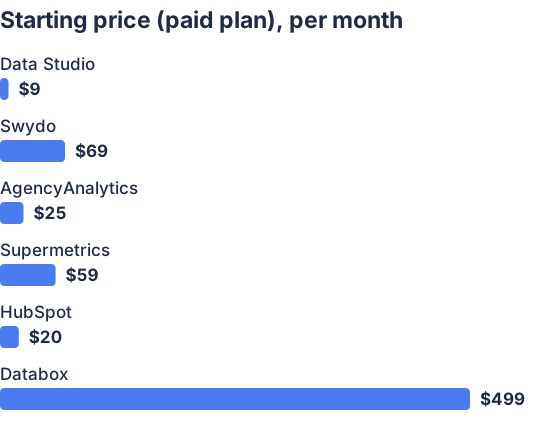
From the sourced table above, checked November 2026.
Data Studio: best for custom dashboards on a budget
Google’s Data Studio, formerly Looker Studio, lets teams build visual reports from connected data sources; the free tier is available to report creators and viewers. Its Pro plan is listed at $9 per user, per project, per month, and adds administrative features and support. (cloud.google.com)
It’s a good fit if you want control over the charts and layout, and are comfortable assembling the dashboard yourself. The trade-off is that a report builder is not a done-for-you reporting service: connecting sources and shaping reports takes setup, and Data Studio does not create landing pages. Choose it when flexibility and low entry cost matter more than prebuilt client-report workflows. (cloud.google.com)
Swydo: best for agencies sending recurring reports
Swydo is designed around reporting and monitoring across marketing data sources. Its published pricing starts at $69 per month, including 10 data sources, with unlimited clients, users, dashboards, and reports; extra sources add cost. The vendor offers a 14-day trial, but not a free plan. (swydo.com)
The fit is strongest for agencies that want reusable report templates and automatic delivery rather than building dashboards from scratch. Because pricing depends on the number of connected data sources, estimate the cost using the accounts you actually need to report on. Swydo reports performance data; it is not a landing-page builder, so you would keep a separate page tool if creating or testing pages is part of the job. (swydo.com)
AgencyAnalytics: best for branded client reporting
AgencyAnalytics combines client dashboards, scheduled reports, white-labeling, and marketing integrations in an agency-oriented platform. Its standard pricing is $25 per client per month when billed monthly; the vendor lists unlimited data sources, reports, and staff accounts with each client. It offers a 14-day free trial, not a permanent free plan. (agencyanalytics.com)
This is a practical choice if client access and branded delivery are central to your reporting workflow. A client can have multiple connected integrations and reports, while the per-client model makes the cost depend on the number of businesses you manage. It is less suited to someone who only wants to monitor a single landing page or build the page itself; its focus is reporting, not page creation. (agencyanalytics.com)
Supermetrics: best for sending marketing data into report tools
Supermetrics is a data connector: it transfers marketing and sales data into destinations such as Data Studio, Google Sheets, Excel, or Power BI. The vendor lists its Starter plan at $59 per month on monthly billing, with one destination, one user, and two data sources; the plan has no free tier, though a 14-day trial is available. (supermetrics.com)
Pick it when your main problem is getting information from multiple platforms into a reporting destination you already use. It differs from Swydo or AgencyAnalytics because the reporting experience depends on the destination you choose; Supermetrics supplies the data rather than serving as a landing-page builder. Check the included data sources and accounts against your needs, since adding more can change the subscription cost. (supermetrics.com)
HubSpot: best for CRM-linked campaign reporting
HubSpot combines marketing analytics and dashboards with CRM information, so reporting can connect campaign activity to contacts and revenue. Its Marketing Hub has free tools, while the published Starter paid plan begins at $20 per month per seat; advanced reporting features are available in higher tiers. (hubspot.com)
It makes sense when your team already manages contacts, campaigns, or sales activity in HubSpot and wants reports in that same system. HubSpot also offers landing-page creation, making it the closest fit here if you want both page publishing and marketing reporting. The limitation is that its strongest reporting is tied to HubSpot’s CRM and product setup, and the cost can rise with seats, contact counts, or a move to a higher tier. (hubspot.com)
Databox: best for shared KPI dashboards
Databox brings data from connected platforms into dashboards and reports for teams to monitor performance. Its pricing page lists a free 14-day trial, but no ongoing free plan; the lowest paid plan with monthly billing is $499 per month. (databox.com)
Consider it when several people need a shared view of business or marketing KPIs, and you want a reporting platform rather than just a connector. Databox’s price is substantially higher than the free dashboard option or entry-level connector listed above, so it is a better match when you need its team capacity and connected-data workflow. Like the other reporting platforms here, it does not replace a tool for building landing pages. (databox.com)
What are the best Unbounce alternatives for marketing reports?
For customizable dashboards at little or no cost, choose Data Studio; for automated reports to clients, consider Swydo or AgencyAnalytics. Supermetrics suits teams that already have a destination for reports and need to feed it marketing data, while HubSpot is a better fit when CRM and campaign reporting need to sit together. (cloud.google.com)
The main distinction is whether you need page-level conversion statistics or reporting across channels, campaigns, and business outcomes. Unbounce already reports on its pages’ visitors, conversions, and conversion rates; a reporting platform is useful when you need to combine those figures with other marketing or CRM data. If you still need to build and A/B test landing pages, check that separately before switching, since most options here focus on reporting rather than page creation. (documentation.unbounce.com)
Which should you choose?
| Your situation | Best fit |
|---|---|
| I want to build my own dashboards inexpensively | Data Studio |
| I send recurring reports to agency clients | Swydo |
| I need branded client portals and reports | AgencyAnalytics |
| I need to feed data into an existing report tool | Supermetrics |
| I want campaign reports tied to CRM activity | HubSpot |
| My team needs shared KPI dashboards | Databox |
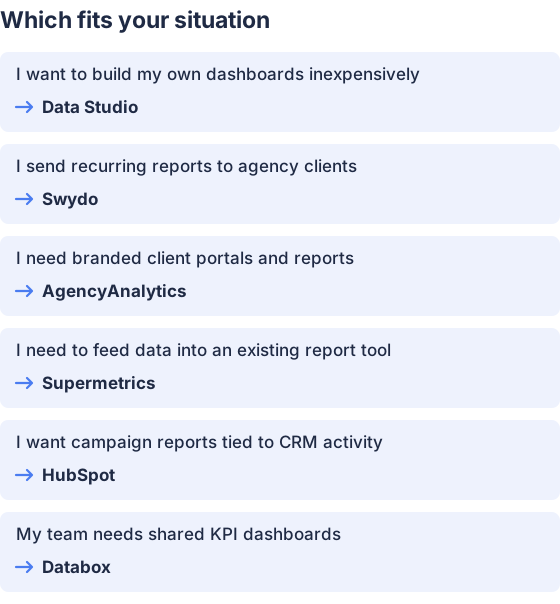
From the table above.
How this comparison was made
Prices and features come from each vendor’s published product and pricing pages, checked in November 2026. The products were not tested hands-on.


