Which is best for workflow automation: FormAssembly, Formstack, or Typeform?
FormAssembly vs Formstack vs Typeform: Compare automation, approvals, signatures, integrations, compliance, pricing, and ideal use cases.

FormAssembly is the best fit for governed, multi-step workflow automation; Formstack suits teams combining forms with approvals, documents, and signatures; Typeform fits lighter follow-ups. Choose based on whether you need process control, an all-in-one forms-and-documents workflow, or a simpler form connected to other apps.
At a glance
| Option | Best for | Starting price (paid plan) | Free plan | Workflow automation | Source |
|---|---|---|---|---|---|
| FormAssembly | Governed, multi-step processes | Quote | No | Yes | formassembly.com |
| Formstack | Forms, approvals, signatures | Not confirmed, see source | No | Yes | formstack.com |
| Typeform | Simple forms and follow-ups | $29/mo | Yes | Partial | typeform.com |
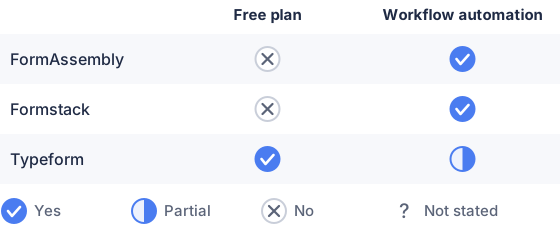
From the sourced table above, checked November 2026.
FormAssembly and Formstack both support routed processes with approvals; Typeform can trigger emails, webhooks, and app integrations, but its strengths center on collecting responses and sending them onward. (formassembly.com) FormAssembly’s current plans page does not publish a price. (customersupport.formstack.com)
FormAssembly: best for governed, multi-step processes
FormAssembly is built for workflows that start with structured data collection and continue through routing, approvals, integrations, and completion. Its plans distinguish basic collection from process automation and, at the Enterprise level, added governance for sensitive or regulated data. (formassembly.com)
That depth can suit intake, applications, or internal requests that need several people or systems to act on a submission. It is less suited to someone who just wants to publish a quick form and send answers to a spreadsheet: the added workflow and governance options bring more to configure, and the current pricing page asks prospects to talk with the team rather than showing a monthly price. (formassembly.com)
Formstack: best for forms that feed documents and signatures
Formstack’s Suite combines Forms, Documents, Sign, and Workflows in one process builder. Its published plans include submission routing for approval, document generation, and e-signatures in the Suite, making it a practical fit when a form submission needs to become a reviewed, signed document. (formstack.com)
Those appear in the Suite and higher-level offerings. So check the plan, not just the product name, against your actual process. (customersupport.formstack.com)
Typeform: best for engaging forms with lighter automation
Typeform focuses on interactive forms and connecting responses to other tools. Its automation features can trigger on completed or partial responses, then send an email, webhook, or integration action; its HubSpot integration can also create or update records. (help.typeform.com)
That is useful for lead capture, feedback, and follow-up where the form is the main event and the next step is straightforward. It is not the strongest choice here for complex internal approval chains or processes that need multiple reviewers, signatures, and tracked stages. The free plan is available, while the lowest monthly-billed paid plan starts at $29 and includes 100 responses a month. (typeform.com)
Which is best for workflow automation: FormAssembly, Formstack, or Typeform?
FormAssembly is the best fit for workflow automation when the process involves multiple steps, conditional routing, and governance; Formstack is a strong fit for form-to-approval-to-document workflows. FormAssembly describes workflows that route submissions, trigger approvals, and send information to connected systems, and its current plans separate workflow automation from basic collection. (formassembly.com)
Formstack offers a visual workflow builder that connects forms, documents, and signatures, with conditional logic and approval steps available in its Suite. Typeform can automate form-triggered emails, webhooks, and app actions, but that is a lighter kind of automation than managing a multi-person process from intake to decision. (formstack.com)
Which handles advanced data collection and compliance?
FormAssembly is the strongest fit when advanced data collection and compliance controls are central to the workflow. Its current Enterprise plan lists collection policies, an auditable chain of custody, and data-retention controls; its Gov Cloud offering lists specialized environments for government requirements. Those controls are plan-specific, so confirm that the plan and setup meet your organization’s requirements. (formassembly.com)
Formstack also has security-oriented offerings, including healthcare plans for HIPAA-compliant forms and Salesforce solutions that list PCI/HIPAA-compliant options. Typeform publishes security and compliance information, including GDPR and HIPAA-related provisions, with some enterprise security features offered on Enterprise plans. Compliance depends on the particular plan, configuration, and intended use, not just the vendor’s general claims. (resources.formstack.com)
Which integrates best with CRMs and apps?
For CRM-connected business processes, FormAssembly is the best fit when you need the form to map into and work alongside core business systems; Typeform is a strong option for straightforward app connections. FormAssembly lists Salesforce, Microsoft Dynamics 365, and HubSpot among its integrations, plus connectors and webhooks for other systems. (formassembly.com)
Formstack supports HubSpot integration that can create or update CRM records from form data, and its Enterprise plans list API access and custom integrations. Typeform offers native HubSpot mapping and Salesforce integrations, along with other app connections; its appeal is connecting form responses to familiar tools without building a larger approval workflow. (properties.formstack.com)
Which is easiest to set up and maintain?
Typeform is likely the easiest to get running for a simple form and follow-up; Formstack is a middle ground, while FormAssembly fits teams willing to configure a more involved process. This is a judgment based on the products’ published capabilities, not hands-on testing: Typeform’s integration setup includes connecting an app and mapping fields, while Formstack and FormAssembly offer additional workflow steps, approvals, and routing to manage. (help.typeform.com)
For a modest process, that extra capability may not be worth maintaining. If your workflow includes approvers, conditional branches, or compliance controls, the additional setup may replace manual handoffs and justify the added administration. (help.formstack.com)
Which should you choose?
| Your situation | Best fit |
|---|---|
| Sensitive data and governed approval paths | FormAssembly |
| Forms that need to become signed documents | Formstack |
| Quick customer-facing forms and follow-ups | Typeform |
| CRM data capture with direct system connections | FormAssembly |
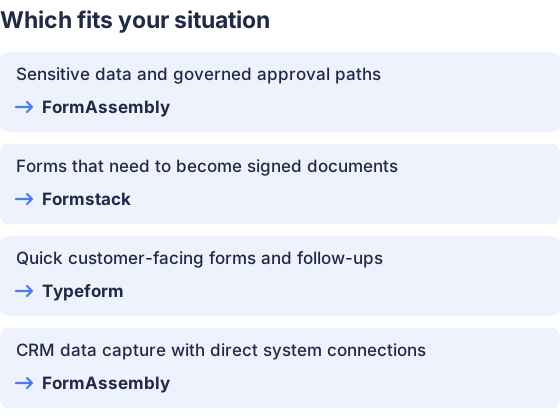
From the table above.
How this comparison was made
Prices and feature descriptions come from each vendor’s published pages, checked in November 2026. The products were not tested hands-on.


