Which form builder is best for a small business?
Form builder comparison 2026: pick the best form tool by budget, expected submissions, payments, branding or compliance.

Pick Tally if you want the lowest-cost, fully usable starter option; choose Typeform for conversational lead capture; choose Jotform when you need many integrations and features.
Which fits you depends on budget, expected submission volume, and whether you need payments, custom branding, or enterprise controls.
At a glance
| Option | Best for | Starting price (paid plan) | Free plan | Small-business fit | Shopify & email integrations | Source |
|---|---|---|---|---|---|---|
| Tally | Free, unlimited submissions | $24/mo | Yes | Yes | Partial | tally.so |
| Typeform | Conversational forms & UX | $39/mo | Yes | Partial | Partial | typeform.com |
| Jotform | Feature-rich, many integrations | Not confirmed, see source | Yes | Yes | Yes | jotform.com |
| Paperform | Branded payment & workflows | $49/mo | Yes | Partial | Yes | paperform.com |
| Formstack | Regulated workflows, enterprise | Not confirmed, see source | No | Partial | Partial | formstack.com |
| Google Forms | Simple, zero-cost forms | $7/mo (Workspace) | Yes | Yes | Partial | workspace.google.com |
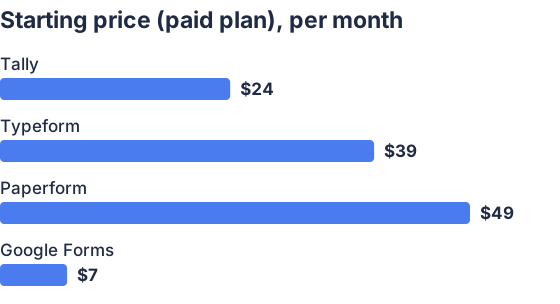
From the sourced table above, checked November 2026. Not charted, no single published figure: Jotform, Formstack.
Tally, Typeform, Jotform, Paperform, Formstack and Google Forms price/frees are taken from each vendor’s pricing page (checked November 2026). See vendor pages for plan detail and limits. (tally.so)
Tally: best when you want unlimited forms at no cost
Tally gives unlimited forms and submissions on its free tier and a modest Pro plan at $24/month for teams and brand control, making it the cheapest way for a small business to start collecting leads and payments. Tally supports payment collection, file uploads, conditional logic and integrations (Google Sheets, Notion, Airtable, Zapier) and advertises unlimited submissions under a fair-use policy. (tally.so) It lacks some advanced workflow automation and enterprise compliance features that Formstack or Paperform offer, so expect to move off Tally as submission complexity or compliance needs grow. Third-party comparisons also list Tally as a strong value pick in 2026. (dupple.com)
Typeform: best when you want conversational UX and polished design
Typeform focuses on one-question-at-a-time, conversational experiences and now advertises AI-assisted form creation and analytics; its Basic monthly plan is $39/month (monthly billing). Typeform makes forms that convert well when UX matters and includes conditional logic, webhooks and integrations; it limits included responses by plan, so costs climb with volume. (typeform.com) Typeform is not the cheapest and some small-business needs (unlimited submissions, advanced server-side workflows) are better served by other tools. Independent reviewers rate Typeform highly for engagement and design. (softwareadvice.com)
Jotform: best when you want features, templates and broad integrations
It also keeps a free Starter tier with limits. Jotform exposes many field types, payment processors, PDF generation, e-signatures, widgets and a large template library, and it lists native integrations with Shopify apps and major email systems (Mailchimp, Brevo, Klaviyo) and Zapier for long-tail workflows. (jotform.com) That breadth makes Jotform a strong choice when you expect to connect forms into sales or fulfillment systems; the tradeoff is pricing complexity and multiple quotas to monitor (submissions, active forms, storage). (toolproofs.com)
Paperform: best when you need branded payment forms and simple automation
Paperform combines form design, payments and built-in e-signatures and lists Pro plans starting at $49/month (annual-billed figure shown on its pricing page). Paperform emphasizes brand control, product-order forms and workflow automations (Stepper) that suit small businesses selling services or products without a full storefront. (paperform.com) It is pricier than Tally or Google Forms but removes many integration steps by offering native payment and e-signature features; for very high submission volumes the “unlimited” claim is controlled by fair use. (paperform.com)
Formstack: best for regulated work and enterprise automation
If your small business needs HIPAA/PCI controls, Salesforce-native forms or heavy document automation, Formstack is purpose-built for that stack. (my.formstack.com) The price is high for a small team; most small businesses only need Formstack once they require compliance, SSO, or large-scale automation.
Google Forms: best when you need zero-cost, simple forms
Google Forms is free for personal Google accounts and is included in Google Workspace for business use; Workspace plans start at $7/user/month and unlock admin controls, pooled storage and additional features. Google Forms is sufficient for contact forms, basic registrations and surveys, and ties directly to Google Sheets for live data access. (workspace.google.com) It lacks native payment collection and advanced branding; use it when cost and simplicity dominate.
Which form builder should a small business buy in 2026?
There is no single best tool; pick by need: choose Tally for lowest-cost, fully usable forms; choose Jotform when you need many integrations and templates; choose Typeform when conversion-focused UX matters; choose Paperform when you want payments + e-signatures; choose Formstack for compliance and heavy automation; use Google Forms for zero-cost basics. Each vendor’s pricing and limits carry different submission, storage and branding tradeoffs that materially change cost as you scale. (tally.so)
How do I choose a form builder for a small business?
Start by listing what matters: expected monthly submissions, need for payments or signatures, required integrations (CRM, email, Shopify), branding needs, and compliance (HIPAA/PCI). If submissions are low and budget is tight, a free tier (Tally, Google Forms, Jotform starter) usually suffices; if you need polished lead capture and higher conversion, pay for Typeform or Paperform. Check per-plan submission and payment caps, whether the plan removes vendor branding, and whether the tool has native integrations you need, these three items typically decide true cost. Finally, factor in workflow: if you need document generation or SSO, move toward Formstack or an enterprise plan. (tally.so)
Which form builders offer the best value for mid-sized businesses?
Mid-sized businesses often value predictable quotas, team seats, and native integrations. Jotform and Paperform frequently appear as value picks because they combine advanced features (payments, PDFs, integrations) with scalable plans; Jotform’s higher-tier plans raise submission and storage limits while Paperform bundles e-signatures and workflows. (jotform.com) Formstack can be the right value when regulatory controls or enterprise workflows remove manual work, but it is more expensive and aimed at regulated or process-heavy teams. Third-party comparisons in 2026 repeat this split: cheap unlimited options for smaller teams, and Jotform/Paperform/Formstack for teams needing scale or compliance. (dupple.com)
Which form builders integrate with Shopify and email marketing?
Jotform and Paperform list direct or Shopify-app-level integrations and native email-marketing connectors (Mailchimp, Klaviyo, Brevo) or provide easy Zapier paths; Jotform explicitly documents many marketing integrations. (jotform.com) Typeform and Tally can integrate with Shopify and email platforms typically via Zapier or built-in connectors for major email tools, but not all have a native Shopify app, confirm the exact connector on the vendor’s integrations page before buying. (typeform.com) Google Forms requires a bridge (Zapier, Apps Script or a third-party connector) for Shopify and most email-marketing systems. (workspace.google.com)
Which should you choose?
| Your situation | Best fit |
|---|---|
| Low budget, unlimited submissions | Tally |
| Need many templates, PDFs, and integrations | Jotform |
| Want high-conversion conversational forms | Typeform |
| Sell services or need built-in payments + e-sign | Paperform |
| Require HIPAA/enterprise workflows and SSO | Formstack |
| Need simple, free forms tied to Google Sheets | Google Forms |
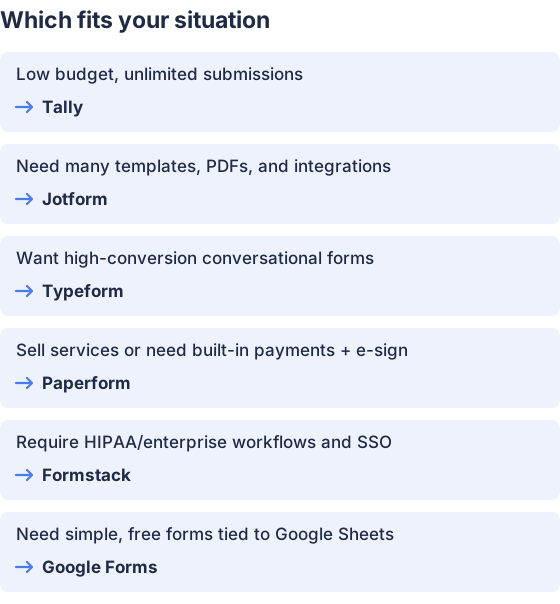
From the table above.
How this comparison was made
Prices and plan features were taken from each vendor’s published pricing and feature pages and checked in November 2026 (pricing pages cited above). Products were not tested hands-on; recommendations are based on documented plan limits, integrations and advertised capabilities. (tally.so)


