Which live chat and AI chatbot solutions work with Squarespace?
Compare Tidio, tawk.to, Crisp, and Chatbase for Squarespace, including pricing, AI features, live chat tools, and how to add each widget.

Tidio fits sites needing live chat and AI; tawk.to is a free-first choice, Crisp adds team inbox tools, and Chatbase focuses on AI answers. All four can be added to Squarespace with a third-party widget script; Tidio's linked instructions show Code Injection. (help.tidio.com)
At a glance
| Option | Best for | Starting price (paid plan) | Free plan | AI chatbot | Source |
|---|---|---|---|---|---|
| Tidio | Live chat plus AI | Not confirmed, see source | Yes | Yes | tidio.com |
| tawk.to | Free live chat | $29/mo | Yes | Yes | tawk.to |
| Crisp | Shared support inbox | $45/mo | Yes | Yes | crisp.chat |
| Chatbase | AI answers from your content | $40/mo | Yes | Yes | chatbase.co |
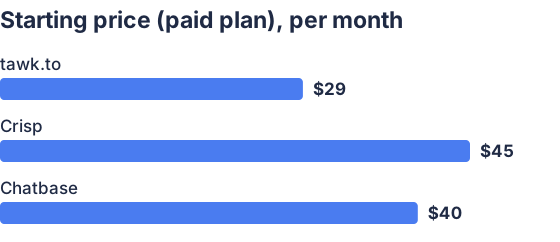
From the sourced table above, checked November 2026. Not charted, no single published figure: Tidio.
Prices are USD monthly-billed rates checked November 15, 2026. The table lists each provider’s lowest paid plan or add-on, which may not include all its AI chatbot features.
Tidio: best for live chat with optional AI
Tidio combines a website chat widget, a shared support inbox and automation; its Lyro AI agent can answer questions using support content. The Squarespace setup uses a JavaScript snippet pasted into Code Injection. (help.tidio.com) Its free plan includes a limited number of human-handled conversations and a one-time allotment of AI conversations, so check the quotas before relying on it for ongoing automated support. (tidio.com)
tawk.to: best for free live chat
tawk.to’s core live chat platform is free, and its widget has specific instructions for adding it to Squarespace through Code Injection. (tawk.to) Its optional AI Assist can answer from a business knowledge base and hand chats to a human; the free AI tier is limited, and paid AI Assist starts at $29 per month. (tawk.to) It suits owners who want to handle chats themselves without a software subscription, but the free live-chat product alone is not the same as a full AI chatbot.
Crisp: best for a shared inbox and team support
Crisp offers a live chat widget, shared inbox and mobile apps, with a no-code AI chatbot and workflows available on higher plans. (crisp.chat) Crisp publishes instructions for installing its chatbox on Squarespace. Its free plan has no AI credits, and its paid Mini plan starts at $45 per month; the AI chatbot is listed among higher-tier features, so the entry price does not buy the full AI feature set. (help.crisp.chat)
Chatbase: best for an AI chatbot trained on your content
Chatbase is primarily an AI agent builder: you can train an agent on your business content, then add it to a site as a chat bubble or embedded chat. (chatbase.co) Add its script through Squarespace Code Injection; the provider’s pricing page lists a free plan and a paid Hobby tier at $40 per month when billed monthly. (chatbase.co) It is a better fit when automated answers matter more than a traditional live-chat-first workflow.
1. Which live chat and AI chatbot solutions work with Squarespace?
Tidio, tawk.to, Crisp and Chatbase can all be added to a Squarespace site using a third-party widget script. Tidio, tawk.to and Crisp publish instructions specifically for Squarespace; Squarespace also says third-party widgets may be added with code injection, a code block or an embed block. (help.tidio.com)
Choose Tidio or Crisp if you want human support tools alongside automation, tawk.to if free live chat is the priority, or Chatbase if you mainly want a chatbot to answer from your own content. Features and quotas differ by plan: for instance, Crisp’s free plan has no AI credits, while tawk.to sells AI Assist as an add-on. (crisp.chat)
2. How do I add a chatbot to my Squarespace site?
Copy the installation script from your chatbot provider, then paste it into Squarespace’s Code Injection area, usually in the Footer field. Tidio and tawk.to both document this process; check your Squarespace plan first, because Code Injection is available only on supported plans. (help.tidio.com)
Save the changes, then visit the published site as a visitor and test the widget. Squarespace warns that code-based customizations are outside its support scope and aren’t guaranteed to work on every site or device, so check the chat on mobile as well. (support.squarespace.com) For Chatbase, choose its website chat-bubble script if you want a floating widget, rather than its iframe option for a chat embedded within a page. (chatbase.co)
3. What features should I look for in a Squarespace chatbot?
Look for a clear handoff to a person, answers based on information you provide, and controls for operating hours or offline messages. Also check the monthly conversation or message allowance: a low plan price can still mean limited AI usage or additional charges. Tidio separates human-handled conversations from AI conversations, while tawk.to’s AI Assist has message credits and human escalation on paid tiers. (tidio.com)
For live chat, consider whether you need a shared inbox, multiple team members, mobile notifications or a record of past conversations. For AI, check how you can provide or update the source content and whether the bot can pass unresolved questions to a person. Test the widget on phone screens and make sure its colors, greeting and placement suit your site.
4. Which solutions are best for small businesses or low budgets?
For no-cost human live chat, start with tawk.to; for a free starting point that combines live chat with limited automation, try Tidio. (tawk.to) Crisp is a fit if a shared inbox matters, but its free plan has no AI credits; Chatbase is worth considering when an AI chatbot is the main need and its message allowance matches your expected use. (crisp.chat)
Compare the feature you actually need against the plan that includes it, not just the lowest advertised price. In particular, check whether AI replies use a separate quota, whether human-agent seats are included and what happens when you reach a limit. (tidio.com)
Which should you choose?
| Your situation | Best fit |
|---|---|
| You need live chat without a software fee | tawk.to |
| You want live chat with limited AI to start | Tidio |
| Your team needs a shared inbox | Crisp |
| You mainly want answers generated from your content | Chatbase |
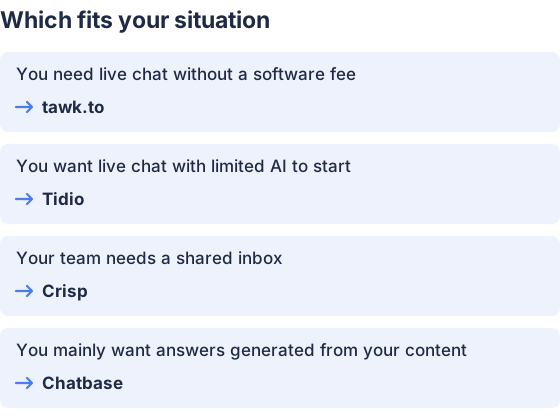
From the table above.
How this comparison was made
Prices and features come from each vendor’s published pages, checked in November 2026. The products were not tested hands-on.


