Which QuestionPro Alternative Has Easier Survey Design?
Compare Typeform, Jotform, and SurveyMonkey for user-friendly survey design, pricing, layouts, templates, and guidance on choosing the right fit.

Typeform is the strongest fit for user-friendly, polished surveys; Jotform suits flexible drag-and-drop building, while SurveyMonkey is better for guided research workflows. The main difference is how much you value a conversational respondent experience versus a flexible builder or research-focused templates.
At a glance
Prices below are the vendors’ published monthly-billed prices, checked November 17, 2026.
| Option | Best for | Starting price (paid plan) | Free plan | One-question layout by default | Source |
|---|---|---|---|---|---|
| Typeform | Polished conversational surveys | $29/mo | Yes | Yes | typeform.com |
| Jotform | Flexible visual building | $39/mo | Yes | Partial | jotform.com |
| SurveyMonkey | Guided research surveys | $149/mo | Yes | Partial | surveymonkey.com |
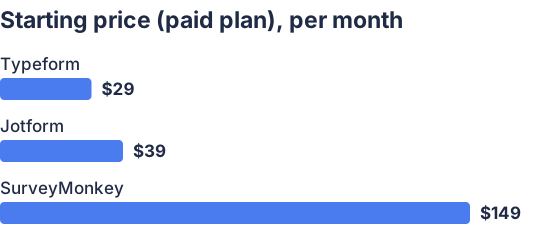
From the sourced table above, checked November 2026.
Typeform: best for polished, conversational surveys
Typeform is a strong choice if “user-friendly design” means making a survey feel simple and focused to the person answering it. Its usual one-question-at-a-time presentation gives the form a conversational feel, and its editor lets you adjust themes and branching logic. It also offers templates and AI-assisted survey creation, so you can start with a draft rather than a blank page. (help.typeform.com)
The tradeoff is that this presentation is not right for every survey. Respondents move through questions in sequence, which may feel slower than scanning a traditional page with several questions at once. Typeform now supports multi-question pages, but its familiar conversational style remains a defining design option. Its free plan is available, though response limits may make it unsuitable for surveys with larger audiences. (community.typeform.com)
Jotform: best for hands-on layout control
Jotform suits people who want to arrange and customize a survey directly in a visual builder. Its survey tools include drag-and-drop editing, templates, and question types for ratings and tables; it also offers prompts to help get a survey started. That combination can make it approachable for someone who wants more control over the form than a fixed conversational layout provides. (jotform.com)
Jotform can also display questions one at a time using its card-form option, but that is a choice rather than the defining default experience. This flexibility is useful if you want to choose between a more traditional survey and a conversational flow, but it means you have more design decisions to make. The free plan is limited to five surveys and 100 monthly responses, according to Jotform’s survey information, so check those limits against your expected use. (jotform.com)
SurveyMonkey: best for guided, research-oriented surveys
SurveyMonkey is a sensible alternative if you want help shaping the questions as well as building the form. It offers expert-built templates, AI-generated drafts, and a question bank; its editor supports building and styling surveys, adding logic, and previewing the respondent experience. It also offers a one-question-at-a-time format, alongside other survey formats. (help.surveymonkey.com)
That makes it useful when a structured starting point and research-oriented question support matter more than a distinctive visual style. The range of editing and logic options may be more than someone needs for a short, straightforward feedback form. Its free Basic plan is available, while its paid monthly plan is substantially more expensive than the entry plans listed for Typeform and Jotform. (surveymonkey.com)
Which QuestionPro alternative offers more user-friendly survey design?
Typeform is the best fit if you want survey design that feels polished and intuitive for respondents. Its conversational presentation and guided editing flow are a good match for short feedback surveys where a focused, one-question-at-a-time experience is welcome. (help.typeform.com)
Choose Jotform instead if you define user-friendly as being able to visually arrange and customize the survey yourself. Its drag-and-drop builder, templates, and optional card-form layout make it flexible, but you may need to make more layout choices than with Typeform’s conversational approach. (jotform.com)
SurveyMonkey is worth considering when template guidance, question-bank support, and survey logic are more important than a distinctive form style. Its multiple ways to start and build a survey can help people who want structure, though those options may feel less direct if the goal is simply to create a short, attractive survey quickly. (help.surveymonkey.com)
There is no single design style that works best for every audience. A one-question flow keeps attention on the current question; a visual drag-and-drop builder gives the creator more layout control; and research templates can help people start with a more structured question set. If possible, preview the finished survey on the devices your respondents are likely to use before choosing a tool. SurveyMonkey provides a preview step, and Typeform’s guidance also recommends checking how a form appears on mobile. (help.surveymonkey.com)
Which should you choose?
| Your situation | Best fit |
|---|---|
| You want a polished, conversational respondent experience | Typeform |
| You want drag-and-drop control over the survey layout | Jotform |
| You want expert-built research templates and question guidance | SurveyMonkey |
| You want to choose between standard and card-style survey layouts | Jotform |
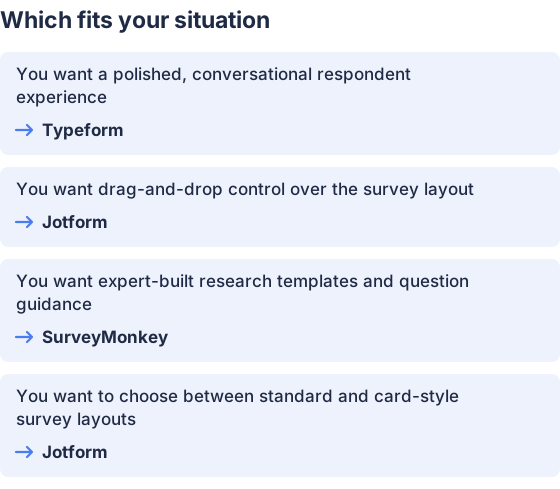
From the table above.
How this comparison was made
Prices and product features come from each vendor’s published pages, checked on November 17, 2026. The products were not tested hands-on.


