Which Review Management Tools Help Prevent Negative Review Escalation?
Compare review management tools for negative-review alerts, escalation workflows, pricing, and the best fit for multi-location or local teams.

Review management tools can help teams catch complaints and respond promptly, but routing urgent feedback and limiting harm depend on the product. Reputation suits multi-location teams needing escalation support; Reviewshake suits smaller businesses wanting low-cost alerts; Sprout Social and Podium suit teams managing reviews alongside other customer conversations.
At a glance
| Option | Best for | Starting price (paid plan) | Free plan | Negative-review alert or routing | Source |
|---|---|---|---|---|---|
| Reputation | Multi-location review response | $80/mo | No | Partial | reputation.com |
| Reviewshake | Affordable review alerts | $29/mo | No | Yes | reviewshake.com |
| Sprout Social | Reviews and social inbox | Not confirmed, see source | No | Partial | sproutsocial.com |
| Podium | Local-business review replies | Quote | No | Not stated | podium.com |
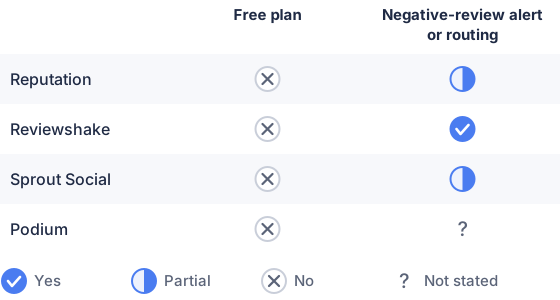
From the sourced table above, checked November 2026.
Reputation: best for multi-location teams
Reputation’s Rep Core plan is listed at $80 per location per month and includes review collection, requests, and AI-assisted replies, according to its pricing page, checked November 21, 2026. The platform’s strongest fit for escalation is its managed review-response service: Reputation says negative or sensitive feedback can trigger alerts for rapid resolution, and that new reviews receive a response within one business day. That managed service is separate from the listed Rep Core features, so confirm what it costs and whether it is included in a proposed package. (reputation.com)
Reputation also offers an Actions & Ticketing add-on that can help teams assign feedback and track follow-up. This is useful when complaints need an owner, not just a reply, especially across locations. The trade-off is that a business seeking basic monitoring may be paying for a broader reputation platform, and the public pricing page does not establish that ticketing or managed escalation is included in the $80 plan. (reputation.com)
Reviewshake: best for affordable review alerts
Reviewshake’s Starter plan is listed at $29 per month on its pricing page, checked November 21, 2026. It monitors reviews, offers AI reply drafts, and sends an email notification when a new review arrives; the vendor also says businesses can flag negative reviews for an alert. That makes it a practical fit for a small team that needs to notice a complaint quickly without buying a full-scale reputation platform. (reviewshake.com)
The important distinction is that an alert is not the same as a structured escalation process. Reviewshake’s public plan details describe monitoring and notifications, but do not establish a built-in workflow for assigning a complaint to a department, enforcing response deadlines, and tracking resolution. It can help prevent a review from sitting unnoticed; teams with formal service-recovery procedures should verify how they will record ownership and follow-up. (reviewshake.com)
Sprout Social: best for reviews and social customer care
It includes review management, an all-in-one inbox, and case-management tools. Sprout brings reviews from platforms including Google, Yelp, Facebook, Trustpilot, and Glassdoor into a centralized view, where teams can sort, filter, and respond. This suits organizations whose complaint response work already sits with social or customer-care staff. (sproutsocial.com)
Sprout’s value is the shared workspace: employees can work from a central inbox rather than checking review sites separately. However, its published review-management description does not specifically promise automatic escalation of a negative review to a designated team or manager. Higher-tier plans add features such as custom workflows and automated inbox actions, but teams should check whether those workflows cover their exact review-routing rules before treating the product as an escalation system. (sproutsocial.com)
Podium: best for local businesses managing reviews and messages
Podium combines review responses with customer communication tools. Its reviews product page describes a single inbox for reviews and other customer interactions, plus an AI Reputation Specialist that can draft personalized review replies. This can help a local business respond promptly without switching between platforms, particularly when the same staff handle reviews, texts, and incoming inquiries. (podium.com)
Podium’s pricing page asks businesses to request a custom quote, so its starting price is not published there; the page also says pricing depends on the business’s needs. Podium describes review management and response assistance, but the cited product page does not specify negative-review routing rules, ticket escalation, or a resolution-tracking process. It is worth considering for a unified local-business inbox, but verify those workflow details if preventing a missed complaint is the main requirement. (podium.com)
Which review management solutions prevent negative review escalation and damage?
No tool can guarantee that negative reviews will not appear or that reputational harm will be prevented. Reputation most directly describes alerts for negative or sensitive feedback through its managed service, while Reviewshake specifically offers alerts for flagged negative reviews. Sprout Social and Podium centralize review handling, but their public feature descriptions provide less detail about automatic escalation. (reputation.com)
The practical question is what happens after a complaint appears: does the tool notify someone, assign responsibility, and show whether the issue was handled? A fast, calm public reply can acknowledge the concern and explain the next step, while resolution details can move to a private channel when appropriate. For examples of internal routing needs, see how to choose software for escalations across review queues. These are workflow safeguards, not guarantees that a review will be removed or that every reader will be satisfied. (support.birdeye.com)
Choose a tool based on the escalation path your team needs. For smaller teams, an alert plus a clear person responsible for responding may be enough; larger or distributed teams may need ticket assignment, management alerts, and follow-up tracking. Review platforms generally do not remove a review simply because it is negative: Trustpilot, for example, says businesses may flag reviews that breach its rules, but disagreement with a negative rating is not a valid reason to flag it. (corporate.trustpilot.com)
Which should you choose?
| Your situation | Best fit |
|---|---|
| Multiple locations need sensitive-review alerts | Reputation |
| One location needs affordable negative-review alerts | Reviewshake |
| Social and customer-care teams share review duties | Sprout Social |
| Local staff manage reviews and customer messages together | Podium |
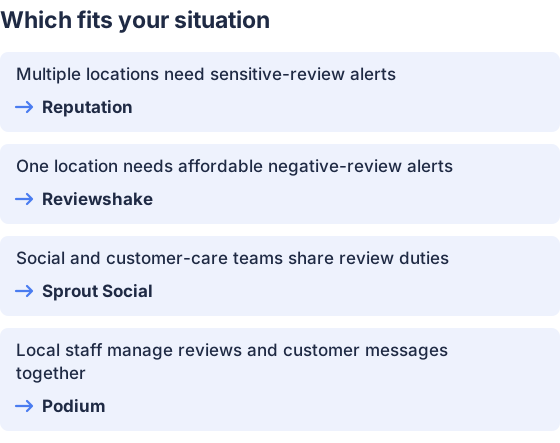
From the table above.
How this comparison was made
Prices and features come from each vendor’s published pages, checked on November 21, 2026. The products were not tested hands-on.


