Which survey platform handles complex quantitative fieldwork?
Compare Qualtrics, QuestionPro, and Alchemer for survey quotas, respondent validation, data-quality checks, pricing, and quantitative research use cases.

Qualtrics is a strong fit for complex quantitative fieldwork when you need configurable quotas and automated response-quality flags. QuestionPro suits research teams that want built-in data-quality checks and multi-criteria quotas; Alchemer is a lower-cost option when you can review flagged responses yourself.
At a glance
| Option | Best for | Starting price (paid plan) | Free plan | Automated respondent validation | Advanced quotas | Source |
|---|---|---|---|---|---|---|
| Qualtrics | Complex research programs | Not confirmed, see source | Yes | Yes | Yes | qualtrics.com |
| QuestionPro | Market research teams | $99/mo | Yes | Yes | Yes | questionpro.com |
| Alchemer | Flexible, lower-cost fieldwork | Not confirmed, see source | No | Partial | Yes | alchemer.com |
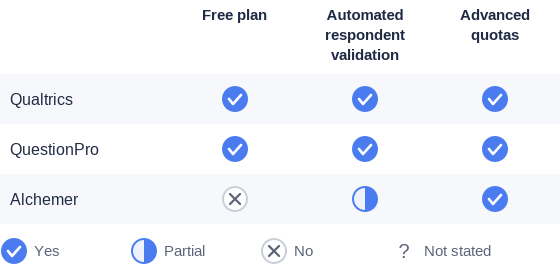
From the sourced table above, checked November 2026.
Prices are the vendors’ published monthly amounts checked in November 2026. QuestionPro’s $99 rate is also billed annually. These are the lowest paid-plan prices, not necessarily the price of the tier or add-ons that include every feature discussed below. (marketing-prod.qualtrics.com)
Qualtrics: best for complex research with layered quality checks
Qualtrics is a strong candidate when a study needs flexible survey logic, quotas, and several ways to flag questionable responses. Its Response Quality tools can identify indicators such as unusually short completion times, bots, and duplicate responses, though bot and duplicate checks require Fraud Detection features in the license. Bot detection assigns a likelihood score; it flags a response rather than proving the respondent is fraudulent. (qualtrics.com)
Quota conditions can be based on respondent answers, and researchers can set actions for when a quota is met. Qualtrics notes that quotas increment when a response is submitted, so simultaneous submissions can occasionally push a quota over its target. Its free account is limited. Confirm which fraud-detection features and response allowances are included in the proposed license. (qualtrics.com)
QuestionPro: best for market research with quality flags and criteria quotas
QuestionPro is worth considering when researchers want data-quality checks and quotas within a market-research product. Its published checks can flag duplicate IP addresses or text, very fast completions, gibberish, patterned answers, all-selected checkboxes, and suspected bot-written text; researchers can review flagged responses and, for some checks, configure termination. These checks need to be enabled, and the vendor’s help pages identify some of them as Research Edition features. (cdn.questionpro.com)
Quota Management supports targets based on one question or conditions combined across multiple questions, with a dashboard for tracking progress. A second quota check later in a long survey can help reduce over-quota responses from people who passed an earlier check while places were still available. The Research Suite is quote-priced, while the public pricing page lists a $99-per-user monthly rate for Advanced, billed annually; check the quote for the features and volume your study needs. (api.questionpro.com)
Alchemer: best for flexible quotas and researcher-led review
Alchemer offers segmented quotas that can be based on survey answers, contact fields, or system data. Researchers can set actions when quota limits are reached and monitor quota progress. Its help documentation also explains a limitation worth planning around: active respondents may hold quota places temporarily, and the system’s handling of in-progress responses can affect the respondent experience. (help.alchemer.com)
For quality checks, Alchemer provides duplicate protection and flags or tools for reviewing completion speed, straightlining, patterned answers, and weak open-text responses. Its data-cleaning workflow gives researchers control over which indicators to use and which responses to quarantine, so it is not the same as automatically verifying each person’s identity or truthfulness. Alchemer also offers a seven-day trial, not a free plan. (help.alchemer.com)
Which survey platform is best for managing complex quantitative fieldwork with automated respondent validation?
Qualtrics is a strong fit when complex survey logic, quota management, and response-quality flags are central to the work. QuestionPro may suit research teams that want multi-question quota controls and multiple data-quality checks; Alchemer is a practical alternative when lower entry pricing and researcher-led cleaning matter more than automatic screening. (qualtrics.com)
Treat “validation” as several separate jobs. A survey can validate that an answer fits a required format, screen people into or out of a target group, and flag possible duplicates or bots. Those signals help researchers decide what to review; they do not establish that a response is truthful or that a respondent is who they claim to be. For panel studies, check how the platform works with the sample provider and whether flags can be reviewed before removing responses.
What respondent validation features should I look for in a survey platform?
Look for a combination of eligibility screening, answer and format rules, duplicate-response protection, speed checks, and automated flags for suspicious patterns or bot-like activity. Also check whether the platform stores the reason for a flag, lets researchers inspect or reverse it, and allows quality fields to be exported with the response data. (qualtrics.com)
Match the checks to the study. Unique invitation links or authenticated access can help control who responds; duplicate detection can help identify repeat entries; and timing, patterned-answer, or open-text checks can highlight responses for review. Be cautious with automatic deletion: shared IP addresses, unusual but genuine answers, and uncertain bot scores can produce false positives. Prefer configurable flags and human review when excluding a response could affect the sample.
How do survey platforms handle quotas and quality checks for fieldwork?
Platforms typically let researchers set overall limits or quotas for segments defined by answers and other respondent data. They then monitor how many responses meet each target, close or redirect respondents when a limit is reached, or flag responses so a researcher can inspect them. Alchemer documents overall, segmented, and link-based quotas; Qualtrics supports quotas based on survey conditions; and QuestionPro offers question-based and multi-question criteria quotas. (help.alchemer.com)
Quality checks may run during collection, after submission, or during a later cleaning step. Depending on the platform and plan, they can flag suspected duplicates, fast completions, patterned responses, or questionable open-text answers. Before fielding, confirm when each quota increments, how in-progress surveys count, what happens when a cell fills, and whether quality checks merely flag responses or can terminate or remove them. Those details matter when quotas are tight or sample is being purchased.
Which should you choose?
| Your situation | Best fit |
|---|---|
| Complex surveys with several quality signals to review | Qualtrics |
| Research studies with multi-question quota criteria | QuestionPro |
| Lower monthly entry price and flexible manual cleaning | Alchemer |
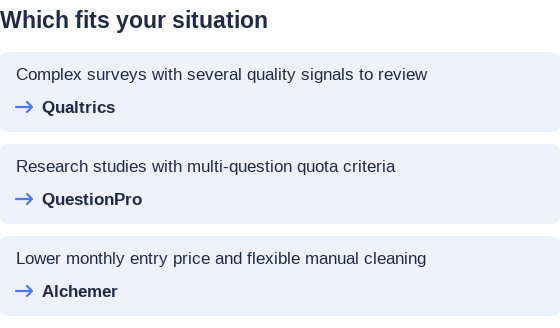
From the table above.
How this comparison was made
Prices and features come from each vendor’s published pages, checked in November 2026. The products were not tested hands-on.


