Which Survey Software Handles Large Amounts of Data Best?
Compare Qualtrics, SurveyMonkey, Alchemer, and LimeSurvey for survey response limits, pricing, exports, and large-scale data needs.

Qualtrics fits large enterprise survey programs, while LimeSurvey Community Edition suits teams able to host and manage their own system. SurveyMonkey and Alchemer offer clearer response limits for teams with more moderate, predictable volumes.
At a glance
| Option | Best for | Starting price (paid plan) | Free plan | High-volume route? | Source |
|---|---|---|---|---|---|
| Qualtrics | Enterprise research programs | $420/mo | Yes | Yes | qualtrics.com |
| SurveyMonkey | Familiar tools, set response limits | $149/mo | Yes | Partial | surveymonkey.com |
| Alchemer | Mid-sized response volumes | Not confirmed, see source | Yes | Partial | alchemer.com |
| LimeSurvey | Self-hosting and data control | $39/mo | Yes | Partial | limesurvey.org |
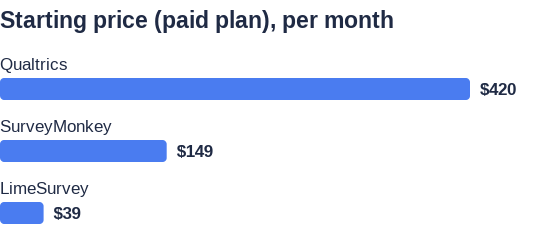
From the sourced table above, checked November 2026. Not charted, no single published figure: Alchemer.
Prices and plan details were checked in November 2026. Qualtrics’s listed $420 monthly price is billed annually; its higher-volume enterprise option is custom-priced. (qualtrics.com)
Qualtrics: best for enterprise-scale survey programs
Qualtrics is a fit for organizations that need advanced survey research, multiple users, and a plan sized to a large response program. Its online paid plan includes 1,000 total responses, while its enterprise research option starts at 5,000 responses and is priced by quote. The published pricing page says the higher-volume option is intended for organizations that expect to exceed the online plan’s response limit. (qualtrics.com)
For getting data out, Qualtrics offers an API workflow that starts an export, tracks its progress, and returns a downloadable file. The API supports compressed exports and several data formats, but it is not limitless: exports above 1.8 GB fail, and the response data-file limit is 1 million records per file. Large projects may need to export in filtered batches and account for those limits when planning downstream analysis. (developer-docs.qualtrics.com)
A recurring SFTP export can also send new responses on a schedule, but that automation has a 500 MB maximum file size. Qualtrics therefore offers a clear enterprise purchasing route and useful export workflows, but teams should verify their expected file sizes and license terms with the vendor before committing. (qualtrics.com)
SurveyMonkey: best for familiar workflows and moderate volumes
SurveyMonkey is a practical choice when the team wants a mainstream survey tool with exports and analysis features, and its response allowance is enough for the project. The Standard Monthly plan is listed at $149 per month for 1,000 responses across surveys; the vendor says additional responses cost $0.15 each. That makes costs easier to estimate for a planned survey, but less attractive if response volume is very high or unpredictable. (surveymonkey.com)
Paid plans include data exports, and SurveyMonkey documents export formats such as CSV, XLS, PDF, and SPSS. Its analysis tools include filters, comparisons, and crosstabs on eligible plans, which can help teams explore a large response set without immediately moving all analysis elsewhere. (surveymonkey.com)
The main drawback is the monthly response allowance and per-response overage, not a lack of basic export functionality. Check the exact plan’s response limit and analysis features before choosing it for ongoing collection at scale. (surveymonkey.com)
Alchemer: best for mid-sized volumes and flexible survey logic
Its higher-priced individual plans list 100,000 and 125,000 annual responses, respectively. Those figures give teams a more concrete basis for estimating capacity than a product with an unspecified standard-plan limit, though they may not cover very large or rapidly growing programs. (alchemer.com)
The feature comparison lists raw-data export to Excel, report downloads, and SPSS export among its data tools. Alchemer says API access is available on Business Platform accounts, so teams that need automated extraction should confirm the relevant package and price rather than assume the entry-level plan includes it. (alchemer.com)
Alchemer may suit teams that want more survey logic and analysis options than a simple form tool, while staying within a published response allowance. Its account limits make it important to compare annual response needs with the plan’s capacity before collecting. (alchemer.com)
LimeSurvey: best for teams able to manage their own hosting
LimeSurvey offers two distinct routes: hosted LimeSurvey Cloud plans with stated response allowances, and Community Edition, which teams can install on their own server. The lowest published Cloud plan is $39 per month for 1,000 responses per month; higher tiers have annual response limits, while the Corporate plan offers tailored limits by agreement. (limesurvey.org)
Community Edition is free, open-source software that can be installed on an organization’s own server. That gives technically capable teams more control over where survey data is stored and what infrastructure they use, but it also means they take responsibility for hosting and maintenance; the vendor does not publish a universal response-volume figure for a self-hosted installation. (community.limesurvey.org)
LimeSurvey can export response data in formats including CSV, Excel, SPSS, R, Stata, and JSON. Its self-hosted option may suit projects where control over infrastructure matters as much as response capacity, but teams should plan and test server capacity for their own collection and export workload rather than treat self-hosting as a guaranteed scale limit. (help.limesurvey.org)
Which survey software works best for handling large amounts of data?
Qualtrics is the strongest fit when you need a vendor-priced enterprise plan for a large survey program, while LimeSurvey Community Edition fits teams that can manage their own hosting. For moderate, known volumes, Alchemer’s published response allowances make planning straightforward; SurveyMonkey is more suitable when its monthly limit and overage charges fit the budget. Compare both collection capacity and export limits: a tool may accept many responses but still require careful batching to move or analyze the resulting data. (qualtrics.com)
Which should you choose?
| Your situation | Best fit |
|---|---|
| Enterprise research with a custom response volume | Qualtrics |
| Familiar survey tools and roughly 1,000 monthly responses | SurveyMonkey |
| A defined annual response allowance and advanced logic | Alchemer |
| Your team can host and maintain the survey system | LimeSurvey |
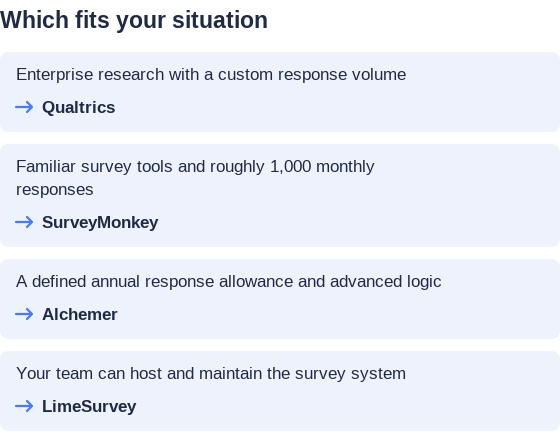
From the table above.
How this comparison was made
Prices and features come from each vendor’s published pages, checked in November 2026. The products were not tested hands-on.


