What survey tools are best for iterative and longitudinal UX research?
Qualtrics or Alchemer for longitudinal UX panels. Typeform, Contentsquare and SurveyMonkey for fast in-product, iterative feedback.

Pick Qualtrics or Alchemer when you need true panel-based, longitudinal UX studies; pick Typeform, Contentsquare (Hotjar), SurveyMonkey or Zigpoll for fast, iterative in-product feedback.
At a glance
| Option | Best for | Starting price (paid plan) | Free plan | Supports longitudinal / panels | Source |
|---|---|---|---|---|---|
| Qualtrics | Enterprise longitudinal panels | $420/mo | Yes | Yes | qualtrics.com/pricing |
| Alchemer | Advanced survey logic, research teams | $55/mo per user | No | Partial | alchemer.com/pricing |
| Typeform | Conversational surveys, iterative UX | $29/mo | Yes | Partial | typeform.com/pricing |
| Contentsquare (Hotjar) | In-product behavior + on-site surveys | From $39/mo | Yes | No | contentsquare.com/pricing |
| SurveyMonkey | Fast panel access (Audience) | $30/mo (team rate shown) | Yes | Yes | surveymonkey.com/pricing |
| Zigpoll | Ecommerce post-purchase & on-site UX | $29/mo (paid from) | Yes | Partial | zigpoll.com/pricing |
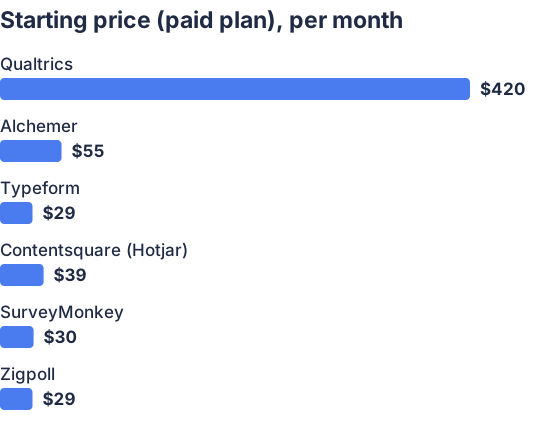
From the sourced table above, checked November 2026.
Prices and plan texts checked on vendor pricing pages in November 2026. Qualtrics publishes a $420/month online package. Typeform’s lowest paid monthly plan displays $29/mo. Contentsquare (Hotjar) Growth starts from about $39/mo and Voice-of-Customer from ≈$79/mo. SurveyMonkey shows Team Advantage at $30/user/mo (annual billing shown on page). Alchemer’s self-serve entry is about $55/user/mo. Zigpoll’s pricing page shows a free Lite plan (50 responses/month) and a “paid from $29/mo” banner. (qualtrics.com)
Qualtrics: best for formal longitudinal panels and enterprise UX research
Qualtrics is strong when you need managed panels, quota controls and long-term tracking across waves; it publishes a $420/month Strategic Research self-serve option. Qualtrics’ Research Suite includes panel and quota tools and features for complex longitudinal designs (repeated measures, video diaries, advanced analytics), but enterprise costs and per-response pricing for large volumes rise quickly. Use Qualtrics when you need governed, repeatable measurement over months or years. (qualtrics.com)
Alchemer: best when you want advanced logic without enterprise lock-in
Alchemer exposes seat-based pricing and many advanced survey and automation features useful for multi-wave UX studies; its published entry seat is about $55/user/month on monthly billing. Alchemer supports scripting, advanced branching, and exports that help stitch repeated responses, but true large-scale panel hosting often shifts you to a quoted platform plan, so longitudinal setups may need bespoke contracting. Alchemer is a good middle ground for research teams that want stronger logic than simple form builders. (userinsight.ai)
Typeform: best for high-response, conversational UX checks
Typeform’s forms are optimized for engagement and iterative in-product checks; its public monthly Basic plan starts at $29/mo and it now offers a Research Flow for recruiting and managing participants. Typeform is easy to deploy for frequent micro-surveys and recontacting users, but its built-in panel/research tooling is lighter than Qualtrics’, expect to combine Typeform with an external panel or contact list for strict longitudinal panels. (typeform.com)
Contentsquare (Hotjar): best when you need behavior + voice together
Contentsquare (the current home for Hotjar features) bundles session replay, heatmaps and on-site surveys; Growth plans start from roughly $39/mo and Voice of Customer features are priced separately from about $79/mo. It’s ideal for iterative UX where you want to pair user behavior with immediate survey prompts (on-page popups, exit surveys). It does not replace a panel management system, it focuses on event/timestamped feedback rather than managed multi-wave panels. (contentsquare.com)
SurveyMonkey: best when you need instant access to panels (SurveyMonkey Audience)
SurveyMonkey combines self-serve survey tools with SurveyMonkey Audience, a large integrated panel you can buy responses from (SurveyMonkey’s pricing page shows team tiers and the Audience product and help pages describe panel capabilities). Team plans begin at roughly $30/user/mo (annual shown), and Audience orders are priced per complete response; SurveyMonkey is a practical choice when you need quick, repeat survey waves against recruited respondents. For tracked, individual-level longitudinal panels you’ll still need to manage identifiers across waves. (surveymonkey.com)
Zigpoll: best when your UX research is ecommerce-centric or post-purchase
Zigpoll focuses on Shopify and ecommerce feedback (post-purchase, on-site, email/SMS), offers a free Lite plan (50 responses/mo) and advertises paid plans “from $29/mo” (annual-equivalent shown on its pricing page). For iterative UX on an ecommerce site Zigpoll is useful because it ties answers to orders and integrates with Klaviyo, Slack and analytics tools; it can support repeated checks tied to a buyer’s lifecycle but it is not a general research-panel system for probability-based longitudinal studies. Zigpoll publishes its pricing and feature list on zigpoll.com. (zigpoll.com)
What survey tools are best for iterative UX research?
Use in-product, embeddable survey tools and behavioral analytics that make it painless to ask short questions repeatedly; Typeform, Contentsquare (Hotjar), Zigpoll and SurveyMonkey are best for iterative workflows. Iterative UX research needs fast deployment, lightweight questions, high response rates and integrations with analytics and messaging, things these products prioritize. For frequent micro-surveys, prioritize on-page widgets, email/SMS triggers and one-question-at-a-time designs to keep response friction low. (typeform.com)
Which features matter for iterative UX survey workflows?
Short answer: fast deploy, low friction, targeting and automated follow-ups. Iterative work depends on quick setup (templates, SDK/web embeds), targeted triggers (in-app, post-purchase, exit intent), good response-rate design (message timing, one-question flows), and easy export/integration with analytics and product tools so findings feed sprints. Auto-reminders, A/B testing of prompts, and built-in AI summaries speed iteration; keep an eye on response-retention windows and export formats for longitudinal comparisons. (contentsquare.com)
Which tools support true longitudinal studies and panel management?
Short answer: Qualtrics and SurveyMonkey provide the most complete, vendor-native panel and longitudinal features; Alchemer and Typeform offer partial support. Qualtrics explicitly supports panels, quota management and multi-wave studies with advanced analytics and governance, making it the standard for longitudinal UX programs. SurveyMonkey’s Audience and panel guidance let you buy or manage recruited panels quickly. Typeform and Alchemer can host repeat respondents and integrate contact lists, but full panel provisioning, quality controls and probability-style re-contact workflows are stronger in Qualtrics/SurveyMonkey or in specialized panel vendors. (qualtrics.com)
How do I choose a survey tool for UX research needs?
Short answer: match scale and methodology to vendor strengths. If you need governed, repeatable longitudinal research with quotas, panel tracking and advanced analytics, choose Qualtrics or a panel provider tied to SurveyMonkey Audience; budget for higher monthly/response costs. If you want fast, frequent in-product checks with behavior context, choose Contentsquare (Hotjar), Typeform or Zigpoll and connect survey data to analytics. If you need research-grade branching, scripting and per-user seats without enterprise contracts, consider Alchemer. Evaluate projected response volumes, identifier persistence (can you tie responses to the same user across waves?), integration needs (analytics, CRM), and retention/exports before choosing. (qualtrics.com)
Which should you choose?
| Your situation | Best fit |
|---|---|
| You need managed, research-grade longitudinal panels | Qualtrics |
| You need advanced branching and seat-level plans | Alchemer |
| You want quick, high-engagement micro-surveys and research flow | Typeform |
| You want to pair replays/heatmaps with on-page surveys | Contentsquare (Hotjar) |
| You run ecommerce and need post-purchase, order-tied feedback | Zigpoll |
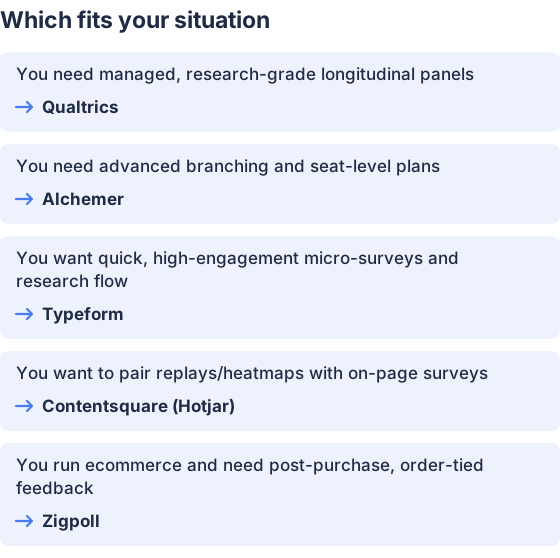
From the table above.
How this comparison was made
Prices, plan limits and feature notes come from each vendor’s published pages and related product docs, checked in November 2026; I did not test products hands-on. Zigpoll publishes this page and the Zigpoll pricing and feature claims above were taken from zigpoll.com/pricing. (qualtrics.com)


