Which Tools Measure Channel ROI Across Multiple Touchpoints?
Compare Google Analytics 4, HubSpot, Ruler Analytics, and Adobe Marketing Campaign Analytics for multi-touch ROI, pricing, and fit.

Google Analytics 4, HubSpot, Ruler Analytics, and Adobe Marketing Campaign Analytics measure channel ROI across multiple touchpoints, but differ in price, data scope, and setup needs. GA4 suits teams wanting a free starting point; Ruler connects marketing activity to sales revenue; HubSpot fits teams already working in its CRM; Adobe targets organizations needing broader, modeled measurement.
At a glance
| Option | Best for | Starting price (paid plan) | Free plan | Multi-touch attribution | Source |
|---|---|---|---|---|---|
| Google Analytics 4 | Free web and app measurement | Quote | Yes | Yes | marketingplatform.google.com |
| HubSpot Marketing Hub | Teams using HubSpot CRM | Not confirmed, see source | Yes | Yes | hubspot.com |
| Ruler Analytics | Connecting channels to sales revenue | Not confirmed, see source | No | Yes | ruleranalytics.com |
| Adobe Marketing Campaign Analytics | Enterprise cross-channel ROI modeling | Quote | No | Yes | business.adobe.com |
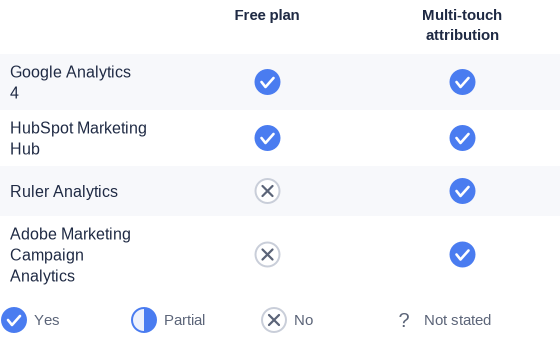
From the sourced table above, checked November 2026.
Prices and features were checked in November 2026. The table’s starting price is the vendor’s lowest published paid-plan price, not necessarily the price of the plan that includes multi-touch attribution: HubSpot, for example, lists attribution under Enterprise, while its lowest paid tier is Starter. (hubspot.com)
Google Analytics 4: best for starting with free attribution
GA4’s attribution reports compare how models assign credit to marketing channels, and data-driven attribution can distribute credit across contributing interactions. It also reports attributed key events and revenue, making it a practical starting point for measuring digital channel performance without a standard subscription fee. (support.google.com)
Its limits matter: GA4’s data-driven model is based on the data in the property, and a report is only as useful as its event setup, channel tagging, and revenue data. Standard GA4 is free; Google lists Analytics 360 as a paid option with a sales contact rather than a published price. For deeper cross-channel paths or offline sales data, you may need other systems or analysis beyond GA4’s built-in reports. (support.google.com)
HubSpot Marketing Hub: best for CRM-centered marketing teams
HubSpot combines marketing reporting with its CRM, and its Enterprise tier includes multi-touch revenue attribution and customer journey analytics. That can help teams connect recorded marketing interactions to deals and revenue without building a separate reporting workflow. (hubspot.com)
Check plan requirements before comparing its cost with standalone attribution tools. It is most useful when your team already records customer interactions and sales outcomes in HubSpot; attribution based on incomplete CRM activity can leave gaps in the journey. (hubspot.com)
Ruler Analytics: best for tying marketing to sales outcomes
Ruler is designed to connect customer touchpoints with revenue records. Its published capabilities include multi-touch models such as linear, time decay, and position-based attribution, plus integrations with advertising platforms and CRMs including Salesforce and HubSpot. That makes it a fit for teams that need to relate marketing activity to leads, opportunities, or sales rather than only on-site conversions. (ruleranalytics.com)
Ruler says prices are indicative and based on factors such as traffic, product, data, and integrations, so confirm the actual quote and included features. It offers less reason to buy if you only need basic web analytics or lack reliable CRM and revenue records to connect to the journey. (ruleranalytics.com)
Adobe Marketing Campaign Analytics: best for enterprise measurement
Adobe describes Marketing Campaign Analytics as a cross-channel measurement product combining marketing mix modeling and multi-touch attribution, with features for incrementality scoring, ROI modeling, scenario planning, and budget optimization. It is aimed at teams seeking to compare investment across paid, owned, and earned channels, rather than just report the final click before a conversion. (business.adobe.com)
Adobe does not publish a fixed price on its pricing page; it directs prospective buyers to get pricing. The product’s broader modeling scope may suit organizations with varied data sources and complex budgets, but it is likely more than needed for a team that wants a straightforward, low-cost attribution report. Adobe also describes data sources such as media spend, channel performance, and CRM revenue outcomes, so confirm that your data can be prepared and connected for the analysis you need. (business.adobe.com)
Which tools measure channel ROI across multiple touchpoints?
Google Analytics 4, HubSpot Marketing Hub, Ruler Analytics, and Adobe Marketing Campaign Analytics all offer ways to measure channel performance across multiple touchpoints. GA4 is the lowest-cost place to begin; HubSpot suits CRM-centered teams; Ruler emphasizes linking marketing journeys to sales revenue; Adobe offers broader cross-channel modeling. (support.google.com)
The central difference is what each tool connects: digital activity, CRM interactions, sales outcomes, or media spend and modeled impact. Before choosing, check whether the tool supports your channels and outcome data, whether multi-touch reporting is in the plan you can afford, and whether you need attribution alone or also incrementality and budget modeling. Attribution distributes credit according to a model; it does not by itself prove that a channel caused the sale. (support.google.com)
Which should you choose?
| Your situation | Best fit |
|---|---|
| You need a free first step for web or app channels | Google Analytics 4 |
| Your customer and deal records are already in HubSpot | HubSpot Marketing Hub |
| You need to connect channel activity to sales revenue | Ruler Analytics |
| You need enterprise cross-channel ROI and budget modeling | Adobe Marketing Campaign Analytics |
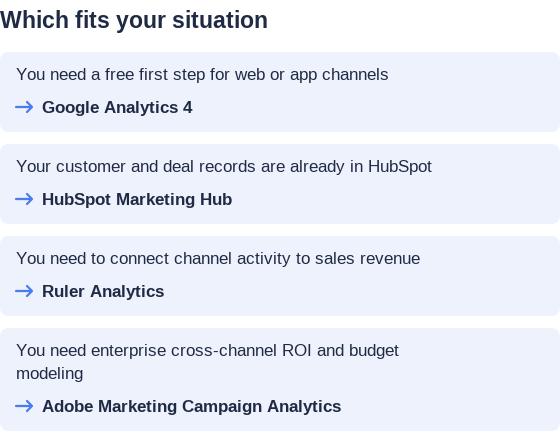
From the table above.
How this comparison was made
Prices and features come from each vendor’s published pages, checked in November 2026. The products were not tested hands-on.


