Which tools provide influencer-specific cohort retention metrics?
Compare influencer retention tools for customer cohorts and creator posting. Learn where Shopify, Adjust, Cruva, and Sprout Social fit.

For customer retention after influencer-driven acquisition, use Shopify or Adjust with influencer-level source tags; for creator posting retention, use Cruva or Sprout Social. The distinction matters: customer cohorts track whether buyers return, while creator cohorts track whether influencers keep publishing. Shopify and Adjust need campaign-level attribution to isolate individual influencers; Cruva and Sprout Social report creator activity directly.
At a glance
| Option | Best for | Starting price (paid plan) | Free plan | Influencer-specific cohort fit | Source |
|---|---|---|---|---|---|
| Cruva | TikTok Shop creator programs | $199/mo | No | Yes | cruva.com |
| Shopify Analytics | Store customer cohorts | $39/mo | No | Partial | shopify.com |
| Adjust | Mobile app user cohorts | Quote | Yes | Partial | adjust.com |
| Sprout Social Influencer Marketing | Creator posting retention | Quote | No | Yes | sproutsocial.com |
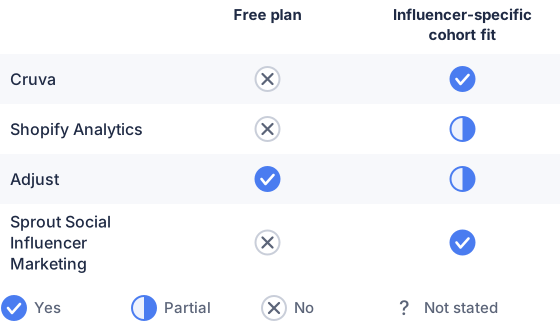
From the sourced table above, checked November 2026.
Prices were checked on November 20, 2026. Shopify’s $39/mo is its Basic plan’s monthly-billed price; Cruva’s $199/mo is its lowest paid plan, but its cohort-retention feature requires the $599/mo Scale plan. (shopify.com)
Cruva: best for TikTok Shop creator cohorts
Cruva is the most direct fit if “influencer retention” means whether creators continue posting after joining an affiliate program. Its retention analysis groups creators by an entry event, such as sample approval, sample delivery, or first video posted, then tracks posting activity over weekly or monthly periods. It also offers cohort metrics such as active creators, posts, and GMV, with filters including product and campaign. (app.cruva.com)
The limitation is plan access and scope: the vendor lists retention and cohort analysis on Scale, not Basic, and the product is built around affiliate and creator programs rather than customer repurchase cohorts. The published starting price is $199/mo, but that is not the price for the plan with cohort analysis; Scale is $599/mo as of November 20, 2026. (cruva.com)
Shopify Analytics: best for store customer cohorts
Shopify’s Customer cohort analysis report measures buyer retention and repeat purchases over time. You can filter cohorts using first-order attributes such as marketing channel and marketing type, then view retention rates, sales, and spending per customer. (help.shopify.com)
This can help compare customers from influencer marketing with customers from other acquisition sources, provided the first-order data is classified accordingly. The published documentation does not establish a native, individual-influencer cohort dimension, so Shopify is a partial fit when you need to compare specific creators rather than broad channels or tagged campaigns. Its Basic plan is $39/mo when billed monthly; Shopify does not list a free plan. (help.shopify.com)
Adjust: best for mobile app acquisition cohorts
Adjust’s cohort reports track app users over time after install or reattribution, including retention and lifetime value. Its documentation describes cohorts built around campaign activity, and its reporting supports segmentation by acquisition source and marketing channel. (help.adjust.com)
For influencer-specific measurement, each creator’s installs need to be distinguishable in the campaign or tracking data; the cohort feature itself does not make an influencer identity appear automatically. Adjust is aimed at app measurement, so it is a better fit for app installs and in-app behavior than retail orders in a web store. Its Base plan is free within published conversion limits; the pricing page directs buyers to contact Adjust for the paid Core plan price. (adjust.com)
Sprout Social Influencer Marketing: best for creator posting cohorts
Sprout Social offers a Retention component in custom influencer-marketing reports. It measures whether creators who posted in an initial period continue posting later, with weekly, monthly, quarterly, or custom intervals. You can also use different calculation modes to distinguish creators active in a given period from those who post continuously across periods. (influencersupport.sproutsocial.com)
This is creator retention, not retention of customers acquired by those creators. Sprout says the component uses creator posts, tracked profiles, brand mentions, and campaign keywords; the report can show which creators make up a cohort cell. Custom Reports are available in legacy plans and the new Advanced package, and the vendor says exact package pricing is provided through the account team, so the price is not published on the pricing page. (influencersupport.sproutsocial.com)
Which solutions provide influencer-specific cohort retention metrics?
Cruva and Sprout Social provide cohort retention metrics for creators’ continued posting. Shopify and Adjust provide customer or app-user retention cohorts that can be segmented by influencer only when the acquisition records preserve influencer-level campaign information. (app.cruva.com)
Before choosing, confirm which “retention” you need: customers returning to buy again, or creators posting again. For buyer retention, check that each influencer’s links, codes, or campaign tags flow into the first-order attribution data used to build cohorts. Shopify’s report uses first-order filters, while Adjust follows app users from install or reattribution; neither source describes an automatic per-influencer cohort without correctly labeled acquisition data. (help.shopify.com)
For creator retention, Cruva and Sprout Social both measure later creator activity, but their data and use cases differ. Cruva’s analysis is tied to creator-program milestones and activity metrics such as videos and GMV; Sprout’s report follows public posting behavior around tracked profiles, mentions, or keywords. Neither should be mistaken for a chart showing how many customers an influencer acquired who later returned. (app.cruva.com)
Which should you choose?
| Your situation | Best fit |
|---|---|
| You need to see whether TikTok Shop creators keep posting | Cruva |
| You want to compare repeat purchases by tagged marketing source | Shopify Analytics |
| You measure retention after influencer-driven app installs | Adjust |
| You need a posting-retention report for tracked creators | Sprout Social Influencer Marketing |
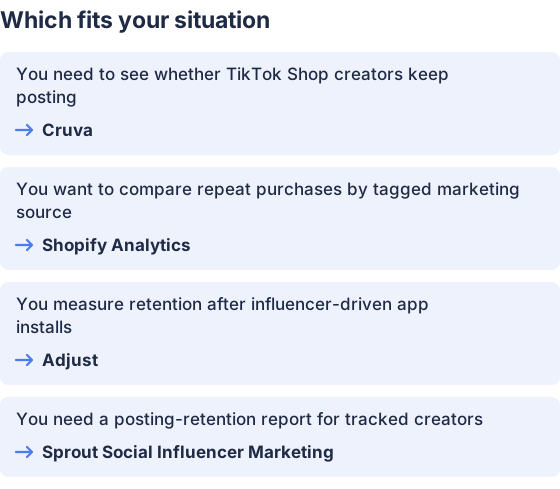
From the table above.
How this comparison was made
Prices and features come from each vendor’s published pages, checked in November 2026. The products were not tested hands-on.


