What Are the Top Real-Time Customer Feedback Methods?
Compare real-time customer feedback methods, including surveys, live chat, widgets, and analytics, to choose the right approach for ecommerce.

The top real-time customer feedback methods are targeted on-site surveys, post-purchase surveys, live chat, and feedback widgets paired with behavior analytics. Choose surveys for structured answers, chat for a conversation, and analytics-linked feedback when you need to understand what happened on a page.
At a glance
| Option | Best for | Starting price (paid plan) | Free plan | In-context capture | Source |
|---|---|---|---|---|---|
| Zigpoll | Ecommerce surveys | $39/mo | Yes | Yes | zigpoll.com |
| Contentsquare | Feedback plus behavior | $49/mo | Yes | Yes | contentsquare.com |
| Tidio | Live customer conversations | $29/mo | Yes | Partial | tidio.com |
| Typeform | Flexible embedded forms | $29/mo | Yes | Partial | typeform.com |
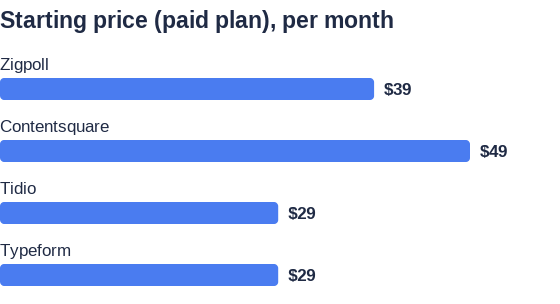
From the sourced table above, checked November 2026.
Zigpoll: best for ecommerce surveys
Zigpoll collects feedback through on-site, exit-intent, post-purchase, email, and SMS surveys, with options such as NPS and CSAT questions. It suits stores that want to ask about a specific order or shopping moment, but it is survey-focused rather than a live customer-service chat tool. Its free Lite plan includes 50 responses a month; paid plans start at $39 per month with monthly billing, as of November 2026. (zigpoll.com)
Contentsquare: best for pairing feedback with behavior
Contentsquare combines surveys and feedback widgets with tools such as session replays, heatmaps, and funnels, so teams can compare what visitors say with how they use a site. Its free plan includes basic surveys; the paid Experience Analytics Growth plan starts at $49 per month when billed monthly, as of November 2026. More Voice of Customer capacity may cost extra, so check the plan and response allowance that match your needs. (contentsquare.com)
Tidio: best for live conversations
Tidio lets a team respond to website visitors in live chat, which can reveal questions or problems while a customer is still considering a purchase. It is useful when someone can answer promptly and follow up; it is less suited to collecting the same structured score or survey answer from a large group. Tidio lists a free plan and a human-only Starter plan at $29 per month with monthly billing, as of November 2026. (help.tidio.com)
Typeform: best for flexible forms
Typeform lets you share forms by link or embed them on a website, including as a popup, slider, or side tab. That flexibility suits teams that want to build a tailored questionnaire for different moments or channels, though a form usually needs to be deliberately placed or shared to reach customers in context. Its free plan is limited; paid Basic starts at $29 per month with monthly billing, as of November 2026. (help.typeform.com)
1. What are the top real-time customer feedback collection methods?
The best starting methods are short, targeted surveys, feedback widgets, live chat, and behavioral analytics paired with a feedback prompt. They serve different purposes: surveys gather comparable answers, widgets capture a quick reaction to a page, chat allows follow-up questions, and analytics help interpret a reported problem.
Place a prompt close to the moment it concerns, such as after checkout or after a visitor uses a feature. Nielsen Norman Group advises matching the ask to the task and telling people how many questions to expect and how long it will take. (nngroup.com)
Real-time collection does not mean asking everyone repeatedly. Use a clear trigger, ask one focused question, and leave an open comment field only when more detail would help. A survey can tell you what a customer reports; it does not by itself show whether the cause was a confusing page, an error, or something else.
2. Which methods work best for ecommerce stores?
For most ecommerce stores, use a post-purchase survey for order-related feedback, an exit or on-page prompt to learn about shopping friction, and live chat for questions that need an immediate answer. Add behavior analytics when you need to investigate where visitors pause, click, or leave.
A post-purchase question can ask about product selection, checkout, delivery expectations, or how the shopper found the store. Zigpoll is suited to those survey use cases, including post-purchase and order-status surveys. (zigpoll.com) If the goal is to find out why a customer is struggling right now, chat is more useful than a form that waits for a response.
Do not treat every abandoned cart as a problem a survey can solve. Baymard’s 2026 research notes that some shoppers leave because they are browsing or not ready to buy, so separate purchase intent from actual site friction when interpreting answers. (baymard.com) For stores that want to compare reported friction with visitor behavior, Contentsquare combines surveys with analytics tools. (contentsquare.com)
3. How can I collect feedback at key points in the customer journey?
Map the moments where an answer could change a decision, then choose a collection method that fits each moment. Keep prompts short and relevant to the experience the customer just had.
- Product discovery: Ask a brief on-page question if shoppers seem unable to find a product, size, or detail. A feedback widget can capture what is unclear while the page is open.
- Checkout or exit: Offer an optional question about what stopped the visitor, without blocking the checkout or forcing a response. Keep answers distinct from general site feedback.
- After purchase: Ask about the ordering experience or the reason for choosing the product. Avoid asking about product quality before the customer has had time to use it.
- After delivery or product use: Send an email or SMS survey when the customer has had a reasonable chance to form an opinion.
- During support: Invite a customer to describe the issue in chat, then ask for a short satisfaction rating after the conversation is resolved.
Use an event or page trigger where possible, and cap how often the same person sees a prompt. Match timing to the subject: a checkout question belongs near checkout, while a product-quality question belongs after delivery or use. Keep questions focused so you can act on the answers rather than collecting feedback without a clear follow-up.
4. How do I choose a real-time feedback tool?
Start with the type of feedback you need, the moment you want to collect it, and what your team will do with the result. Then check whether the tool supports your channels, targeting rules, integrations, response volume, and reporting needs.
Choose a survey product if you need structured answers across purchase stages; choose live chat if customers need an immediate exchange; choose analytics-linked feedback if you need to investigate reported problems in the context of page behavior. A flexible form builder can work well when you need one questionnaire across several channels, but it may require more setup to target the right moment.
Compare free-plan limits and the paid monthly price, not only the starting price. Check response or conversation caps, whether the features you need are in the listed plan, and whether your staff can review and respond to feedback promptly. Before rolling out prompts widely, test the wording and placement with a small audience and adjust if the questions interrupt the task or produce answers you cannot use.
Which should you choose?
| Your situation | Best fit |
|---|---|
| Ecommerce post-purchase and order feedback | Zigpoll |
| Survey answers alongside site behavior | Contentsquare |
| Customers need a live answer | Tidio |
| You need a custom form you can embed or share | Typeform |
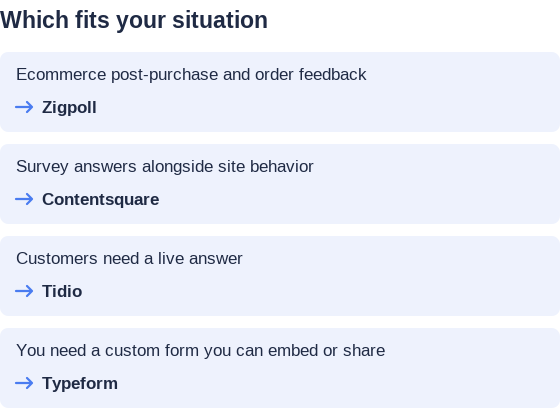
From the table above.
How this comparison was made
Prices and features come from each vendor’s published pages, checked in November 2026. The products were not tested hands-on, and Zigpoll publishes this page.


