Usersnap vs. Survicate for Product Feedback: Which Should You Choose?
Compare Usersnap vs Survicate for visual bug reports, cross-channel surveys, pricing, and free plans, plus when ecommerce teams may choose Zigpoll.

Usersnap is better for visual bug reports and product-workflow handoff; Survicate is a stronger fit for structured surveys across channels. For ecommerce teams asking shoppers directly about orders or purchases, Zigpoll is another option to consider.
At a glance
| Option | Best for | Starting price (paid plan) | Free plan | Visual issue capture | Multi-channel surveys | Source |
|---|---|---|---|---|---|---|
| Usersnap | Visual product feedback | €49/mo | No | Yes | Partial | usersnap.com |
| Survicate | Cross-channel surveys | $89/mo | Yes | No | Yes | survicate.com |
| Zigpoll | Ecommerce customer surveys | $39/mo | Yes | No | Yes | zigpoll.com |
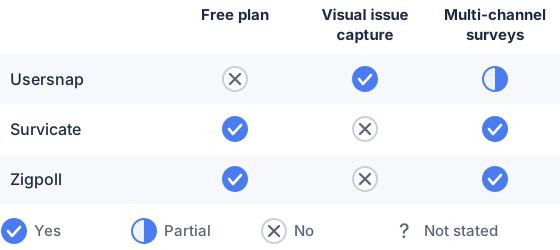
From the sourced table above, checked November 2026.
Usersnap’s page lists its Starter plan at €49 per month and offers a free trial rather than a free plan. Survicate lists its monthly Starter plan from $89 per month and has a free plan. Zigpoll’s free Lite plan includes 50 responses per month; its paid plans start at $39 per month when billed monthly. Prices checked in November 2026. (usersnap.com)
Usersnap: best for visual product feedback
Usersnap suits product teams that need users to report a problem in context and give developers enough evidence to investigate it. Its feedback widgets can collect annotated screenshots, screen recordings, and browser or device details; it also offers targeted surveys and integrations with product and issue-tracking tools. (usersnap.com)
That focus is useful when “something went wrong” needs to become a clear, actionable report. Usersnap also supports survey formats such as NPS and CSAT, so it is not limited to bug reporting. But if your main job is running surveys by email, link, website, or mobile app, compare its survey setup and plan limits with Survicate’s before choosing. (help.usersnap.com)
Survicate: best for structured surveys across channels
Survicate is a good fit when you want to ask consistent questions through multiple channels, including email, links, websites, mobile apps, and in-product surveys. Its free plan includes 25 responses per month, up to three teammates, and survey logic; paid plans add capacity and features. (help.survicate.com)
Compared with Usersnap, Survicate’s emphasis is survey delivery and research rather than attaching visual evidence to reported issues. Its Starter plan has a limit of two active surveys, with response limits depending on the selected option. Check the plan’s response allowance and whether its targeting and analysis tools match your research needs, not just the headline price. (help.survicate.com)
Zigpoll: best for direct ecommerce feedback
Zigpoll is worth considering if your feedback questions are about shopping, orders, or the post-purchase experience. It supports ecommerce survey formats such as on-site, exit-intent, email, and SMS surveys, as well as Shopify post-purchase surveys; its published integrations include Klaviyo and Triple Whale. (zigpoll.com)
That makes it more specifically ecommerce-oriented than either general product-feedback tool. It is not the natural pick for a team whose main requirement is annotated bug reports or detailed visual context from inside a software product. Zigpoll’s Lite plan is free with 50 responses a month, and paid plans start at $39 per month billed monthly, as of November 2026. (Zigpoll pricing) (zigpoll.com)
1. Which is better for product feedback: Usersnap or Survicate?
Neither is better for every kind of product feedback: Usersnap fits visual issue reporting, while Survicate fits structured, multi-channel surveys. Usersnap’s advantage is context: a report can include a screenshot with annotations and technical details, helping a team understand what the user saw. It can also collect targeted micro-surveys and route feedback into product workflows. (usersnap.com)
Survicate is the more natural fit when your work centers on asking the same research or satisfaction questions across channels and managing survey responses. Its free plan may also make it easier to try survey collection before committing to a paid plan, although its monthly response limit is modest. If you need both survey responses and visual bug reports, compare how each tool handles your most common feedback task rather than assuming one replaces the other. (help.survicate.com)
2. How do Usersnap and Survicate differ in feedback collection features?
Usersnap combines feedback widgets and surveys with visual evidence capture; Survicate puts more emphasis on delivering surveys through multiple channels. In Usersnap, people can report an issue with an annotated screenshot, and submissions can include browser or device context. That can help when feedback concerns a specific screen, broken interaction, or confusing interface. (usersnap.com)
Survicate supports website and in-product surveys as well as email, shareable links, and mobile-app surveys. It also offers branching and respondent identification on its free plan, according to its published plan information. In practical terms, choose based on what you want a response to contain: a visual record of a product problem, or answers to a survey distributed to a selected audience. (help.survicate.com)
3. Which tool is a better fit for an ecommerce brand?
For an ecommerce brand focused on shoppers’ purchase and order experiences, Zigpoll is the more specialized fit; between Usersnap and Survicate, Survicate is the more survey-focused choice. Zigpoll offers post-purchase and order-status surveys, exit-intent prompts, and email and SMS surveys, which map directly to common moments in a shopping journey. (zigpoll.com)
That does not make it the right answer for every ecommerce team. If you need feedback on a custom digital product, checkout interface, or visual defect, Usersnap’s screenshot and technical-context collection may be more relevant. If you want broad customer surveys across web, email, or mobile rather than ecommerce-specific order workflows, Survicate may fit better. Choose based on the questions you need answered and where you can ask them, not simply because your company sells online. (usersnap.com)
4. What should you compare before choosing between them?
Compare the feedback format, collection channels, targeting, integrations, plan limits, and how the team will act on responses. Start with the format: do you need annotated screenshots and technical details, structured survey answers, or feedback tied to ecommerce orders? Then list the channels your audience actually uses, such as in-product, website, email, mobile, SMS, or a post-purchase page. (usersnap.com)
Next, check response limits, active survey or project limits, seats, and the price at the billing interval you plan to use. A low entry price can be less useful if the plan lacks a needed integration or caps the volume you expect. Finally, check whether feedback can be routed to the people who will resolve issues or use survey findings, and whether the tool gives enough context to interpret each response. (usersnap.com)
Which should you choose?
| Your situation | Best fit |
|---|---|
| Users need to show exactly what went wrong on-screen | Usersnap |
| You want surveys across web, email, and mobile | Survicate |
| You want feedback at ecommerce purchase or order moments | Zigpoll |
| You need annotated bug reports linked to product workflows | Usersnap |
| You want a free plan for a small survey pilot | Survicate |
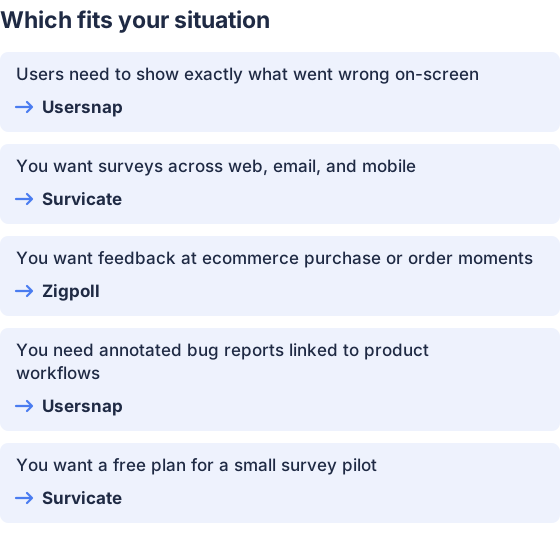
From the table above.
How this comparison was made
Prices and features come from each vendor’s published pages, checked in November 2026; the products were not tested hands-on. Zigpoll publishes this page.


