What UX Research Software Works Best for Collaborative Teams?
Maze vs Condens vs Lyssna vs UserTesting: Compare UX research collaboration, testing methods, pricing, and free plans.

Maze best fits product teams that want to test prototypes and discuss findings together; Condens suits teams synthesizing interviews into a shared research library. Lyssna offers accessible testing with a modest free tier, while UserTesting is built for organizations that need enterprise-scale research and participant access.
At a glance
| Option | Best for | Starting price (paid plan) | Free plan | In-product collaboration | Source |
|---|---|---|---|---|---|
| Maze | Prototype testing and team feedback | Quote | Yes | Yes | maze.co |
| Condens | Collaborative research analysis | €15/mo | No | Yes | condens.io |
| Lyssna | Small teams running quick tests | $199/mo | Yes | Partial | lyssna.com |
| UserTesting | Enterprise research programs | Quote | No | Yes | usertesting.com |
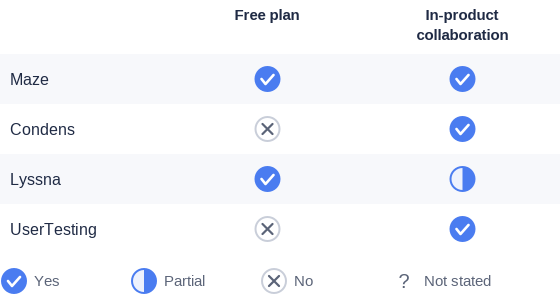
From the sourced table above, checked November 2026.
Maze: best for product teams testing and reviewing together
Maze brings prototype and usability testing, study reports, and team discussion into one workflow. Teammates can comment on report sections, reply to one another, and discuss findings in context; reports can also be shared with stakeholders. Its free plan includes five seats and one study a month, while the pricing page lists the enterprise plan as custom-priced, rather than publishing a fixed paid monthly price. (help.maze.co)
The trade-off is that the free plan limits research volume, and participant-panel recruitment is pay-per-use. Maze is strongest when collaboration means getting a study reviewed and making findings easier to discuss; it is less suited to teams mainly seeking a long-term home for transcripts and insights from many different research projects. See Maze’s collaboration features and pricing. (maze.co)
Condens: best for shared analysis and a research library
Condens centers on analyzing and organizing research: its listed features include transcription, tagging, clips, whiteboards, comments, mentions, and real-time collaboration. Teams can build a searchable collection of findings and share selected results with stakeholders. The Lite plan starts at €15 per month and includes one contributor; an extra contributor costs €15 per month. (condens.io)
That low entry price has an important limit for collaborative teams: Lite gives only one contributor a seat, so multiple researchers add to the bill. Business includes five contributors and unlimited viewers, but is listed at €500 per month paid yearly. Condens offers a 15-day trial, not a continuing free plan. Choose it when shared synthesis and preserving research knowledge matter more than running lots of different study formats in one testing tool. See Condens pricing. (condens.io)
Lyssna: best for small teams running quick studies
Lyssna combines common design-research methods, including prototype tests, card sorts, tree tests, and first-click tests. Its free plan has three seats and includes Spaces for organizing studies; the Growth plan includes five seats, role-based permissions, and unlimited self-recruited responses. For teams, that makes it a practical way to run studies and share work without beginning with an enterprise contract. (lyssna.com)
As of November 2026, Growth’s monthly-billed price is $199 per month; the lower displayed $166 monthly equivalent is for annual billing. The free tier limits self-recruited responses that can be viewed to 15, and Growth includes five seats, so larger groups may need another arrangement. Participant-panel responses cost extra on either plan. Lyssna fits teams that want to conduct tests together, but it is less focused than Condens on building a broad repository of insights. See Lyssna’s pricing and plan details. (lyssna.com)
UserTesting: best for enterprise research at scale
UserTesting offers moderated conversations and unmoderated tests, and its plans include research and collaboration features such as workspaces and integrations with tools including Slack, Teams, Jira, Figma, FigJam, and Miro. Its test-based plan allows unlimited users across an enterprise, which can help when many teams need access without paying for each additional seat. The Ultimate tier adds features including AI-powered analysis, an Insights Hub, card sorting, and tree testing. (usertesting.com)
The cost and fit are harder to assess before speaking with sales: UserTesting asks prospective customers to request pricing, and does not list a free plan. Feature access also varies by plan, so teams should confirm which methods and integrations are included in the quote. It makes the most sense for organizations that need a broader research program, participant panel, and enterprise controls, rather than a small team seeking an inexpensive collaborative workspace. See UserTesting’s plans. (usertesting.com)
What UX research software works best for collaborative teams?
Maze is a strong fit when product and design teammates want to test prototypes and discuss reports in the same tool. Condens is better for teams that need to analyze interviews together and make findings reusable across projects; Lyssna suits smaller groups running frequent, focused tests. UserTesting fits larger organizations that want enterprise-scale research, but its pricing is custom and capabilities vary by plan. (maze.co)
The choice turns on what “collaborative” means for your team: co-running tests, commenting on results, jointly analyzing qualitative material, or making insights available across an organization. Compare seat limits and paid-plan requirements with the research work you actually do. For example, Condens Lite’s listed price covers one contributor, while Lyssna Growth includes five; UserTesting does not publish a fixed price on its plans page. (condens.io)
Which should you choose?
| Your situation | Best fit |
|---|---|
| We need comments on prototype-test results | Maze |
| We analyze interview recordings together | Condens |
| We are a small team running quick studies | Lyssna |
| Many teams need enterprise research access | UserTesting |
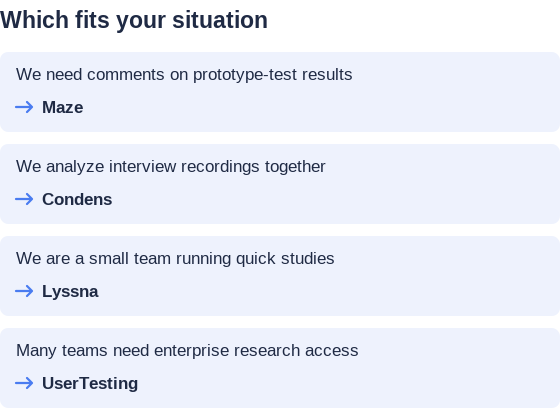
From the table above.
How this comparison was made
Prices and features come from each vendor’s published product and pricing pages, checked in November 2026. The products were not tested hands-on.


