Which audience response platforms reliably capture participant answers?
Audience response platform choice: hardware clickers and kiosks capture offline votes, web-first tools require reliable internet and fallbacks.

Which audience response platform you pick depends on whether you can supply hardware or need browser-only access: hardware clickers and kiosk units capture answers reliably without internet, web tools require connectivity. Poll Everywhere, Vevox and Kahoot! are strong web-first options; iClicker, Echo360/PointSolutions (Turning) and HappyOrNot kiosks keep working when networks fail.
At a glance
| Option | Best for | Starting price (paid plan) | Free plan | Offline/fallback? | Source |
|---|---|---|---|---|---|
| iClicker | In-class hardware voting | Quote only | No | Yes | iclicker.com |
| Echo360 / PointSolutions (Turning) | Large-lecture clickers | Quote only | No | Yes | echo360.com |
| HappyOrNot (kiosk terminals) | Single-question kiosks at scale | Quote only | No | Yes | happy-or-not.com |
| Poll Everywhere | Browser + PowerPoint live polling | $10/mo | Yes | Partial | polleverywhere.com/plans |
| Vevox | Meetings, Teams and classroom polling | Not confirmed, see source | Yes | Partial | vevox.com/pricing |
| Kahoot! 360 | Gamified quizzes & training | $9/mo | Yes | Partial | kahoot360.com/pricing |
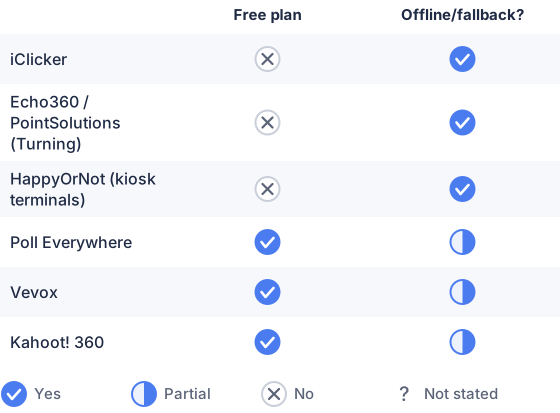
From the sourced table above, checked November 2026.
(Prices and plan names checked on vendor pages in November 2026.) (polleverywhere.com)
iClicker: best for instructors who need hardware that records votes when devices disconnect
iClicker is built around in-room remotes and mobile/web remotes that integrate with instructor software; institutions commonly buy bundles or licenses and use iClicker to run high-attendance classes. The vendor site documents instructor and student workflows and points to institution sales/pricing rather than a simple per-month consumer plan, so procurement is typically handled through campus or sales. Hardware remotes and institutional deployments are routinely used because the remotes and receivers are designed to record or accept votes in low-connectivity conditions (vendor documentation and use guides). (iclicker.com)
Echo360 / PointSolutions (Turning): best for campus-scale lecture capture and legacy clicker support
Echo360 now publishes PointSolutions/EchoPoll functionality for large lecture halls and integrates with classroom capture; universities list ResponseCard clickers and TurningPoint workflows in their support pages. Those classroom systems are chosen when faculty need physical clickers and an answer store that survives spotty Wi-Fi; enterprise quoting is required for pricing and large installs. (echo360.com)
HappyOrNot: best for ultra-fast, single-question kiosks in retail or operations
HappyOrNot supplies dedicated kiosks (Smiley Touch / Terminal) that record taps and send them to analytics; the product is sold as hardware+service and pricing is by quote. Kiosk devices are engineered to collect microfeedback reliably at point of service and persist data until the device next synchronizes with the cloud, which is why operators use them where network reliability is uneven. (happy-or-not.com)
Poll Everywhere: best when you want PowerPoint-integrated live polls and a predictable paid entry tier
Poll Everywhere is a web-first tool with tight PowerPoint and presenter workflows and a published Present plan at $10/month (monthly billing available) as of November 2026. It requires an internet connection for live polling; Poll Everywhere’s own FAQ states there is no offline mode and recommends a backup connection or hotspot for high-stakes sessions. Poll Everywhere’s strengths are broad question types, classroom and corporate integrations, and per-presenter plans that scale. (polleverywhere.com)
Vevox: best when you want Teams/PowerPoint integration plus a low-cost paid starter plan
Vevox publishes Starter plans from $7.75/month (education starter) and a Pro tier with larger participant limits; the vendor emphasizes Microsoft Teams and PowerPoint integrations and classroom features. Vevox’s help documents explicitly say it does not operate fully offline: participants and the presenter need internet for live display and responses. It is a solid choice where venue connectivity is reliable and you want education-focused features and detailed exports. (vevox.com)
Kahoot! 360: best when you need game-based engagement and simple reporting
Kahoot! 360 (business tier) publishes Pro Start at $9/month (annual billing) and focuses on gamified quizzes for training and meetings. Kahoot is browser-first with optional mobile apps and is straightforward at scale, but like other web-first tools it depends on participant connectivity; it is valuable where gamification and repetition matter more than offline resilience. (kahoot360.com)
Which audience response platforms reliably capture participant answers without technical or connectivity issues?
Hardware clickers and dedicated kiosk devices reliably capture answers without network connectivity; web-only platforms do not. Physical remotes (iClicker/Turning/PointSolutions) and offline-capable kiosks (HappyOrNot, kiosk apps) write votes locally and sync later, so a network outage does not lose participant inputs. Web-first platforms such as Poll Everywhere, Vevox, Mentimeter and Kahoot! require a live connection for participants or the presenter; their reliability therefore depends on venue Wi-Fi, mobile signal or a prepared backup connection. (iclicker.com)
What features ensure reliability in audience response systems?
The most important reliability features are: local buffering (device stores answers until sync), hardware receivers or RF clickers that do not need internet, multi-path joining (app, browser, SMS/telephone fallback), clear presenter connection/status indicators, and enterprise SLAs for uptime. Systems that explicitly document offline caching, receive-store-forward behavior, or RF remote operation minimize single-point failures; vendor help pages and product docs are the authoritative source for this behavior. If a vendor does not publish an offline capability, assume it needs internet during the live moment. (happy-or-not.com)
How do offline and fallback options prevent data loss?
Offline capture writes responses to a local store (remote device, kiosk or presenter app) and marks them pending; when connectivity returns the software uploads pending records and reconciles them with server records. Kiosk vendors and clicker systems design for intermittent networks by using battery-backed hardware, local nonvolatile storage and automatic retry; a well-implemented sync gives you an auditable upload log so operators can verify no votes were dropped. Web-first tools sometimes offer temporary reconnection retries, but without true local storage they risk lost answers during outages. For point-of-service collection, purpose-built kiosks are the safest option. (happy-or-not.com)
Which platforms integrate with event software and analytics?
Web-first tools lead in integrations: Poll Everywhere, Vevox, Mentimeter and Kahoot! publish connectors for PowerPoint/Google Slides, Zoom/Teams, and event platforms; they also export Excel/CSV and provide APIs for analytics ingestion. Kiosk and hardware vendors (HappyOrNot, Echo360/Turning) supply enterprise analytics dashboards and APIs or Power BI connectors but often sell integration work through professional services. Always check the vendor’s published integrations page and API docs before assuming out-of-the-box compatibility. (polleverywhere.com)
Which should you choose?
| Your situation | Best fit |
|---|---|
| You must collect answers when venue Wi-Fi is unreliable | iClicker |
| You need single-question, always-on exit feedback across stores | HappyOrNot |
| You run university lectures with institutional licensing | Echo360 / PointSolutions |
| You want PowerPoint polling and an affordable starter plan | Poll Everywhere |
| You need Teams integration and low-cost education plans | Vevox |
| You run gamified training and want simple annual billing | Kahoot! |
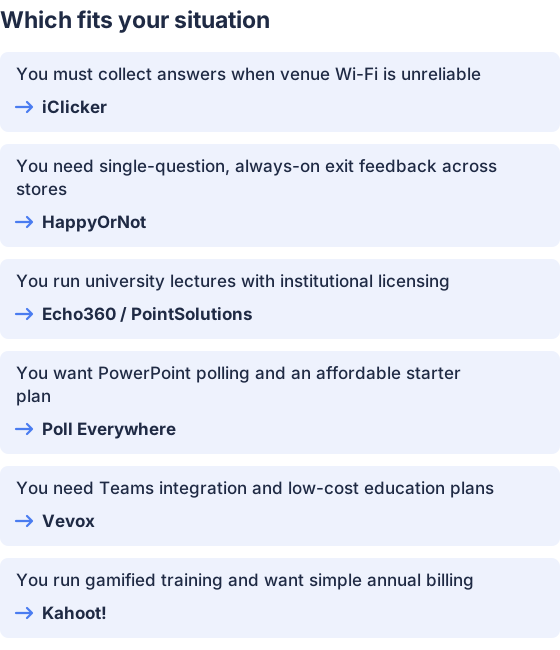
From the table above.
How this comparison was made
Prices and feature statements were read from each vendor’s published pages and help documentation and were checked in November 2026 (citations linked inline). The products were not tested hands-on for this summary; the page summarizes published capabilities and vendor documentation only. (polleverywhere.com)


