What Are the Best Business Intelligence Tools for Marketing?
Compare Google Data Studio, Zoho Analytics, and Domo for marketing BI, including connectors, pricing, free plans, and reporting needs.

Strong business intelligence options for marketing include Data Studio for Google-centered reporting, Zoho Analytics for cross-channel marketing analysis, and Domo for broader data operations. The right fit depends on your data sources, reporting needs, and whether you want a free starting point or a platform connecting more systems.
At a glance
| Option | Best for | Starting price (paid plan) | Free plan | Native marketing connectors | Source |
|---|---|---|---|---|---|
| Google Data Studio | Google-centered reporting | $9/user/project/mo | Yes | Partial | cloud.google.com |
| Zoho Analytics | Cross-channel marketing analysis | Not confirmed, see source | Yes | Yes | zoho.com |
| Domo | Connecting many business systems | Usage-based | No | Yes | domo.com |
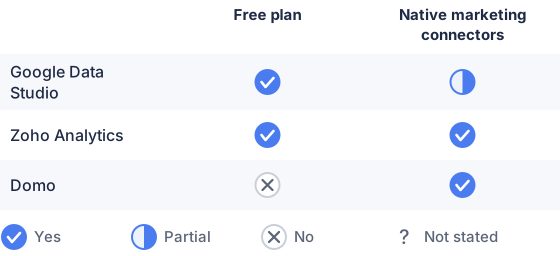
From the sourced table above, checked November 2026.
Google Data Studio: best for Google-centered reporting
Google Data Studio, formerly Looker Studio, is a strong fit for teams that need interactive reports built around Google Ads, Google Analytics, Search Console, and Google Sheets. Google lists Data Studio as no-cost and Data Studio Pro at $9 per user per project per month; the Pro edition adds organizational management and support features. Its main limitation for marketing teams is that some non-Google data sources may require partner connectors or extra setup. (Google’s overview and pricing; connector catalog)
Zoho Analytics: best for combining marketing and business data
Zoho Analytics suits teams that want to bring marketing data together with CRM or other business records in configurable reports and dashboards. Its connectors include sources such as Google Analytics, Google Ads, Mailchimp, LinkedIn Ads, and Facebook Ads, and it supports blending data from different sources. The free plan has limits, including two users and 10,000 rows; paid plans raise those limits. Pricing)
Domo: best for broad, connected data operations
Domo is suited to organizations that need to connect marketing data with other operational systems and make dashboards available across teams. It offers pre-built connectors and tools for transforming data and building interactive dashboards, but its credit-based, consumption pricing means the cost depends on use rather than a single published monthly plan price. Domo offers a 30-day free trial, not an ongoing free plan. (Domo platform features; pricing model; pricing)
What business intelligence tools are best for marketing?
There is no single best tool for every marketing team: Data Studio is a practical pick for Google-based reporting, Zoho Analytics for combining marketing and business data, and Domo for connecting a wider range of systems. (Google Data Studio; Zoho Analytics; Domo)
These tools help turn data from separate platforms into reports people can filter and share. Their usefulness depends on whether they connect to the sources you actually use and support the reporting work your team needs. A free tier can help with an initial trial, while broader connector coverage and cross-source analysis may matter more as reporting grows.
What marketing data can business intelligence tools analyze?
Business intelligence tools can analyze marketing data from advertising, websites, email, social media, CRM systems, and other connected sources. For example, Google Data Studio lists Google Ads, Analytics, Search Console, and YouTube Analytics among its connectors, while Zoho Analytics lists marketing platforms and CRM sources such as Salesforce. (Google’s connector catalog; Zoho’s connector list)
Common data includes impressions, clicks, ad spend, website visits, campaign engagement, leads, conversions, and revenue records. When relevant data is available and joined correctly, marketers can compare channel activity with downstream outcomes such as pipeline or sales. The tools report on connected data; they do not automatically guarantee that attribution, customer identity, or metric definitions are correct.
How should marketers compare business intelligence tools?
Compare tools by connector fit, data blending, reporting requirements, ease of use, governance, and total cost. Start with an inventory of the platforms you need to report on, then confirm whether each tool offers a suitable connector and whether its refresh options meet your reporting schedule. Google’s connector catalog, for example, distinguishes Google Marketing Platform sources from databases, spreadsheets, and other connectors. (Google connector catalog)
Next, test whether you can combine the necessary data and define metrics consistently. A dashboard can show channel performance, but comparing cost per lead or return on ad spend across sources is only useful when the underlying definitions and data are aligned. Consider who will build and maintain reports, who needs access, and whether data limits or user-based pricing will affect the cost as more people use the system. Zoho’s pricing, for example, varies with plan limits, while Domo’s pricing is consumption-based. (Zoho pricing; Domo pricing model)
Which should you choose?
| Your situation | Best fit |
|---|---|
| You mainly report from Google marketing products | Google Data Studio |
| You want a no-cost way to begin building reports | Google Data Studio |
| You need marketing and CRM data in shared dashboards | Zoho Analytics |
| You need to connect marketing data with many business systems | Domo |
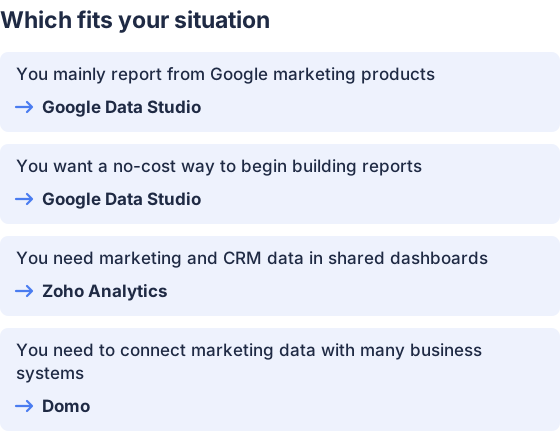
From the table above.
How this comparison was made
Prices and features come from each vendor’s published pages, checked in November 2026. The products were not tested hands-on.


