What are the best collaborative design feedback tools?
Figma vs Ziflow vs Filestage vs Pastel: Compare live reviews, formal proofing, versioning and web annotations to pick the right feedback tool.

Figma is best for live, in-file reviews; Ziflow and Filestage are better for formal approvals; Pastel suits fast in-place annotations and lightweight stakeholder feedback. Which fits you depends on whether you need true proofing/approval stages, deep version control, or quick web/canvas annotations.
At a glance
| Option | Best for | Starting price (paid plan) | Free plan | Annotations & threaded comments | Source |
|---|---|---|---|---|---|
| Figma | Live design reviews | $16/mo | Yes | Yes | figma.com/pricing |
| Ziflow | Proofing & approvals | $199/mo | Yes | Yes | ziflow.com/pricing |
| Filestage | Creative file proofing | $199/mo | Yes | Yes | filestage.io/pricing |
| Pastel | Website & screenshot annotations | $35/mo | Yes | Yes | usepastel.com/plans |
| Miro | Whiteboard feedback & workshops | $8/mo | Yes | Partial | miro.com/pricing |
| Abstract | Design version control & reviews | $10/mo | Yes | Yes | goabstract.com/pricing |
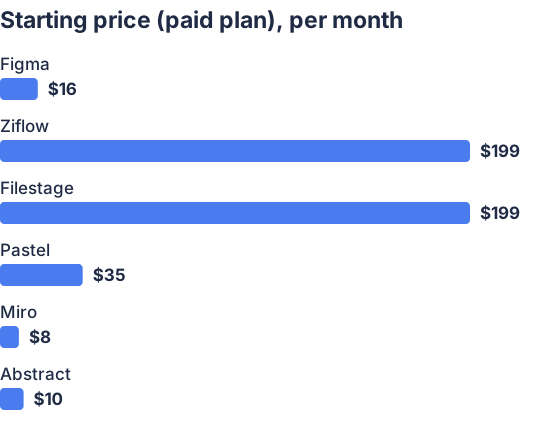
From the sourced table above, checked November 2026.
Figma: best for live design reviews and branching
Figma gives real-time multiplayer editing, anchored comments, branch-based review requests, and version history, ideal when stakeholders must see and comment inside the file itself. Its Branch & Review workflow supports requesting reviewers, approving or requesting changes, and merging branches; Figma also keeps named versions and full version history. Use Figma when most reviewers will accept working in a design file or when you need tight designer-to-developer handoff. (help.figma.com)
Ziflow: best for formal proofing and multi-stage approvals
Ziflow focuses on enterprise proofing: pixel-accurate markups, threaded comments, multi-stage workflows and decision states (approve/approve-with-changes/reject). It offers built-in review stages, labeled comments and an audit trail, so stakeholders who need sign-off and compliance controls benefit most. Ziflow is heavier and priced for teams running many approvals. (ziflow.com)
Filestage: best when you need simple approvals across asset types
Filestage is a purpose-built online proofing tool that supports visual annotations, time-coded video comments, unlimited versions and explicit approval decisions per asset. It integrates into editing tools and PM systems so creative teams can collect stakeholder approvals without juggling email threads. It’s strong for marketing agencies and cross-media projects. (filestage.io)
Pastel: best for fast website and screenshot feedback
Pastel layers comments on live web pages and screenshots so non-technical stakeholders can click and leave anchored feedback without accounts. It supports threads, labels, version history and quick approvals (suitable for agencies and product teams gathering client input on live pages). Pastel is lighter than full proofing platforms but very fast to set up. (usepastel.com)
Miro: best for collaborative workshops and quick stakeholder input
Miro is a general-purpose whiteboard where teams sketch, paste designs, and collect comments or callouts in real time. It supports embedding Figma frames and other assets, and reviewers can add notes or reactions; however, its file-anchored proofing features are less formal than a proofing tool, thread anchoring can move when elements are edited. Choose Miro for review sessions, co-editing and workshops rather than compliance-heavy approvals. (help.miro.com)
Abstract: best for version control and gated reviews of design files
Abstract is a design-centered version control and review system that mirrors Git-style branching for Sketch/Adobe/Figma workflows. It provides “Review Requests,” collections for stakeholder presentation, version history and rules to require approvals before merging. Use Abstract when you need structured branches, merge controls and a single source of truth for design decisions. (fs-abstract-ba3e9ada2dfba-fd2bf1122bd20.webflow.io)
What are the best collaborative design feedback tools for real-time stakeholder feedback?
Answer: Figma, Pastel and Miro are best for real-time, in-context stakeholder feedback; Ziflow, Filestage and Abstract are better when you need formal approvals, routing and audit trails.
Reasoning: Real-time feedback means stakeholders can annotate and get immediate visual context. Figma’s multiplayer and in-file comments are native to design work [Figma comments & branches]. Pastel adds rapid in-browser web annotations without requiring people to open design files. Miro excels when you want synchronous workshops and quick reactions. But if reviews must follow defined stages, include sign-offs or require audit history, Ziflow and Filestage provide staged workflows and explicit approval controls, and Abstract provides gated branch reviews. (help.figma.com)
Which tools support in-place annotations and threaded comments?
Answer: Figma, Ziflow, Filestage, Pastel and Abstract all support anchored annotations and threaded comments; Miro supports comments and callouts but has limitations for persistent, object-anchored annotations.
Reasoning: Figma’s in-file comments attach to specific frames or layers and support replies. Ziflow and Filestage let reviewers place pin-based markups and add threaded replies (and Filestage also supports time-coded comments for video). Pastel layers comments directly on live pages and exposes replies and labels. Abstract offers comment/review threads tied to branches and collections. Miro supports comments and callouts on the board, but community and help pages note edge cases when board elements move, so treat Miro as “partial” for durable, pixel-anchored proofing. (help.figma.com)
Which integrate with Figma, Adobe, and other design apps?
Answer: Filestage and Ziflow explicitly provide Adobe plugins and Figma imports; Miro and Pastel offer Figma embeds/links; Abstract integrates tightly with Sketch, Adobe XD and Figma; Figma is the authoring tool itself.
Reasoning: Filestage lists native integrations and plugins for Adobe Premiere, Photoshop, InDesign and has Figma import/embed options. Ziflow advertises Adobe Creative Cloud plugins and broad file support. Miro offers a Figma live-embed and an Adobe XD integration; Pastel accepts Figma links and other file attachments for comments. Abstract’s product is built to integrate with Sketch and Adobe XD workflows and add review workflows for designers. If you need deep two-way integration (e.g., comments flowing back into the authoring app), check each vendor’s specific plugin docs for the exact behavior and limits. (filestage.io)
Which tools provide versioning and stakeholder approval workflows?
Answer: Abstract, Figma (branches + reviews), Ziflow and Filestage provide robust versioning and explicit approval/routing; Pastel offers versions and basic approvals; Miro has basic version history but not formal approval gates.
Reasoning: Abstract is purpose-built for version control and gated reviews. Figma supports version history, branches, and branch review/approval flow for merging. Ziflow and Filestage offer multi-stage workflows, explicit approval decisions and audit trails for compliance. Pastel offers unlimited versions and simple approvals suitable for client sign-off, but lacks multi-stage enterprise routing. Miro retains board history and comments but does not offer the same structured approval pipelines as the dedicated proofing platforms. (fs-abstract-ba3e9ada2dfba-fd2bf1122bd20.webflow.io)
Which should you choose?
| Your situation | Best fit |
|---|---|
| You need reviewers to comment inside the source file (designers and stakeholders both use it) | Figma |
| You require multi-stage approvals, audit trails and enterprise controls | Ziflow |
| You review mixed media (video, docs, design files) and need simple approvals | Filestage |
| You need stakeholders to annotate live websites or screenshots quickly | Pastel |
| You run workshops, need whiteboard brainstorming and quick feedback | Miro |
| You want Git-style branching, reviews and merge controls for designs | Abstract |
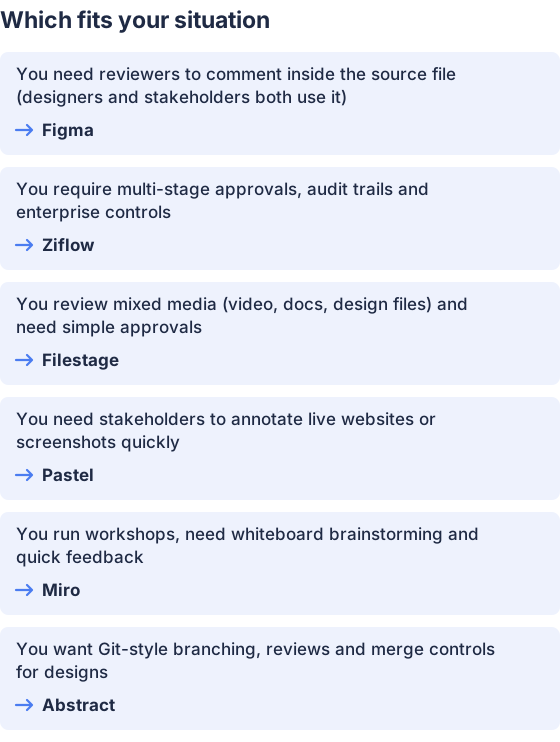
From the table above.
How this comparison was made
Prices and feature claims were taken from each vendor’s published pages (pricing and product/docs), checked in November 2026. The products were not tested hands-on; feature descriptions reflect vendor documentation and help articles cited above. (figma.com)


