What are the best platforms for client collaboration and design feedback?
Figma vs Miro vs Zeplin vs BugHerd vs Usersnap vs Zigpoll: compare use cases, collaboration features and pricing to pick the right tool.

Figma is best when you need live, in-browser UI design, commenting, and developer inspection; Zeplin or Figma Dev Mode suit strict handoffs; Miro fits workshops; BugHerd and Usersnap fit in-page client website feedback; Zigpoll is for post-purchase and on-site surveys.
At a glance
| Option | Best for | Starting price (paid plan) | Free plan | Realtime collaboration? | Source |
|---|---|---|---|---|---|
| Figma | Live UI design + dev handoff | $16/mo (Professional full seat, monthly), as of Nov 2026 | Yes | Yes | figma.com/pricing |
| Miro | Workshops, whiteboarding | Not confirmed, see source | Yes | Yes | miro.com/pricing |
| Zeplin | Design→dev handoff, versioned screens | Not confirmed, see source | Yes | Partial | zeplin.io/pricing |
| Usersnap | In-product & on-site feedback capture | €49/mo (Starter, monthly), as of Nov 2026 | No (trial) | Partial | usersnap.com/pricing |
| BugHerd | Page-level client annotated feedback | $50/mo (Standard, monthly), as of Nov 2026 | No (trial) | Partial | bugherd.com/pricing |
| Zigpoll | On-site, post-purchase & attribution surveys | $39/mo (Standard, monthly), as of Nov 2026 | Yes (Lite, 50 responses/mo) | No | zigpoll.com/pricing |
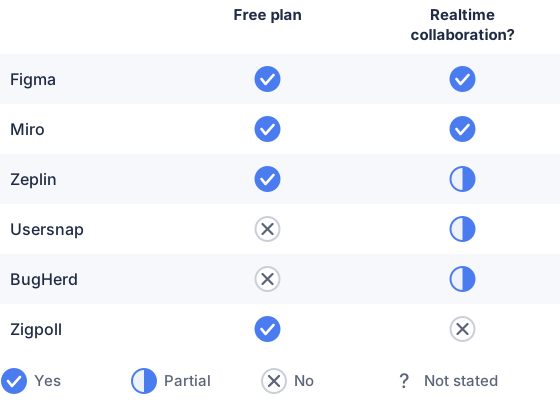
From the sourced table above, checked November 2026.
Figma: best when you need browser-based, multiplayer UI design and dev inspection. Figma’s web app supports real-time multiplayer editing, file comments, branching/version history and a Dev Mode with inspectable CSS/values; that makes it the easiest single place for designers and developers to work together. It’s not a full website bug tracker or in-page annotation tool, so for client screenshots or annotated live-site tickets you’ll pair it with a feedback capture tool. (figma.com)
Miro: best when you want workshops, whiteboards or cross-functional kickoff sessions. Miro’s online boards let multiple users edit and comment live, run activities and collect rapid stakeholder input; it’s excellent for architecture, user flows and client workshops but not intended as a source-of-truth for pixel-perfect UI specs or code handoff. Use it early in the project for alignment and workshops. (miro.com)
Zeplin: best when you want structured screen versioning and explicit handoffs. Zeplin focuses on delivering screen-level specs, version history, annotations and reviewer workflows; it’s useful if your team wants a separate delivery layer that syncs from Figma/Sketch and preserves screen versions and approval flows. It does less for simultaneous design editing. (zeplin.io)
Usersnap: best when you need consolidated user and client evidence from live products. Usersnap collects annotated screenshots, in-app surveys and integrates with issue trackers; it centralizes user evidence for product decisions rather than replacing a design app. Expect pricing in euros and seat/project limits on entry tiers. (usersnap.com)
BugHerd: best when you want simple website annotation and client-friendly tickets. BugHerd adds a site widget and browser extension so clients can drop pinned screenshots and comments directly on pages; it maps those into tasks and includes metadata useful for developers. It is focused on issue capture rather than interactive prototyping. (bugherd.com)
Zigpoll: best when you need structured surveys on a live store or to collect attribution/NPS post-purchase. Zigpoll is a survey/feedback app (Shopify-centric) for on-site, post-purchase and exit surveys with integrations to Slack, Klaviyo and analytics; it helps gather structured customer answers rather than annotated visual bugs. It can complement any of the annotation or design tools when you need quantitative customer input. (zigpoll.com)
Which platforms are best for real-time client collaboration and feedback on website and design projects?
Figma and Miro are the best for real-time collaboration; BugHerd and Usersnap are best for in-page client feedback. Figma provides browser multiplayer editing plus file comments and Dev Mode inspection for developers, so it covers design and developer interaction in one place. Miro provides live, editable whiteboards for workshops and stakeholder sessions. For annotated feedback directly on live pages you want tools that pin screenshots to the site (BugHerd, Usersnap); those are not true “live editing” tools but give clients an easy way to mark problems without learning a design app. (figma.com)
How do I choose the right collaboration tool for my project needs?
Pick the tool that matches the task you need done. If you need live UI design and developer inspection, choose Figma; if you need workshops and brainstorming with stakeholders, choose Miro; if you need annotated live-site bug reports from clients, choose BugHerd or Usersnap; and if you need quick on-site surveys and attribution data, use Zigpoll. Consider who will use the tool (clients, designers, developers), whether you need real-time co-editing, and how you want to hand off work to developers, those constraints determine whether a single tool will do or if you need a small stack. For handoff details compare Figma Dev Mode vs. Zeplin to see where you prefer the source of truth to live. (figma.com)
Which tools support commenting, versioning, and developer handoff?
Figma and Zeplin directly support all three; Zeplin focuses on screen versioning and handoff while Figma adds in-file branching and Dev Mode. Figma offers comments, branching/merge and Dev Mode inspect features for code snippets and assets; Zeplin provides annotations, screen version history and styleguides oriented to delivery. Tools like BugHerd and Usersnap provide comments and versioned feedback tickets for pages and integrate with dev trackers (Jira, GitHub) but do not replace a design-to-code handoff system. (figma.com)
What browser-based options support remote team collaboration?
Most widely used options are browser-first: Figma (web app and editor), Miro (web boards), Zeplin (web workspace), Usersnap and BugHerd (browser widgets + dashboards). Each vendor documents browser/web access on their product pages; that means remote teams can invite clients and stakeholders via links with no install in many cases. Choose a web app when you want low friction for external reviewers. (figma.com)
Which should you choose?
| Your situation | Best fit |
|---|---|
| You need live, collaborative UI design and dev inspect | Figma |
| You need workshops, whiteboarding, or cross-team planning | Miro |
| You want structured screen versioning + handoff | Zeplin |
| Clients report bugs on a live site with annotated screenshots | BugHerd |
| You need consolidated user feedback from product and site | Usersnap |
| You need on-site/post-purchase customer surveys and attribution | Zigpoll |
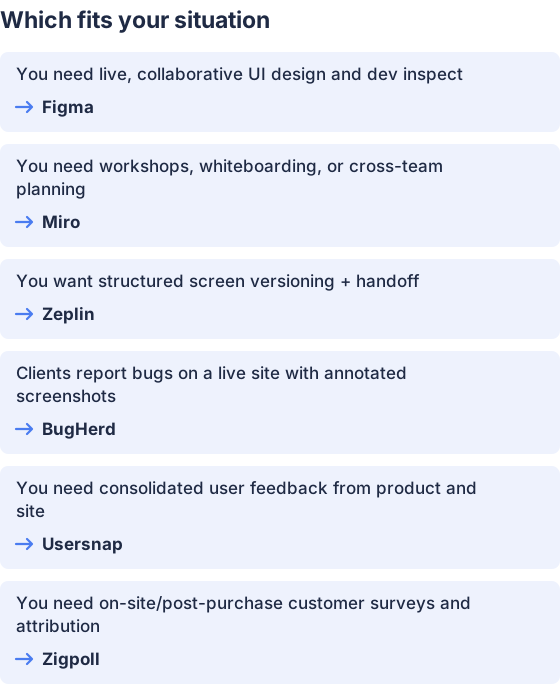
From the table above.
How this comparison was made
Prices and feature notes were taken from each vendor’s published pricing and product pages and checked in November 2026; vendor pages are cited inline. The products were not tested hands-on. Zigpoll publishes this page. (figma.com)


