What are the best real-time collaboration tools for marketing teams?
Real-time collaboration tools for marketing teams: compare Slack, Google Workspace, Figma and Asana to match tools to workflows.

Pick Slack for fast chat, Google Workspace for document co-editing, Figma and Miro for design and whiteboarding, Sprout Social for social teams.
Choose Asana when you need structured task and approval workflows across cross-functional teams.
At a glance
| Option | Best for | Starting price (paid plan) | Free plan | Real-time co-editing | Source |
|---|---|---|---|---|---|
| Slack | Fast team chat & async approvals | $8.75/mo | Yes | Partial | slack.com/pricing |
| Google Workspace | Document co-editing & storage | $7/mo | No | Yes | workspace.google.com/pricing |
| Figma | Design, prototypes, shared libraries | $16/mo (Full seat) | Yes | Yes | figma.com/pricing |
| Miro | Workshops, journey maps, brainstorms | Not confirmed, see source | Yes | Yes | miro.com/pricing |
| Asana | Task management, approvals & proofs | $13.49/mo | Yes | Partial | asana.com/pricing |
| Sprout Social | Multi-channel social publishing & inbox | Not confirmed, see source | No | Partial | sproutsocial.com/pricing |
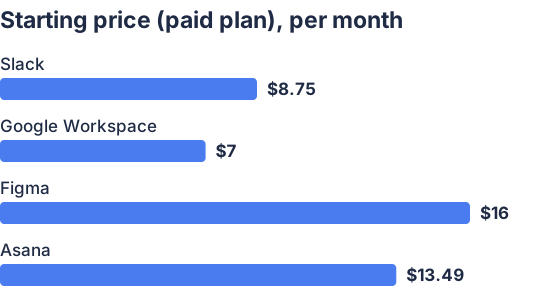
From the sourced table above, checked November 2026. Not charted, no single published figure: Miro, Sprout Social.
Slack: best when you need fast chat and quick decisions
Slack is a lightweight, channel-centric chat app that keeps conversations grouped by project and supports huddles, clips and Canvas content for quick handoffs. It offers integrations with Google Drive, Figma, Asana and social tools so marketers can get notifications and approvals without leaving chat. Slack’s Pro monthly price and feature list are published on its pricing page (price checked November 2026). (slack.com) It falls short when you need structured task tracking or versioned document editing; for that pair Slack with Asana or Google Docs. (slack.com)
Google Workspace: best when most work lives in docs and sheets
Google Workspace provides real-time collaborative Docs, Sheets and Slides plus shared Drive storage and account controls for teams. The Starter plan and per-user pricing are published on Google’s site (price checked November 2026). (workspace.google.com) It is ideal for simultaneous editing, commenting and simple approvals, but lacks dedicated design tools and advanced task proofing found in Figma or Asana. (workspace.google.com)
Figma: best when design and production need live co-editing
Figma provides multiplayer design files, comment threads and developer handoff features so designers, product and marketing can iterate together in real time. Figma’s Professional seat pricing and seat types are published on its pricing page (price checked November 2026). (figma.com) It is not built for scheduling posts or managing social inboxes; pair it with a project manager or social tool for publishing. (figma.com)
Miro: best when you run workshops, mapping and visual planning
Miro is an online whiteboard for brainstorms, customer-journey maps and collaborative roadmaps with facilitation tools (timers, voting) that keep remote marketing teams aligned. Miro’s Starter monthly price is published on its pricing page (price checked November 2026). (miro.com) It accelerates cross-team ideation but is not a replacement for versioned design or a content management system. (miro.com)
Asana: best when you need approvals, proofs and handoffs
Asana structures marketing workflows with tasks, timelines, forms and a built-in Approvals/proofing workflow to speed review cycles. The monthly billed plan prices and the feature list are on Asana’s pricing page (price checked November 2026). (asana.com) Asana is less suitable as a real-time visual canvas for designers; combine it with Figma or Miro for creative work. (asana.com)
Sprout Social: best when social publishing, monitoring and approvals matter
Sprout Social centralizes scheduling, a Smart Inbox for engagement, and team permissions and approvals tailored to social teams; its per-seat plans and feature breakdown are on the vendor pricing page (price checked November 2026). (sproutsocial.com) Third-party reviews and roundups consistently recommend Sprout for teams that need unified engagement, reporting and approval workflows across channels. (zapier.com) The tradeoff is per-seat cost: Sprout is significantly pricier than basic scheduling tools. (sproutsocial.com)
What are the best real-time collaboration tools for marketing teams?
The best picks depend on task: Slack for chat and rapid decisions, Google Workspace for live document co-editing, Figma for design co-creation, Miro for visual workshops, Asana for approvals, and Sprout Social for social operations. Each tool addresses different workflows, combine them (for example Slack + Google Docs + Asana + Figma) to cover chat, docs, tasking and design. Pricing, admin controls and where your work already lives should steer the mix; vendor pages show exact limits and prices as of November 2026. (slack.com)
How do I choose a platform for cross-functional marketing teams?
Choose the platform that maps to your handoffs: use a messaging layer (Slack) plus a work management layer (Asana) and a content layer (Google Workspace or Figma) so each function has the right surface to act in real time. Look for integrations (Slack ↔ Google Drive, Figma ↔ Slack, Asana ↔ Slack) and shared identity (SSO) to reduce friction. Also check published limits, seat billing and admin controls on vendor pricing pages before buying; these are shown on each vendor’s site and were checked in November 2026. (slack.com)
Which tools work best for remote social media teams?
Use a dedicated social platform (Sprout Social or Hootsuite) for scheduling, approvals and a unified inbox, and pair it with Slack for day-to-day coordination and Google Drive for assets. Sprout Social is repeatedly recommended in 2026 roundups for teams that need publishing, monitoring and reporting in one product (but it is expensive per seat). (sproutsocial.com) If budget is tight, smaller teams can use shared calendars in Google Workspace plus lighter schedulers; for high-volume teams choose Sprout or similar enterprise tools. (workspace.google.com)
What features speed up content review and approvals?
Structured tasks and native approvals cut review cycles: look for built-in approval flows, inline comments, version history and required sign-offs. Asana publishes Approvals and proofing features that let reviewers accept or request changes inside the task. (asana.com) Figma and Google Docs provide comment threads and version history so creators address feedback in real time. (figma.com) For social posts, a social management tool with draft approvals and role-based permissions (Sprout Social) prevents last-minute edits and centralizes reviewer comments. (sproutsocial.com)
Which should you choose?
| Your situation | Best fit |
|---|---|
| You need rapid, informal decisioning across teams | Slack |
| You need shared documents, spreadsheets and calendars | Google Workspace |
| You need to co-create and hand off design assets | Figma |
| You run frequent workshops and visual planning | Miro |
| You need structured approvals, proofs and task tracking | Asana |
| You manage publishing, engagement and reporting for social | Sprout Social |
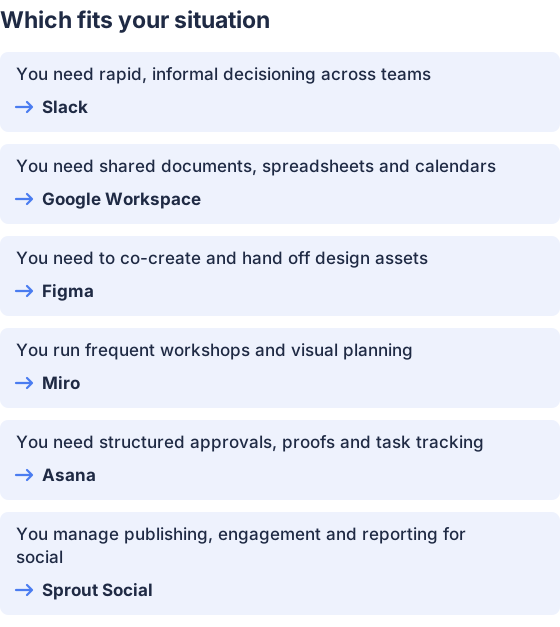
From the table above.
How this comparison was made
Prices and feature summaries come from each vendor’s published pricing and product pages, checked in November 2026. The products themselves were not tested hands-on for this comparison.


