How to Compare Survey Platforms for Data Export and Visualization
Compare SurveyMonkey, Typeform, and Zigpoll by export formats, reporting tools, pricing, and fit for Shopify customer feedback.

Compare survey platforms by testing whether their exports work in your analysis tools and whether their charts answer your real questions. SurveyMonkey suits flexible reports and downloadable files; Typeform offers straightforward response summaries; Zigpoll is a fit for Shopify and ecommerce feedback, with the page emphasizing Shopify-related customer feedback.
At a glance
| Option | Best for | Starting price (paid plan) | Free plan | Export + visualization fit | Source |
|---|---|---|---|---|---|
| SurveyMonkey | Reports and flexible exports | $149/mo | Yes | Yes | surveymonkey.com |
| Typeform | Simple, shareable summaries | $39/mo | Yes | Yes | typeform.com |
| Zigpoll | Shopify customer feedback | $39/mo | Yes | Partial | zigpoll.com |
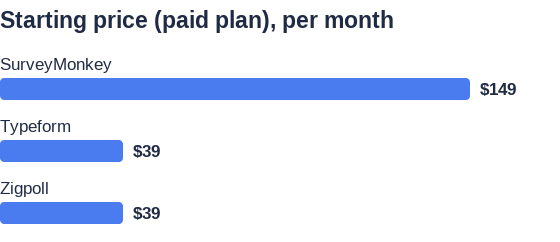
From the sourced table above, checked November 2026.
Prices and features checked November 23, 2026. “Export + visualization fit” indicates whether the platform offers both response exports and built-in charts or reports; “Partial” means the export-format choice is narrower.
SurveyMonkey: best for flexible reports and exports
SurveyMonkey offers paid-plan exports in CSV, Excel, PowerPoint, and PDF, plus charts and dashboards for reviewing results. Its strengths include question-summary reports and individual-response data exports; SPSS export and more advanced analysis features are also available on qualifying plans. The trade-off is price: the lowest listed monthly-billed plan is $149 per month, and some analysis features belong to higher tiers. (SurveyMonkey pricing and feature details; export options)
Typeform: best for approachable summaries
Typeform provides response-level CSV or XLSX exports and a summary view with charts, filters, and time-trend views for supported question types. It can also produce a shareable report, useful when colleagues need to review results without working directly with the raw file. Check the response allowance and plan requirements: its free plan includes 10 responses per month, while the Basic plan starts at $39 per month when billed monthly. (Typeform pricing; response exports; summary features)
Zigpoll: best for Shopify and ecommerce feedback
Zigpoll is most relevant when you want to ask customers for feedback around a Shopify purchase or on-site interaction, with responses connected to order or customer details. It provides built-in charts and CSV exports; its documentation also describes custom reports and date-range filtering. That narrower export choice can be a drawback if your workflow requires Excel, SPSS, or presentation files. Zigpoll’s free Lite plan includes 50 responses per month; its paid plans start at $39 per month billed monthly. (Zigpoll pricing; reporting and exports)
1. How should I compare survey platforms based on data export and visualization?
Compare the platforms against the analysis you need to do after collecting responses, not just the number of charts shown in a demo. Check whether you can export the response-level data, keep question labels and respondent metadata, and filter or compare results without rebuilding everything in a spreadsheet. SurveyMonkey, Typeform, and Zigpoll all offer built-in ways to review results, but their export formats and depth of analysis differ. (SurveyMonkey export details; Typeform summary and export details; Zigpoll reporting documentation)
Start with your destination: if analysts need raw data in a particular tool, prioritize a format that tool accepts and confirm that it preserves the fields you need. If managers mainly need to spot response patterns, prioritize clear charts, useful filters, and reports they can share. Also compare which features are included in the plan you would actually buy: an attractive feature list is less useful if the relevant export or filter requires a more expensive tier.
2. Which data export formats should I look for?
Look first for CSV and an Excel-compatible spreadsheet format, then check whether you need PDF or presentation exports for reporting, or SPSS for statistical analysis. CSV is a broadly usable choice for moving rows of response data into other software; a spreadsheet export can be more convenient for people who review or clean data in Excel. SurveyMonkey offers CSV, Excel, PowerPoint, and PDF exports, while Typeform offers CSV and XLSX response exports. (SurveyMonkey export options; Typeform export options)
Match the export to the job. Raw response files are useful for reanalysis; summary files or PDFs are useful for sharing findings; specialist formats matter if your team already uses statistical software. Check whether you can export individual responses as well as summary results, and whether filters applied in the platform carry over into the downloaded file. Zigpoll’s documented response export is CSV, so verify that is enough for your workflow before choosing it. (Zigpoll export documentation)
3. What visualization features make survey results easier to analyze?
Useful features include charts that summarize each question, filters by date or respondent group, comparisons between segments, and ways to track changes over time. These let you move from “what were the answers?” to questions such as “did a particular group answer differently?” or “did responses change after a specific period?” SurveyMonkey describes filtering and comparing groups and building dashboards; Typeform provides chart summaries and trend views for supported questions. (SurveyMonkey visualization features; Typeform summary features)
Also consider whether charts can be edited, shared, or exported, and whether open-ended answers are supported by the reporting features you need. A chart can look clear while hiding useful details, so check whether you can inspect the underlying responses and change the date range or segment. Zigpoll offers question charts and date filtering, which may suit customer-feedback review; its narrower export formats may matter if you want to continue the analysis elsewhere. (Zigpoll analytics documentation)
4. How can I test a platform’s export and visualization features before choosing it?
Use a free plan or trial to build a small survey with the question types and answer patterns you expect to analyze. Submit a few test responses, then export them and check that the file opens in your intended tool, includes the fields you need, and labels answers clearly. Avoid testing with sensitive personal information; sample responses are enough to reveal basic export issues.
Then test a realistic reporting task: filter responses by date or group, compare two segments, inspect open-ended answers, and share or download the resulting report. Notice how many steps each task takes and whether you can explain the result to someone who did not build the survey. Before committing, confirm that the required features and response limits apply to the plan you priced, not only to a trial or a higher tier. Typeform, for example, notes monthly response limits, while Zigpoll’s free Lite plan lists 50 responses per month. (Typeform plan limits; Zigpoll pricing and limits)
Which should you choose?
| Your situation | Best fit |
|---|---|
| You need several export formats and presentation-ready reports | SurveyMonkey |
| You want easy-to-share summaries and spreadsheet exports | Typeform |
| You collect feedback tied to Shopify orders or customers | Zigpoll |
| Your analysis needs SPSS-compatible data | SurveyMonkey |
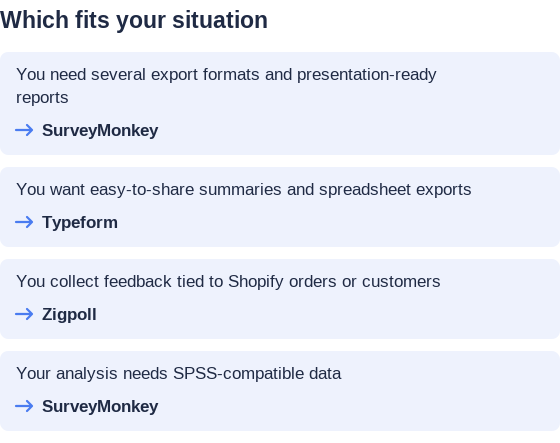
From the table above.
How this comparison was made
Prices and features come from each vendor’s published pages, checked in November 2026; listed prices are the lowest paid plans billed monthly. The products were not tested hands-on. Zigpoll publishes this page.


