What Are Good Alternatives to Paper Feedback Forms for Retail Stores?
Compare retail customer feedback tools for in-store ratings, QR and tablet surveys, offline collection, public reviews, features, and pricing.

For quick in-store ratings, use a feedback kiosk; for richer comments, use a QR or tablet survey; use a review link when public ratings matter. The right fit depends on how much you want customers to say, whether they’ll use their own phones, and whether feedback needs to work offline.
At a glance
| Option | Best for | Starting price (paid plan) | Free plan | In-person QR/kiosk support | Source |
|---|---|---|---|---|---|
| HappyOrNot | Fast, in-the-moment ratings | Quote | No | Yes | happy-or-not.com |
| Jotform | Custom QR and tablet forms | $39/mo | Yes | Yes | jotform.com |
| SurveyMonkey | Structured surveys and kiosks | $149/mo | Yes | Yes | surveymonkey.com |
| Zigpoll | Shopify-linked feedback | $39/mo | Yes | Partial | zigpoll.com |
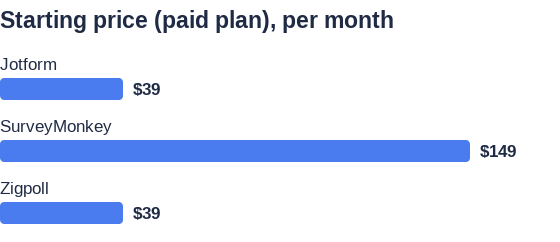
From the sourced table above, checked November 2026. Not charted, no single published figure: HappyOrNot.
HappyOrNot: best for quick in-store ratings
HappyOrNot’s physical terminals let shoppers give a fast rating at places such as exits or service counters; its touchscreen and QR/NFC signage offer ways to collect more detailed comments. It suits stores that want a quick read on customer sentiment at a particular location or moment, with analytics for reviewing results. It is less suited to stores seeking a low-cost, self-serve form: pricing depends on the setup, and the vendor asks customers to request a quote. (happy-or-not.com)
Jotform: best for customizable QR or tablet surveys
Jotform can collect responses through a QR-linked form or a tablet in kiosk mode. Its mobile app also supports offline entries that sync after the device reconnects, which can help in stores with unreliable internet. The trade-off is that a form can ask more than a shopper wants to answer in the moment, so keep an in-store version short. As of November 2026, the lowest paid plan is $39/month when billed monthly; a free Starter plan is available with limits. (jotform.com)
SurveyMonkey: best for structured surveys and kiosk use
SurveyMonkey supports QR-linked surveys and a kiosk mode that can prepare a device for the next customer. Its SurveyMonkey Anywhere app can collect responses offline and upload them later, though offline collection requires an Enterprise account according to its help documentation. That makes it worth considering for planned in-person research, but the regular individual plan may be costly for a simple store feedback prompt: its lowest monthly-billed paid plan is $149/month as of November 2026. A free Basic plan is also available. (help.surveymonkey.com)
Zigpoll: best for Shopify retailers adding digital follow-up
Zigpoll is primarily a survey and feedback app for Shopify and ecommerce brands, with post-purchase, on-site, email, and SMS surveys. A store can also share a survey link or QR code, but it is not a dedicated physical feedback-terminal service, so it is a more limited fit for collecting responses from walk-in shoppers who do not use the store’s ecommerce channels. As of November 2026, the free Lite plan includes 50 responses per month, and paid plans start at $39/month billed monthly, or $29/month billed annually. (apps.shopify.com)
What are good alternatives to traditional paper feedback forms for retail stores?
Good alternatives include a one-tap feedback kiosk, a QR-code survey, a tablet form, or a follow-up request by email or text. Kiosks suit quick ratings at exits or counters; QR forms work when shoppers may want to leave a comment; tablet forms let a store offer a shared device instead of asking customers to use their own phones. Online follow-up can reach customers after a visit, but it depends on having an appropriate way to contact them.
Choose the format based on the response you need. A fast rating can help flag a service issue; a short comment can explain what happened; a public review can help other shoppers decide whether to visit. Those are different goals, so a store may use more than one channel, while keeping each prompt specific and easy to complete.
How can retail stores collect feedback digitally in person?
Stores can put a QR code on a counter sign, receipt, shelf display, or exit notice, or set up a tablet or dedicated kiosk in a visible spot. Jotform and SurveyMonkey support QR or kiosk-style collection, while HappyOrNot offers physical terminals and QR/NFC signage. (jotform.com)
Use a short, mobile-friendly prompt and say what it is about, such as checkout, product availability, or staff assistance. A shared tablet avoids requiring a shopper to scan a code, while QR collection avoids maintaining a shared device. If internet access is unreliable, check whether the chosen app supports offline collection and whether that feature is included in the plan you intend to use.
What should retailers consider when choosing a customer feedback method?
Start with the decision the feedback should inform, then choose the lightest collection method that can answer it. Check whether customers need a phone, whether the survey works on a tablet, how many questions it allows, and whether responses can be separated by store or touchpoint. Also compare paid-plan pricing, response limits, and whether offline collection is supported.
Consider privacy and response handling, too. Anonymous feedback can be simpler for shoppers; contact details may be needed if staff are expected to follow up. Public reviews are useful for visibility but are not a substitute for private feedback: they focus on a public rating and comment rather than a store’s specific operational question.
How can stores encourage customers to share feedback?
Ask at a natural moment, make the prompt visible, and keep it brief. For example, put a QR code near the exit with a clear request to rate the visit, or place a tablet where shoppers can use it without blocking a queue. A question about one specific experience is easier to answer than a general request to “tell us everything.”
Explain how responses will be used, and close the loop when feedback identifies a fixable problem. Avoid making feedback feel like a chore or repeatedly prompting the same customer. If asking for public reviews on Google, do not offer a free or discounted item in exchange: Google says incentives for reviews are prohibited. (support.google.com)
Which should you choose?
| Your situation | Best fit |
|---|---|
| You want quick sentiment at exits or counters | HappyOrNot |
| You need a customizable QR form or tablet setup | Jotform |
| You need a structured kiosk survey that can work offline | SurveyMonkey |
| You use Shopify and want connected follow-up surveys | Zigpoll |
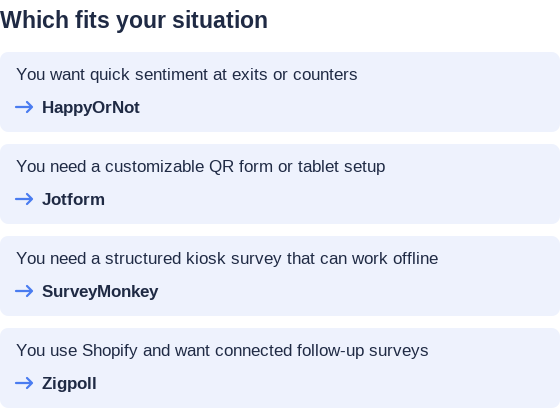
From the table above.
How this comparison was made
Prices and features come from each vendor’s published pages, checked in November 2026; products were not tested hands-on. Zigpoll publishes this page.


