How do data entry automation platforms compare for ecommerce orders?
Compare Zapier, Make, n8n, and Power Automate for ecommerce order workflows, including connectors, pricing, complexity, and maintenance.

Zapier, Make, n8n, and Power Automate can move order data between systems, but the best fit depends on connector coverage, workflow complexity, and who maintains it. Zapier suits quick app-to-app flows; Make suits visual, branched workflows; n8n suits technical teams wanting control; Power Automate fits Microsoft-centered operations or desktop automation.
At a glance
| Option | Best for | Starting price (paid plan) | Free plan | Order connectors | Source |
|---|---|---|---|---|---|
| Zapier | Quick app-to-app automations | Not confirmed, see source | Yes | Yes | zapier.com |
| Make | Visual, branching workflows | Not confirmed, see source | Yes | Yes | make.com |
| n8n | Technical teams needing control | Not confirmed, see source | Yes | Yes | n8n.io |
| Power Automate | Microsoft and desktop workflows | $15/mo | No | Partial | microsoft.com |
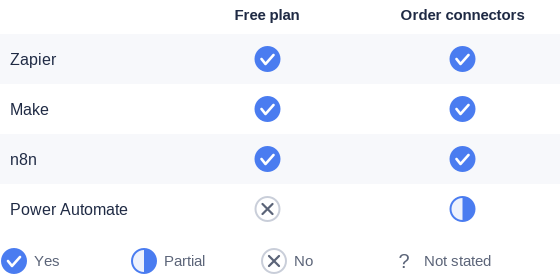
From the sourced table above, checked November 2026.
Prices were checked in November 2026. Zapier’s and n8n’s listed entry prices depend on billing choice; Power Automate’s $15-per-user monthly price is billed yearly, not month to month. The free n8n option is its self-hosted Community Edition, not a free hosted cloud plan. (zapier.com)
How do data entry automation platforms compare for ecommerce order processing?
Zapier is a straightforward choice when the store and the destination apps have supported connectors and the workflow is mostly linear. Make offers more visible control over routing and data handling, while n8n gives technical teams more room to use APIs and code. Power Automate is worth considering when orders must interact with Microsoft tools or a desktop application, but its store connectors can bring extra setup requirements. These platforms move data; they do not, by themselves, replace an order management system or guarantee that every order is accurate.
Before choosing, check that a connector supports the specific events and fields you need: for example, whether it can trigger on a new order, read line items, and update the destination record. Decide how to handle refunds, changed addresses, duplicate events, failed runs, and orders that need staff review. The right option is the one that fits those requirements and can be monitored by the people responsible for it.
Zapier: best for quick app-to-app automations
Zapier is a practical fit for simple order flows, such as sending a new order to a spreadsheet, accounting tool, or notification app, when those apps have suitable connectors. Its WooCommerce connector documents instant order triggers and actions, while its Shopify connector requires a paid Zapier plan because Shopify is a premium app. (help.zapier.com)
The main trade-off is how usage adds up: Zapier counts tasks for steps that perform actions, so a multi-step order workflow can use more tasks per order than a one-action workflow. Its free plan is limited to 100 tasks per month and two-step Zaps; multi-step workflows and premium apps require a paid plan.
Make: best for visual, branching workflows
Make suits workflows where order data must be transformed, filtered, or routed to different destinations. Its WooCommerce integration supports order-related triggers and describes examples such as creating a spreadsheet row or an accounting order from a new purchase. The visual scenario builder can make it easier to inspect how data moves through a longer process. (make.com)
Make charges credits for module actions, so estimate how many steps run for each order and whether the monthly allowance covers normal and peak volume. The free plan includes 1,000 credits a month. Make says unused credits expire at the end of the term, and scenarios stop running when credits run out until more are added. (make.com)
n8n: best for technical teams needing control
n8n is a stronger fit when someone on the team can configure and maintain workflows, credentials, and integrations. Its Shopify and WooCommerce nodes document actions for getting, creating, and updating orders, and its HTTP Request node can connect to services through their APIs when a suitable built-in node is unavailable. (n8n.io)
Its pricing counts complete workflow executions rather than individual steps, which may suit longer flows with many steps. A free Community Edition is available to self-host. Self-hosting gives more control over where the software runs, but it also means the team takes responsibility for operating it. (n8n.io)
Power Automate: best for Microsoft and desktop workflows
Power Automate fits operations already built around Microsoft services, and it can also automate desktop tasks where an application lacks a usable API. Its WooCommerce connector can trigger on order events and perform actions on store resources, but it requires a separately purchased WooCommerce plugin. Its Shopify connector is labeled as an independent-publisher preview, so confirm its status and fit before relying on it for production order processing. (learn.microsoft.com)
Power Automate Premium is listed at $15 per user per month, billed yearly, and includes cloud flows and attended desktop flows. The free offer on its pricing page is a 30-day trial, not a continuing free plan. This can be a sensible option for Microsoft-heavy teams, but the annual billing and connector prerequisites matter when comparing it with the others. (microsoft.com)
Which should you choose?
| Your situation | Best fit |
|---|---|
| You need a quick flow across familiar apps | Zapier |
| You want to branch and inspect a visual workflow | Make |
| You have technical support and need API flexibility | n8n |
| Your process depends on Microsoft or desktop apps | Power Automate |
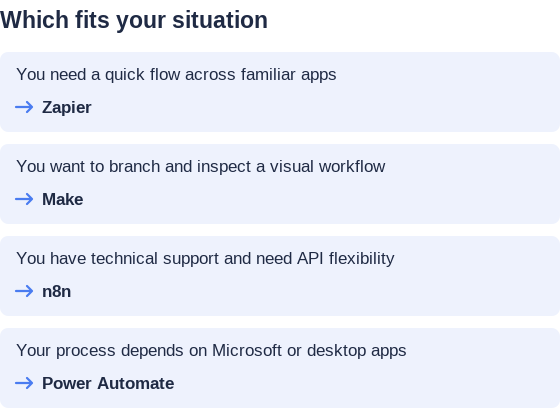
From the table above.
How this comparison was made
Prices and features come from each vendor’s published pages, checked in November 2026. The products were not tested hands-on.


