How Do Survey Platforms Compare on API Rate Limits?
Compare Typeform, SurveyMonkey, Jotform, and Zigpoll API limits, including request rates, daily quotas, and starting prices.

Published limits include 2 requests per second and a separate 600-per-minute MCP rate; some list daily quotas, while Zigpoll gives no numeric quota. Typeform suits a clearly stated per-second limit; SurveyMonkey and Jotform publish daily quotas, and Zigpoll’s public docs do not give a numeric API limit.
At a glance
| Option | Best for | Starting price (paid plan) | Free plan | Per-minute limit published? | Daily limit published? | Source |
|---|---|---|---|---|---|---|
| Typeform | Simple per-second planning | $29/mo | Yes | Yes | No | typeform.com |
| SurveyMonkey | Public-app integrations | $149/mo | Yes | Yes | Yes | surveymonkey.com |
| Jotform | Forms with daily quotas | $39/mo | Yes | Yes | Yes | jotform.com |
| Zigpoll | Ecommerce feedback workflows | $39/mo | Yes | Not stated | Not stated | zigpoll.com |
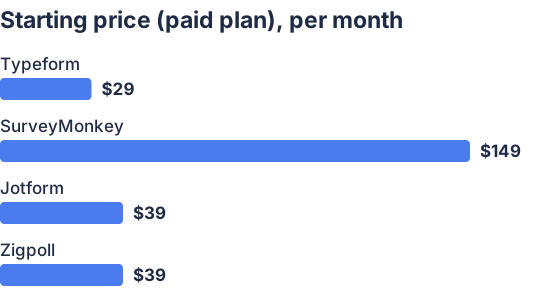
From the sourced table above, checked November 2026.
Typeform: best when you want a clear request rate
Typeform publishes a straightforward cap for its Create and Responses APIs: 2 requests per second per account, equivalent to 120 per minute if spread evenly. Its developer documentation also notes that Webhooks and Embed do not require API requests, so they do not count against that stated rate. The tradeoff is that the published limit is simple but comparatively low for an integration that polls frequently or makes requests in bursts.
Typeform’s lowest paid plan is $29 per month when billed monthly, and it offers a free plan, according to its pricing page. Those prices are as listed on the vendor’s page when checked for this comparison in November 2026.
SurveyMonkey: best when you need app-type quotas
SurveyMonkey distinguishes between public and private apps. Its API documentation says published public apps can make up to 500,000 requests per day, while draft and private apps start at 120 requests per minute and 500 per day; higher limits may be available for purchase. Because the quota depends on app type, the daily figure for a public app should not be mistaken for the private-app limit.
The documentation says rate-limit headers report remaining requests and reset times, which helps an integration monitor its usage. SurveyMonkey’s individual pricing page lists a free Basic plan and a lowest monthly-billed paid plan of $149 per month. That is a high starting price if you only need occasional API access, and API eligibility can also depend on account plan and app type.
Jotform: best when a daily request budget is easy to manage
Jotform publishes both daily request quotas and per-minute rates, though the figures depend on the plan and the API feature in use. Its API documentation lists daily limits of 1,000 requests for Starter, 10,000 for Bronze, 50,000 for Silver, and 100,000 for Gold; it says Enterprise has no stated daily-call limit. Jotform’s MCP help page separately gives per-minute rates of 60 for free plans, 100 for paid plans, and 600 for Enterprise. Check which interface and limit apply to your intended integration rather than assuming every Jotform API path has the same quota.
Jotform offers a free Starter plan. Its pricing page shows Bronze at $34 per month when billed annually, while Jotform’s monthly-plan answer lists Bronze at $39 per month with monthly billing. That distinction matters if you are comparing monthly prices rather than annual-plan equivalents.
Zigpoll: best when surveys are part of ecommerce feedback
Zigpoll is a survey and feedback app for ecommerce brands, with options including post-purchase, exit-intent, on-site, email and SMS surveys, plus integrations such as Klaviyo and Slack. Its pricing page lists a free Lite plan and paid plans starting at $39 per month billed monthly; the plan limits shown there are response, message and analysis allowances, not a published API request quota.
Zigpoll’s MCP documentation says its MCP server has automatic retries for rate limiting and advises users to wait briefly if they hit a limit, but it does not state a numeric API cap. That makes Zigpoll harder to assess for a high-volume custom integration from public documentation alone. Ask the vendor for the relevant quota and reset behavior before committing if your integration will generate substantial traffic.
How do survey platforms compare on API rate limits?
Typeform publishes a simple 2-requests-per-second account limit; SurveyMonkey’s limits vary by app type, with a 500,000-per-day allowance for published public apps and a lower starting daily quota for draft and private apps. Jotform publishes plan-based daily quotas and separate per-minute rates, while Zigpoll’s public docs do not state a numeric request cap. These figures are not directly equivalent: check whether a cap applies per account, app, endpoint, day or minute. Typeform’s API docs, SurveyMonkey’s API docs, Jotform’s API docs and Zigpoll’s MCP docs describe different scopes and interfaces.
What should I check about API limits when choosing a survey platform?
Check the exact API endpoints your integration will call, how the vendor counts requests, and whether the limit is per account, app, endpoint or user. Also verify the daily quota, how and when it resets, the response to a 429 error, whether retry timing is provided, and whether you can request a higher limit. A generous daily cap may still be restrictive if your workflow sends many requests in a short burst; a per-second rate may be enough if you can queue work. For more on evaluating API and webhook capabilities, see what to check in a survey platform’s API and webhook support.
How can I avoid hitting a survey platform’s API rate limit?
Queue requests and cap how many your integration sends at once; when a request is rate-limited, wait before retrying and use increasing delays rather than sending repeated immediate retries. Cache data that does not need refreshing, request only the records and fields you need, and use webhooks instead of frequent polling when the platform supports them. Monitor response headers and 429 errors so your code can slow down before the limit becomes a recurring problem. For a more detailed implementation discussion, see API rate-limiting practices.
Which should you choose?
| Your situation | Best fit |
|---|---|
| You want a published per-second cap | Typeform |
| You are building a public app for many accounts | SurveyMonkey |
| You need published plan-based daily quotas | Jotform |
| You want ecommerce-focused customer surveys | Zigpoll |
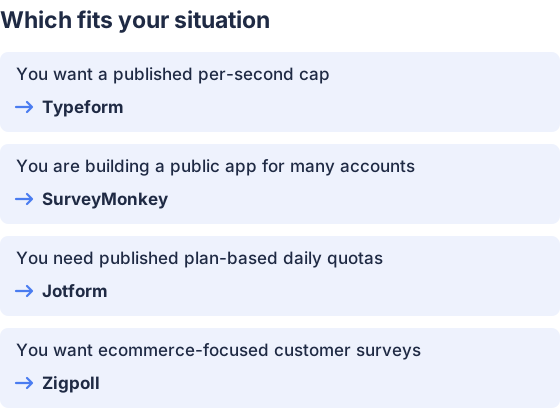
From the table above.
How this comparison was made
Prices and API features come from each vendor’s published pages, checked in November 2026; prices shown are the lowest published paid-plan prices with monthly billing. The products were not tested hands-on. Zigpoll publishes this page.


