Which Ticketing Software Automates Routing and Escalation Best?
Compare ticketing tools for priority routing and SLA escalation. Find the best fit for customer support, IT incidents, or lower-cost help desks.

Zendesk is the strongest fit for customer-support teams that need tickets prioritized by SLA deadlines, skills, agent capacity, and ticket priority. Jira Service Management fits IT teams that need on-call escalation policies; Freshdesk offers a lower-cost alternative, while Intercom suits conversation-led support that needs workflow-based SLAs.
At a glance
| Option | Best for | Starting price (paid plan) | Free plan | Priority/SLA automation | Source |
|---|---|---|---|---|---|
| Zendesk | Complex customer-support routing | Not confirmed, see source | No | Yes | zendesk.com |
| Freshdesk | Lower-cost support teams | $23/mo | Yes | Yes | freshworks.com |
| Jira Service Management | IT incident escalation | $21.50/mo | Yes | Yes | atlassian.com |
| Intercom | Conversation-led customer support | $39/mo | No | Partial | intercom.com |
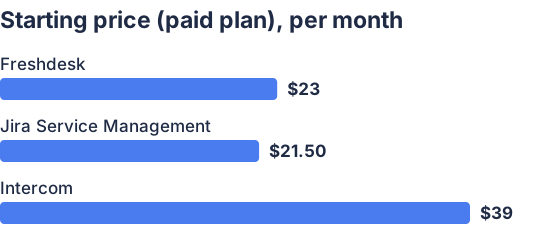
From the sourced table above, checked November 2026. Not charted, no single published figure: Zendesk.
Prices are per agent or seat, where applicable, and reflect the lowest paid plan’s published monthly-billed price as of November 2026. A vendor’s entry-level price may not include the advanced routing or SLA features described below.
Zendesk: best for complex customer-support routing
Zendesk offers the strongest combination here for customer support teams managing multiple channels, queues, and service targets. Its omnichannel routing can account for agent availability and capacity, and can prioritize tickets by priority or time until an SLA breach; skills-based routing is available on higher plans. (support.zendesk.com)
SLA policies set priority-based response and resolution targets, and business rules can act on SLA status. (zendesk.com)
Freshdesk: best for lower-cost support teams
Freshdesk Pro combines intelligent routing with multiple SLA policies, while Enterprise adds skill-based routing. Its SLA settings can set different first-response, next-response, and resolution targets for each priority, use business or calendar hours, and send reminders or escalations when targets approach or are missed. (freshworks.com)
The trade-off is that the lowest paid plan does not include the full routing and SLA feature set: check the required tier against your workflow before comparing prices. Freshdesk also offers a Free Program for up to two agents, but it lasts six months, so it is not a permanent free plan. (freshworks.com)
Jira Service Management: best for IT incident escalation
Jira Service Management is a strong choice for IT and operations teams that need to route incidents to on-call responders. Teams can use routing rules to select schedules or escalation policies based on alert properties and time; an escalation policy can notify one responder, then move to the next if the alert remains unacknowledged. (support.atlassian.com)
For service requests, teams can define SLAs around priority and other conditions, then use queues and automation to alert or assign the right people. Its free plan is limited to three agents, and free or Standard plans have fewer advanced escalation-policy options than Premium or Enterprise. (support.atlassian.com)
Intercom: best for conversation-led support workflows
Intercom lets teams use Workflows to assign conversations, mark them as priority, and apply an SLA. The distinction between plans matters: workflows and round-robin assignment are on Advanced, while SLA management requires Expert. (intercom.com)
That makes it a fit for teams already working in Intercom’s inbox and messaging environment, but less compelling if SLA-based routing is the main requirement. Intercom supports only one active SLA per conversation, and its usage-based AI charges can add to seat costs. (intercom.com)
Which scalable ticketing software offers the strongest priority- and SLA-based routing and escalation automation?
Zendesk is the strongest overall fit for customer-support teams because its omnichannel routing can prioritize by ticket priority or proximity to an SLA breach, alongside agent availability, capacity, and skills. For IT incident response, Jira Service Management is a better fit when the crucial requirement is escalation through on-call schedules. (support.zendesk.com)
Compare the plan required for these controls, not just the entry price. For example, Zendesk lists skills-based routing on Suite Professional, while Intercom requires Expert for SLA management. (zendesk.com)
What escalation rules can ticketing software automate?
Ticketing software can apply a priority-specific response or resolution deadline, warn the assigned agent as that deadline approaches, and notify a manager or another team if it is missed. Depending on the product, it can also assign or reassign tickets by team, skill, schedule, or SLA urgency, or notify the next on-call responder if an alert goes unacknowledged. (support.freshdesk.com)
Rules may branch on urgency, customer type, ticket fields, elapsed time, or business hours. Check whether the software can pause or restart timers at the right workflow stages and whether an escalation changes ownership or only sends a notification. (support.freshdesk.com)
How should I compare ticketing tools for scalability and SLA management?
Compare the routing logic and SLA controls available at the plan you would actually buy: priorities and response targets, business-hour calendars, multiple policies, pre-breach reminders, breach escalation, skills, team queues, and on-call schedules. Check whether rules can use your real ticket fields and whether workflows can change assignment as well as send alerts. (support.zendesk.com)
Then assess scale in practical terms: agent limits, workflow or automation allowances, channel coverage, admin controls, reporting, and the monthly cost at your expected seat count. Trial representative scenarios, such as an urgent ticket near its deadline and an after-hours incident, to see whether the resulting assignment and escalation match your policy. (zendesk.com)
Can ticketing software route tickets automatically by priority?
Yes. Depending on the product and plan, rules can assign work to a queue or qualified agent based on priority, skills, capacity, or time remaining before an SLA breach. Zendesk documents priority- and SLA-aware omnichannel routing; Jira Service Management can use priority to determine incident routing and escalation. (support.zendesk.com)
Automation depends on the ticket having a usable priority value. Teams can set that value through intake fields or rules, then map each level to a target and an assignment or escalation path. (support.zendesk.com)
Which should you choose?
| Your situation | Best fit |
|---|---|
| Customer-support queues prioritized by SLA deadlines | Zendesk |
| IT incidents that need on-call escalation | Jira Service Management |
| A lower-cost help desk with priority-based SLA rules | Freshdesk |
| Support centered on messaging and shared conversations | Intercom |
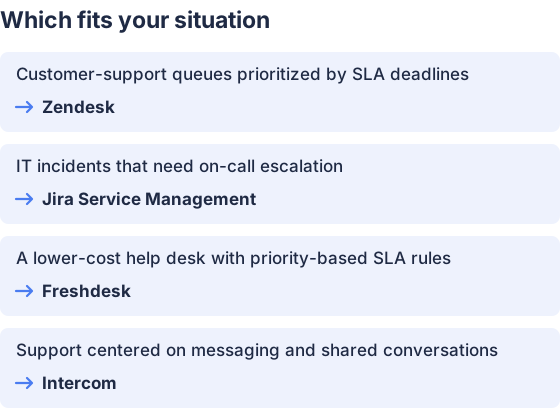
From the table above.
How this comparison was made
Prices and features come from each vendor’s published pages, checked in November 2026. The products were not tested hands-on.


