What’s the Best Online Survey Tool for Automated Workflows?
Compare survey tools for automated workflows: Zigpoll for ecommerce feedback, Typeform for branded surveys, and Jotform for approvals.

The best online survey tool for automated workflows depends on where responses need to go: Zigpoll suits ecommerce feedback, Typeform suits polished general surveys, and Jotform suits form-based operations. Choose by the system you need the survey to connect to and what should happen after someone responds.
At a glance
| Option | Best for | Starting price (paid plan) | Free plan | Response-triggered workflow | Source |
|---|---|---|---|---|---|
| Zigpoll | Ecommerce customer feedback | $39/mo | Yes | Yes | zigpoll.com |
| Typeform | Branded surveys and forms | $39/mo | Yes | Yes | typeform.com |
| Jotform | Forms and approval processes | $39/mo | Yes | Yes | jotform.com |
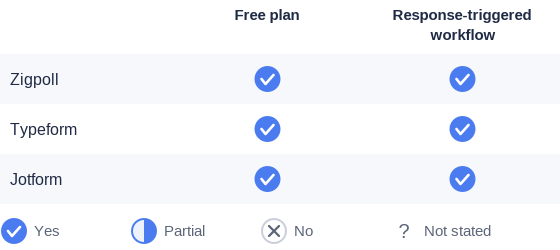
From the sourced table above, checked November 2026.
Zigpoll: best for ecommerce customer feedback
Zigpoll is a strong fit when you want to ask customers directly and use their answers in ecommerce or marketing workflows. Its published features include Shopify post-purchase and on-site surveys, Shopify Flow triggers, and integrations such as Klaviyo, Slack, Zapier, Make, and webhooks. (zigpoll.com)
The main trade-off is that Zigpoll is aimed at survey and feedback use, especially for ecommerce, rather than being a general-purpose form and approvals platform. Its Lite plan is free, and paid plans start at $39 per month billed monthly, or $29 per month billed annually, as of November 2026. (zigpoll.com)
Typeform: best for branded general surveys
Typeform suits teams that want polished, interactive surveys and a route for sending responses into other apps. Its Basic plan lists conditional logic, webhooks, and integrations; its webhook documentation explains how response data can be sent to a chosen URL after a submission. (typeform.com)
The trade-off is that the more built-in contact and follow-up automation features are separate from the lowest plan: the Contacts & Automations add-on is not available on Free or Basic, and the listed add-on starts at $25 per month. Typeform is therefore a better fit when survey experience and broad connections matter more than ecommerce-specific triggers tied to order data. (typeform.com)
Jotform: best for forms and approval processes
Jotform works well when a survey is one part of a larger process. Its workflow tools can route responses using conditions, send notifications, request approvals, and pass data to connected apps or a webhook. (jotform.com)
It also offers Shopify and BigCommerce integrations for embedding forms on ecommerce sites, so it can collect information there. But that is different from a survey tool that connects answers directly to customer and order records or provides ecommerce-specific triggers. Bronze starts at $39 per month billed monthly; the free Starter plan has submission and form limits. (jotform.com)
What’s the best online survey tool that triggers automated workflows?
For ecommerce feedback tied to customer and order activity, choose Zigpoll; for a polished general-purpose survey that sends responses to other tools, choose Typeform; for routing, approvals, and form-based operations, choose Jotform. These are different strengths, not a single winner: a tool that embeds on a storefront may not have the same customer or order connections as one built for ecommerce feedback.
Check the specific trigger and destination you need before choosing. A response sent to a spreadsheet, a conditional notification, a Shopify Flow event, and an approval request are different kinds of automation. A platform may support one directly while requiring an integration, a paid add-on, or developer setup for another. The table’s “response-triggered workflow” column means the vendor publishes a way for a form response to start an automated action, not that every action or integration is available on every plan.
What kinds of workflows can survey tools automate?
Survey tools can send an alert or follow-up email when someone responds, route answers to different people based on a rating or choice, and pass response data to a CRM, spreadsheet, or other connected app. For example, Jotform supports conditional routing and approval steps, while Typeform describes automations triggered by completed or partial responses and offers email, webhook, and integration actions. (jotform.com)
They can also connect feedback to customer service or marketing: a low satisfaction score might notify a support team, while a positive response could be sent to a marketing platform for follow-up. In ecommerce, a survey response can be used alongside order events or customer records, depending on the platform and integration. Zigpoll publishes Shopify Flow triggers and integrations including Klaviyo and Slack. (zigpoll.com)
Before relying on any workflow, check what starts it, what data is passed, and whether the action is native or needs a third-party connector. Also confirm whether partial responses count, if conditions can be based on specific answers, and whether the connection is included in the plan you intend to buy. For a closer look at workflow patterns, see How can I automate workflows in survey tools?.
How do I choose a survey tool that integrates with my ecommerce platform?
Start with your platform and the job the survey should do. If you need to embed a feedback form on a store website, a general form tool may be enough; if you want responses associated with specific purchases or customer profiles, look for a native ecommerce integration and verify what store data it reads and writes. Jotform publishes Shopify and BigCommerce form integrations, while Zigpoll publishes Shopify-specific surveys and order-related capabilities. (jotform.com)
Next, map the workflow in plain terms: “after this event, send these answers to that system, then take this action.” Check that the event is supported, such as a survey submission or an order-status milestone, and that the destination is one you use. Confirm whether the integration can pass customer identifiers, order details, and the specific answers you need. If it relies on Zapier, Make, or a webhook rather than a native connection, account for setup and any limits or costs on those services.
Finally, compare the plan limits against expected response volume and team needs. Check the paid monthly price, free-plan caps, response allowances, and whether advanced automations require an add-on or higher tier. If you use a platform other than Shopify, ask the vendor to confirm the exact integration and trigger before you commit; an embed option alone does not confirm that responses will sync with orders or customers.
Which should you choose?
| Your situation | Best fit |
|---|---|
| Tie ecommerce feedback to Shopify customer or order activity | Zigpoll |
| Make a polished general survey and send responses to connected tools | Typeform |
| Route forms through approvals and conditional steps | Jotform |
| Embed a form on a Shopify or BigCommerce site | Jotform |
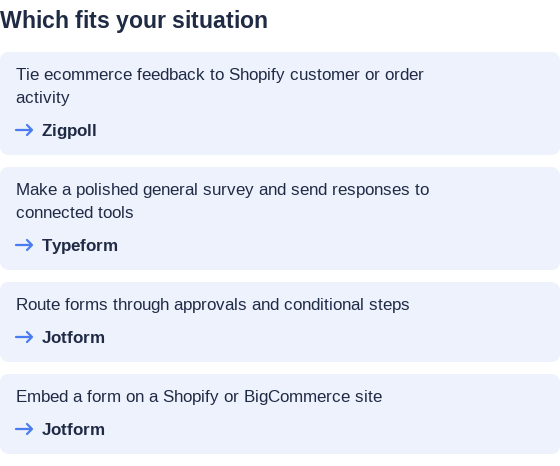
From the table above.
How this comparison was made
Prices and feature details come from each vendor’s published pages, checked in November 2026; the products were not tested hands-on. Zigpoll publishes this page.


