What are the best collaborative analytics platforms for enterprise teams?
Compare Looker, Data Studio Pro, Metabase, and Zoho Analytics by collaboration, governance, pricing, integrations, and team fit.

Choose Looker for governed metrics, Data Studio Pro for Google teams, Metabase for SQL-friendly self-service, and Zoho Analytics for flexible lower-cost BI. The right fit depends on how your team handles access, shared reporting, data connections, and the ongoing cost of licenses and infrastructure.
At a glance
| Option | Best for | Starting price (paid plan) | Free plan | Shared workflows | Sharing controls | Source |
|---|---|---|---|---|---|---|
| Looker | Governed enterprise metrics | Quote | No | Yes | Yes | cloud.google.com |
| Data Studio Pro | Google-centered teams | $9/user/project/mo | Yes | Yes | Yes | cloud.google.com |
| Metabase | SQL-friendly self-service BI | $100/mo | Yes | Partial | Yes | metabase.com |
| Zoho Analytics | Flexible, lower-cost BI | Not confirmed, see source | Yes | Yes | Yes | zoho.com |
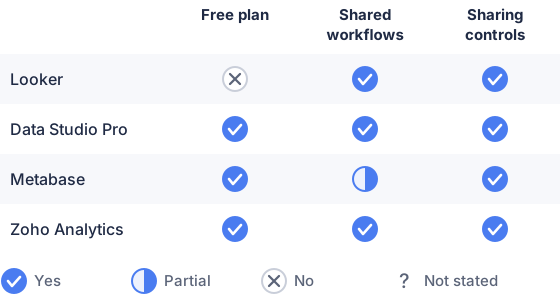
From the sourced table above, checked November 2026.
Looker: best for governed metrics across an organization
Looker suits organizations that want shared metric definitions and permissioned access for different roles. It uses LookML models to define data and metrics, and its user types distinguish between people who build, explore, or mainly view content. That structure can help prevent teams from making separate versions of the same business metric, but it requires more modeling and administration than a lightweight reporting tool. (cloud.google.com)
Data Studio Pro: best for teams using Google data
Data Studio is a strong fit when teams need quick reports over sources such as Google Sheets, BigQuery, and Google Analytics. Its free tier supports report creation and sharing; Pro adds team workspaces, organization-owned content, and administrative features for managing access across a team. Pro workspaces require a linked Google Cloud project, so teams should account for that setup as well as any data-warehouse costs. (cloud.google.com)
Metabase: best for SQL-friendly self-service analytics
Metabase gives analysts and business users a choice between a visual query builder and SQL, with dashboards and scheduled delivery for sharing results. Its paid Pro tier adds features such as single sign-on, auditing, and row- and column-level permissions; the free open-source edition can be self-hosted. The trade-off is that self-hosting means your team manages the infrastructure, while managed plans and advanced controls increase the cost. (metabase.com)
Zoho Analytics: best for flexible team sharing at a lower entry price
Zoho Analytics supports sharing reports and dashboards with users or groups, with controls for actions such as exporting, drilling into data, and commenting. Its higher plans add more users, data capacity, refreshes, and connectors, so it can suit teams that want to start with a small account and scale by plan. Check the row limits and the number of users who need authoring access: those can affect the fit and total price. (zoho.com)
What are the best collaborative analytics platforms for enterprise teams?
There is no single best platform for every enterprise team: Looker fits governed, model-led analytics; Data Studio Pro fits Google-oriented reporting; Metabase fits SQL-friendly self-service; and Zoho Analytics fits teams seeking flexible plan sizes. (cloud.google.com)
Start with the way your organization defines and manages metrics. If shared definitions and controlled access matter most, Looker’s modeled approach may be a stronger fit. If you want teams to create and share reports directly, Data Studio Pro, Metabase, and Zoho Analytics offer more direct reporting workflows, with different levels of governance and administration. (cloud.google.com)
Which platforms support collaborative workflows and sharing?
All four platforms support sharing; Data Studio Pro, Looker, and Zoho Analytics have particularly explicit team-oriented content or permission features, while Metabase supports dashboard delivery and controlled access. (docs.cloud.google.com)
Data Studio Pro team workspaces let administrators share content with individuals or groups and assign roles. Looker’s boards organize dashboards and reports, while folder and user permissions determine who can access them. Zoho Analytics supports group sharing and granular view permissions, including row filters and options to allow comments. (docs.cloud.google.com)
Metabase can send dashboard subscriptions by email or Slack and control access to collections and data. Its published feature comparison marks public links and embeds as sharing options, but that is not the same as multiple analysts editing content together in a real-time shared workspace. Treat “collaboration” as a set of concrete needs: shared editing, commenting, scheduled delivery, access control, or external sharing. (metabase.com)
How do I choose the right collaborative analytics platform?
Choose by data governance, team roles, source-system fit, deployment needs, and the total cost of licenses and operations. First, list the data stores and applications the platform must connect to, and confirm whether it uses direct connections, imports, or third-party connectors. For example, Metabase lists database and warehouse connectors including Snowflake, BigQuery, Redshift, and Databricks; Data Studio lists Google sources as well as database connectors such as PostgreSQL and Amazon Redshift. (metabase.com)
Next, map who builds reports, who explores them, and who only views them. Compare each product’s permissions with your needs for row-level restrictions, group access, and organization-owned content. Finally, test representative workflows with your own data: a product’s connector list does not by itself show how well it handles your data model, report complexity, or access rules. (cloud.google.com)
How do pricing and integrations compare across platforms?
As of November 2026, the vendors publish entry prices ranging from $9 per user per project per month for Data Studio Pro to $100 per month for Metabase Starter; Looker requires a sales quote. (cloud.google.com)
Metabase Starter is $100 per month with the first five users included; the listed Pro plan is $575 per month. These are entry points, not like-for-like enterprise estimates: Metabase’s enterprise plan is custom-priced, and Looker’s platform and user licensing are quoted based on the organization and user types. (zpdfcreate-60047056813.catalystserverless.in)
Integration fit varies too. Metabase is oriented around databases and warehouses, with SaaS data often brought in through a warehouse or an integration tool. Data Studio offers Google connectors and a catalog of third-party connectors. Zoho Analytics lists business-app connectors and APIs. Looker’s platform price includes integrations and semantic modeling, but the final quote depends on the setup. Check connector availability, refresh behavior, and any separate warehouse or connector charges before comparing totals. (metabase.com)
Which should you choose?
| Your situation | Best fit |
|---|---|
| You need shared, centrally modeled business metrics | Looker |
| Your reporting is built around Google Cloud and Google sources | Data Studio Pro |
| Your analysts want a visual query builder and SQL access | Metabase |
| Your team wants flexible entry pricing and role-based sharing | Zoho Analytics |
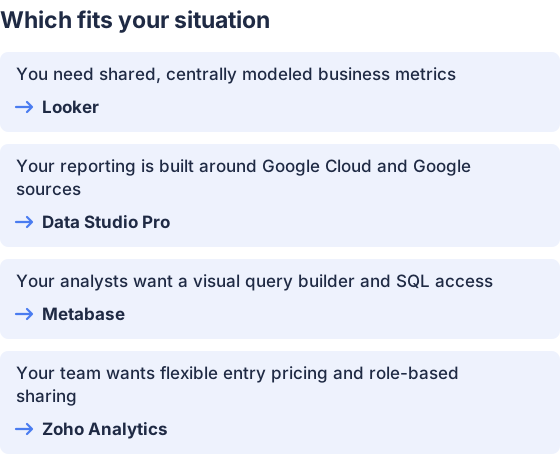
From the table above.
How this comparison was made
Prices and features come from each vendor’s published pages, checked in November 2026. The products were not tested hands-on.


