What are the best metrics and tools for measuring marketing productivity?
Compare ClickUp, Asana, and HubSpot for marketing team productivity, including key metrics, pricing, attribution, and how to choose.

Use ClickUp for workload or Asana for campaign delivery; HubSpot connects marketing activity to CRM records, with revenue attribution on Enterprise. The most useful scorecard pairs execution metrics with business outcomes, rather than treating more tasks or assets as proof of higher productivity.
At a glance
| Option | Best for | Starting price (paid plan) | Free plan | Output + outcome metrics | Source |
|---|---|---|---|---|---|
| ClickUp | Work tracking and targets | $10/mo/user | Yes | Partial | clickup.com |
| Asana | Campaign delivery tracking | $13.49/mo/user | Yes | Partial | asana.com |
| HubSpot Marketing Hub | Marketing results and attribution | Not confirmed, see source | Yes | Yes | hubspot.com |
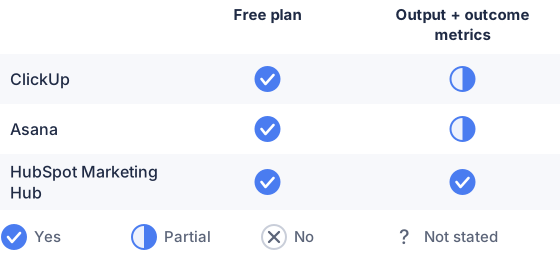
From the sourced table above, checked November 2026.
Prices and features checked in November 2026. HubSpot’s listed $7 price is a new-customer promotional rate; its pricing page also displays $20/mo/seat for monthly billing.
ClickUp: best for tracking workload and goals
ClickUp brings tasks, time tracking, goals, and dashboards together, making it useful for tracking campaign throughput, deadlines, and planned versus actual effort. Its free plan can be a way to test basic workflows; its lowest paid plan is $10 per user per month when billed monthly as of November 2026. The trade-off is that operational work tracking is not the same as measuring attributable marketing results: connecting activity to leads or revenue may require integrations or a separate analytics system. ClickUp lists time tracking, goals, and its monthly plan price on its site. (help.clickup.com)
Asana: best for managing campaign delivery
Asana is suited to teams that need clear campaign ownership, milestones, and delivery reporting. Its dashboards can chart tasks and project data, while custom fields let teams categorize work consistently; its Starter plan is $13.49 per user per month with monthly billing as of November 2026. Asana is strongest for seeing whether work is moving and where it is stuck, not for independently attributing revenue to campaigns. Asana describes its reporting dashboards and pricing on its site. (help.asana.com)
HubSpot Marketing Hub: best for connecting marketing to business results
HubSpot combines marketing tools with CRM data, so it can help teams follow marketing activity through contacts, deals, and campaign results. The page also displays $20 per seat per month for monthly billing without that promotion. Check the plan details before buying: HubSpot’s campaign analytics and revenue reporting require higher-tier subscriptions, and revenue attribution reporting is listed for Enterprise. HubSpot can therefore show outcomes more directly than a task tracker, but it is not a substitute for measuring delivery time or team capacity. (hubspot.com)
What are the best metrics and tools for measuring marketing team productivity?
Use a small scorecard that combines delivery, quality, and business impact; pair a work tracker such as ClickUp or Asana with a marketing analytics or CRM tool such as HubSpot when attribution matters. No single metric captures productivity well: a team can produce more work without producing more value. Gartner’s recommended metric types include operational measures, such as marketing resource productivity and capacity utilization, alongside transaction and relationship measures such as CPA, ROI, CAC, and customer lifetime value. (gartner.com)
Which metrics indicate marketing productivity most effectively?
The clearest indicators are on-time delivery, campaign cycle time, work completed against plan, rework or revision rate, and capacity used, paired with results such as cost per qualified lead, conversion rate, pipeline contribution, CAC, or ROI. Use the operational measures to understand how work gets done and the outcome measures to check whether it mattered. Choose outcomes that match the team’s remit: for example, a content team may track qualified organic leads, while a demand-generation team may track qualified pipeline and acquisition cost. Avoid using raw activity counts, such as posts published or emails sent, as stand-alone productivity scores.
Make definitions consistent before comparing results. Decide what counts as a completed campaign, a qualified lead, or a revision, and use the same attribution window and reporting period across teams. Attribution models can assign different credit to the same customer journey, so document the model rather than treating attributed revenue as a precise measure of each team’s contribution. Google Analytics, for example, lets users compare how attribution models assign credit across touchpoints. (support.google.com)
How do I benchmark marketing productivity and set targets?
Start with your team’s own recent baseline, then set targets for a defined period and review them alongside quality and business outcomes. Record several cycles of comparable work, segmented where useful by channel, campaign type, or team; compare like with like rather than judging a complex launch against routine work. If you use external benchmarks, check that the industry, team size, channel mix, and metric definition match yours.
Set a small number of targets tied to current bottlenecks. For example, a team with frequent deadline slips might target a higher on-time delivery rate, while a team with heavy revisions might focus on reducing rework. Keep a quality or outcome guardrail next to each speed or volume goal, so faster production does not reward rushed work. Review targets regularly and revise them when scope, staffing, or priorities change. There is no universal target that makes sense for every marketing team.
How to evaluate and compare productivity tools for marketing?
Choose tools based on the work and evidence you need to see: task ownership, deadlines, capacity, elapsed time, campaign performance, or attributable revenue. Compare whether each tool can collect the necessary fields, report across teams, connect to your existing analytics and CRM systems, and export or share results with stakeholders. Confirm which reporting and attribution features are included in the plan you would actually buy.
Test a representative workflow before committing: enter a campaign, assign its work, track a delay or revision, and check whether the resulting dashboard answers a real management question. Include setup effort and staff adoption in the comparison. A detailed dashboard is not useful if the team does not keep its underlying data current. Keep work-management and marketing-outcome reporting distinct when one product cannot cover both; combining a tracker with an analytics or CRM tool may be more practical than expecting one platform to do everything.
Which should you choose?
| Your situation | Best fit |
|---|---|
| Need task, time, and goal tracking | ClickUp |
| Need campaign deadlines and project dashboards | Asana |
| Need campaign results connected to CRM records | HubSpot Marketing Hub |
| Need both team workflow and marketing outcomes | Asana + HubSpot Marketing Hub |
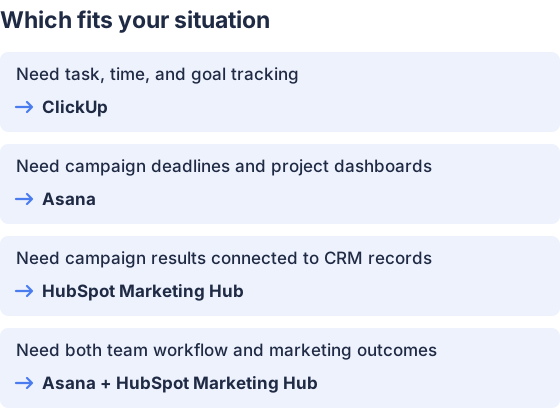
From the table above.
How this comparison was made
Prices and features come from each vendor’s published pages, checked in November 2026. The products were not tested hands-on.


